DHTMLX Gantt alternatives

DHTMLX Gantt is a JavaScript Gantt library with a GPL-licensed Standard edition covering drag-and-drop, dependency links, and basic task rendering. If you're looking for an alternative, you're likely trying to avoid the paid Pro gate for auto-scheduling, critical path, resource management, baselines, and task splitting, or you need client-side export instead of DHTMLX's online export service.
What to know about DHTMLX Gantt alternatives
The table below compares licensing, scheduling features, framework support, package access, and MCP support.
| Feature | Syncfusion Gantt | ScheduleJS | Netronic VSW SE | Bryntum Gantt |
|---|---|---|---|---|
| License | Community License (free) / Commercial | Commercial (from 1,500 EUR) | Commercial (quote-based) | Commercial |
| Free tier | Community License | None | None | Trial only |
| Auto-scheduling | ✔️ | ❌ | ❌ | ✔️ |
| Critical path | ✔️ | ❌ | ❌ | ✔️ |
| Resource management | ✔️ | ✔️ (rows) | ✔️ | ✔️ |
| Framework support | React, Angular, Vue, Blazor | Angular only | Framework-agnostic | React, Angular, Vue, plain JavaScript |
| Public npm | ✔️ | ❌ | ❌ | Trial packages and wrappers |
| Agent support (MCP, skills) | stdio MCP server (JavaScript / React) | ❌ | ❌ | HTTP MCP server, Claude Code skill |
Syncfusion Gantt
Syncfusion Gantt is a commercial JavaScript Gantt component that includes auto-scheduling, critical path, baselines, task splitting, resource management, and undo/redo. The Community License makes it free for qualifying organizations: less than $1 million in annual gross revenue, five or fewer developers, and 10 or fewer total employees.
Installing Syncfusion Gantt
The package is on the public npm registry:
npm install @syncfusion/ej2-gantt@33.2.4
A license key suppresses the trial validation banner. Community License holders generate a key from the Syncfusion account portal, then register it before initializing any component. This minimal setup shows a two-phase project with a dependency:
<!-- index.html -->
<style>
  html, body { margin: 0; height: 100%; }
  #container { height: 100vh; }
</style>
<div id="container"></div>
import { registerLicense } from '@syncfusion/ej2-base';
import { Gantt, Edit, Selection, Toolbar } from '@syncfusion/ej2-gantt';
import '@syncfusion/ej2-base/styles/material.css';
import '@syncfusion/ej2-buttons/styles/material.css';
import '@syncfusion/ej2-calendars/styles/material.css';
import '@syncfusion/ej2-dropdowns/styles/material.css';
import '@syncfusion/ej2-inputs/styles/material.css';
import '@syncfusion/ej2-navigations/styles/material.css';
import '@syncfusion/ej2-popups/styles/material.css';
import '@syncfusion/ej2-richtexteditor/styles/material.css';
import '@syncfusion/ej2-treegrid/styles/material.css';
import '@syncfusion/ej2-grids/styles/material.css';
import '@syncfusion/ej2-gantt/styles/material.css';

registerLicense('your-license-key-here');

Gantt.Inject(Edit, Selection, Toolbar);

const data = [
  {
    TaskID   : 1,
    TaskName : 'Phase 1: Discovery',
    subtasks : [
      { TaskID : 2, TaskName : 'Requirements', StartDate : new Date('2026-05-01'), Duration : 5, Progress : 100 },
      { TaskID : 3, TaskName : 'Design',       StartDate : new Date('2026-05-08'), Duration : 8, Progress : 20, Predecessor : '2' }
    ]
  }
];

new Gantt({
  dataSource : data,
  height     : '100%',

  taskFields : {
    id         : 'TaskID',
    name       : 'TaskName',
    startDate  : 'StartDate',
    duration   : 'Duration',
    progress   : 'Progress',
    dependency : 'Predecessor',
    child      : 'subtasks'
  },

  columns : [
    { field : 'TaskName', headerText : 'Task',     width : 250 },
    { field : 'Duration', headerText : 'Duration', width : 80  },
    { field : 'Progress', headerText : '%',        width : 60  }
  ],

  labelSettings    : { leftLabel : 'TaskName' },
  splitterSettings : { position  : '40%' },

  projectStartDate  : new Date('2026-05-01'),
  projectEndDate    : new Date('2026-05-20'),
  toolbar           : ['ZoomIn', 'ZoomOut', 'ZoomToFit'],
  highlightWeekends : true
}).appendTo('#container');
Four setup details require attention:
- The
Gantt.Inject()call must come before instantiation with any feature modules (Edit,Selection,Toolbar, and others). - CSS must cover the Gantt component and all its dependencies. Replace these styles with a single Syncfusion combined theme file to consolidate imports.
- The
taskFieldsconfig maps data property names to Gantt field identifiers. - The
registerLicense()call must come before the first component mounts.
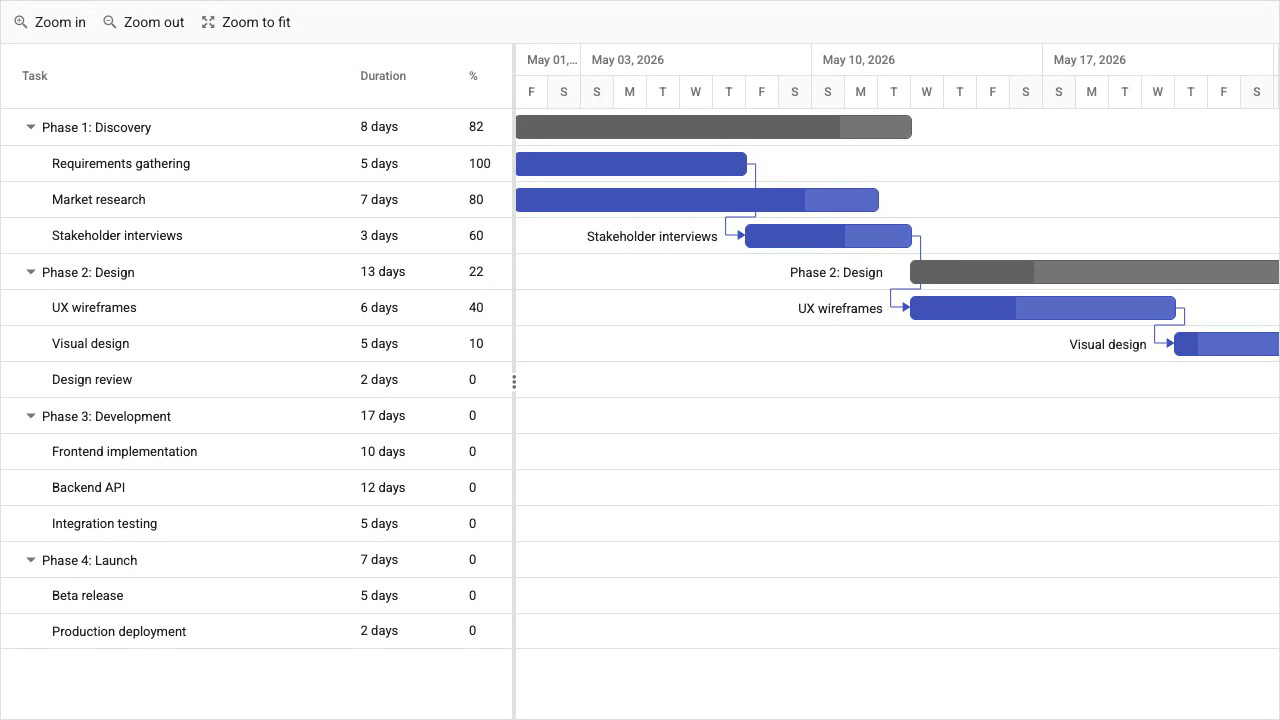
Community License includes all scheduling features for qualifying organizations at no cost
Qualifying organizations get these features at no cost through the Community License, with no feature gating between community and commercial tiers:
- Auto-scheduling
- Critical path
- Baselines
- Task splitting
- Resource management
- Undo/redo
Export to PDF, Excel, and CSV runs client-side. Framework wrappers cover React, Angular, Vue, and Blazor. It is the only alternative in this comparison with auto-scheduling, critical path, and baselines available through a free tier.
Syncfusion Gantt requires per-feature CSS imports, Inject calls, and stdio MCP setup
CSS setup requires either a combined Syncfusion theme file or separate imports for the Gantt component and all its dependencies. The Gantt.Inject() call for each feature module adds a setup step that teams often miss.
Paid licensing uses custom pricing with no published rates. Teams that exceed Community License thresholds need to contact Syncfusion sales.
The Syncfusion JavaScript and React MCP servers communicate via stdio, not HTTP. They require MCP client configuration with an API key rather than a public HTTP URL. Unlike the DHTMLX Gantt and Bryntum Gantt HTTP servers, which work in Claude Code without API key configuration, the Syncfusion stdio servers require additional client-side setup.
Syncfusion Gantt pricing: free Community License, commercial rates on request
The Community License is free for organizations with less than $1 million in annual gross revenue, five or fewer developers, and 10 or fewer total employees (and less than $3 million in external funding). Paid licensing uses quote-based subscription pricing.
ScheduleJS
ScheduleJS is a commercial Angular Gantt library that renders to an HTML Canvas element rather than DOM elements, which suits applications that need smooth scrolling at very large row counts. The library handles rendering and interaction but leaves scheduling logic, auto-scheduling, critical path, and export to the application.
Installing ScheduleJS
ScheduleJS is not on the public npm registry. After purchasing a license from AISO SA and receiving the package, place it in a local_modules/ folder in the project root and install it as a local file reference:
yarn add file:./local_modules/schedule
ScheduleJS targets Angular. A new Angular project provides the required shell:
ng new project-name --style=scss
The following shows a team sprint Gantt with two members. Setup spans three files: the Angular module, the component class, and the component template.
// app.module.ts
import { NgModule } from '@angular/core';
import { BrowserModule } from '@angular/platform-browser';
import { Locale as BaseLocaleEnUs } from '@js-joda/locale/dist/prebuilt/en-us';
import { LicenseManager, Locale, ScheduleModule } from 'schedule';
import { AppComponent } from './app.component';
import { SprintGanttComponent } from './sprint-gantt/sprint-gantt.component';

@NgModule({
  declarations : [AppComponent, SprintGanttComponent],
  imports      : [BrowserModule, ScheduleModule],
  bootstrap    : [AppComponent]
})
export class AppModule {
  constructor() {
    Locale.updateDefault(BaseLocaleEnUs.US);
    LicenseManager.setLicenseFromKey('your-license-key-here');
  }
}
// sprint-gantt.component.ts
import { Component, Injector } from '@angular/core';
import {
  AppTransactionalService,
  ChronoUnit,
  DefaultScheduleGanttComponentBase,
  GanttChart,
  Layer,
  MutableActivityBase,
  Row,
  TimeUtil
} from 'schedule';

class Task extends MutableActivityBase<{ name: string }> {
  constructor(name: string, startHours: number, durationHours: number) {
    const start = TimeUtil.now() + TimeUtil.ofHours(startHours);
    const end   = start + TimeUtil.ofHours(durationHours);
    super(name, start, end);
    this.setUserObject({ name });
  }
}

class TeamMember extends Row<undefined, undefined, Task> {}

@Component({
  selector    : 'app-sprint-gantt',
  templateUrl : './sprint-gantt.component.html',
  styleUrls   : ['./sprint-gantt.component.scss']
})
export class SprintGanttComponent
    extends DefaultScheduleGanttComponentBase<TeamMember> {

  gantt = new GanttChart<TeamMember>(undefined, this._injector);

  constructor(
    _appTransactionalService: AppTransactionalService,
    _injector: Injector
  ) {
    super(_appTransactionalService, _injector);
  }

  start(): void {
    const tasksLayer = new Layer('Tasks');
    this.gantt.getLayers().push(tasksLayer);

    const alice = new TeamMember('Alice (Frontend)');
    alice.addActivity(tasksLayer, new Task('UI Component Library', 0, 40));

    const bob = new TeamMember('Bob (Backend)');
    bob.addActivity(tasksLayer, new Task('REST API Development', 0, 40));

    this.gantt.addRows(alice, bob);
    this.gantt.getTimeline().showTemporalUnit(ChronoUnit.DAYS, 200);
  }
}
<!-- sprint-gantt.component.html -->
<default-schedule-button-bar [gantt]="gantt"></default-schedule-button-bar>
<div class="timeline-container">
  <div class="timeline-filler"></div>
  <div class="timeline">
    <schedule-date-line  [gantt]="gantt"></schedule-date-line>
    <schedule-event-line [gantt]="gantt"></schedule-event-line>
  </div>
</div>
<default-schedule-gantt-graphic
  class="gantt-graphic"
  [gantt]="gantt"
  [ganttContainerElement]="nativeElement">
</default-schedule-gantt-graphic>
Four setup details require attention:
- The
LicenseManager.setLicenseFromKey()call must come before any ScheduleJS component mounts. - The package name is
schedule, notschedulejs. All import paths use'schedule'. - Resources are
Rowsubclasses and task bars areMutableActivityBasesubclasses. The library uses class extension rather than configuration objects. - Extend
DefaultScheduleGanttComponentBaseto wire up the Angular lifecycle.
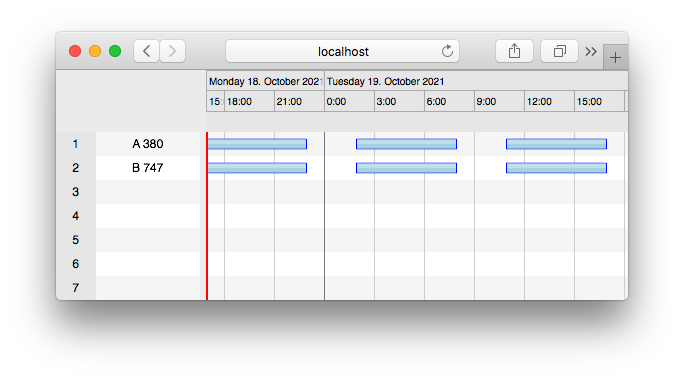
ScheduleJS suits large Angular datasets that push DOM rendering to its limits
Canvas rendering keeps the component fast at very large activity counts. The class-extension data model gives pixel-level control over activity renderers, row heights, and interaction layers. Three layout types ship: Gantt layout, chart or histogram layout, and agenda layout.
ScheduleJS suits the specific case where the dataset is large enough to push DOM rendering to its limits and the target framework is Angular. Like Netronic VSW SE, it uses canvas rendering for performance at large activity counts, but targets Angular specifically rather than offering a framework-agnostic API.
ScheduleJS has no scheduling engine, no public npm package, and supports only Angular
ScheduleJS is Angular-only. React, Vue, and vanilla JavaScript applications require a different library.
The library provides ActivityLink visualization but no project scheduling engine. Applications need custom implementation for:
- Auto-scheduling
- Critical path
- Baselines
- Task splitting
- Undo/redo
- PDF or Excel export
The local file install adds friction at onboarding and in automated pipelines. ScheduleJS and Netronic VSW SE both require a manual distribution step that Syncfusion Gantt and DHTMLX Gantt avoid with public npm packages.
ScheduleJS pricing: from 1,500 EUR, perpetual license per developer and application
AISO SA publishes pricing from 1,500 EUR for the ScheduleJS Enterprise perpetual license. The license includes one year of updates, support, and maintenance for one application and one developer.
Netronic VSW SE
Netronic Visual Scheduling Widget SE is a commercial JavaScript scheduling widget that renders to an HTML Canvas element. It works with any JavaScript framework and includes resource timelines, resource histograms, drag-and-drop, work calendars, and PDF export. Auto-scheduling, critical path, and baselines are absent.
Installing Netronic VSW SE
Netronic VSW SE is not on the public npm registry. Teams go through an evaluation or purchase flow with Netronic GmbH, then download the bundle from the customer portal and place it in the project manually. Version 9.0 added ESM and TypeScript support for modern build setups. Teams should plan around four setup details from the public Netronic documentation:
- Teams should expect a sales or evaluation flow rather than a public npm install.
- The widget delegates data management and business logic to the host application.
- No wrapper package exists for React, Angular, or Vue. The API-driven configuration works with any JavaScript environment.
- Canvas-based rendering means DOM inspection tools show a single canvas element rather than individual task bar elements.
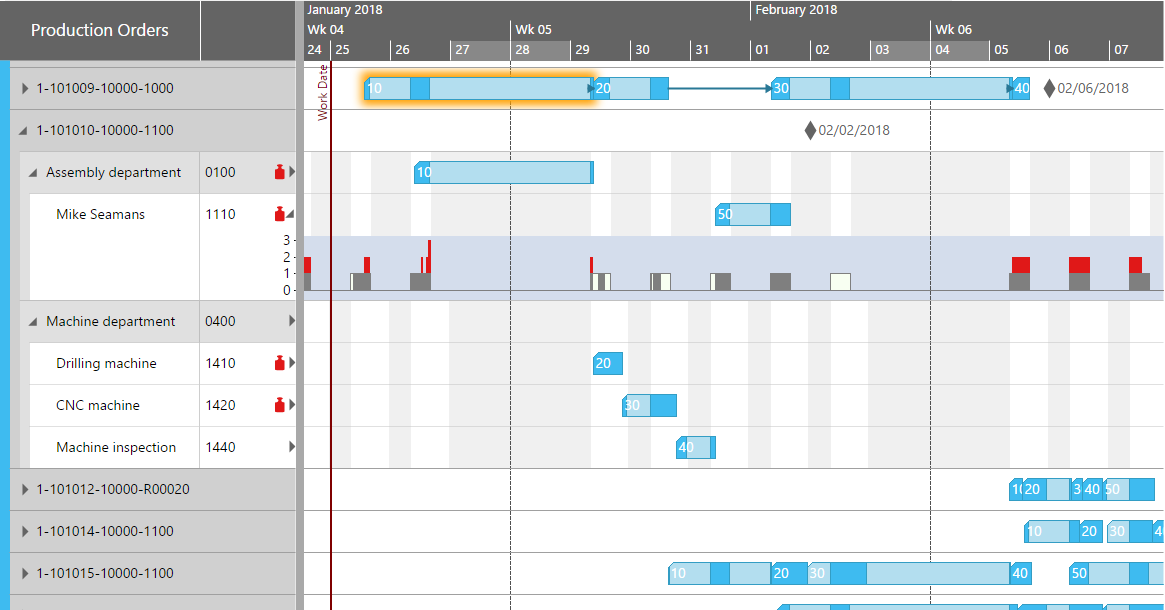
Netronic VSW SE suits framework-agnostic canvas-based scheduling at large activity counts
Canvas rendering keeps the widget fast at large activity counts. The framework-agnostic API works in React, Angular, Vue, or plain JavaScript without a wrapper package. Resource histograms, work calendars, and PDF export are included without custom implementation.
Netronic VSW SE fills the gap that ScheduleJS leaves for non-Angular applications: canvas performance and resource histograms across any JavaScript environment. Unlike ScheduleJS, which also uses canvas rendering but requires Angular, Netronic VSW SE works with React, Vue, and plain JavaScript without a wrapper.
Netronic VSW SE has no auto-scheduling, no critical path, and no public npm package
These features are absent:
- Auto-scheduling
- Critical path
- Baselines
- Task splitting
- Undo/redo
Applications that need these features require custom implementation. The local bundle distribution adds friction at onboarding and in automated pipelines. Netronic VSW SE and ScheduleJS both omit auto-scheduling and critical path, while Syncfusion Gantt and Bryntum Gantt include both without a paid upgrade.
Pricing is quote-based with no published rates. Teams cannot compare costs directly without contacting Netronic sales. Netronic ships no MCP server, no Claude Code skill, and no AI tooling.
Netronic VSW SE pricing: quote-based with no published rates
Netronic VSW SE uses commercial quote-based pricing. No standard rates are published on the product page. A trial version is available for evaluation before purchase.
Bryntum Gantt
Bryntum Gantt is a commercial JavaScript Gantt component built on ChronoGraph, an open-source reactive scheduling engine. These features are all in the base license:
- Auto-scheduling
- Critical path
- Resource management
- Baselines
- Task splitting
- Client-side export
Installing Bryntum Gantt
The trial package is on the public npm registry without authentication:
npm install @bryntum/gantt@npm:@bryntum/gantt-trial@7.3.0
This minimal setup shows a two-task project with a dependency. Three CSS imports are required in order before instantiation:
<!-- index.html -->
<style>
  html, body { margin: 0; height: 100%; }
  #container { height: 100vh; }
</style>
<div id="container"></div>
import '@bryntum/gantt/fontawesome/css/fontawesome.css';
import '@bryntum/gantt/fontawesome/css/solid.css';
import '@bryntum/gantt/gantt.css';
import '@bryntum/gantt/svalbard-light.css';
import { Gantt } from '@bryntum/gantt';

new Gantt({
  appendTo : 'container',

  columns : [
    { type : 'name',        width : 250 },
    { type : 'duration',    width : 80  },
    { type : 'percentdone', width : 60  }
  ],

  project : {
    startDate : '2025-01-14',
    tasks : [
        {
            id : 1000, name : 'Launch SaaS Product', expanded : true, percentDone : 35.7,
            children : [
                { id : 11, name : 'Install Apache',      startDate : '2025-01-14', duration : 3, percentDone : 50 },
                { id : 12, name : 'Configure firewall', startDate : '2025-01-14', duration : 3, percentDone : 50 },
                { id : 15, name : 'Run tests',          startDate : '2025-01-21', duration : 2, percentDone : 0 }
            ]
        }
    ],
    dependencies : [
        { fromTask : 11, toTask : 15, lag : 2 },
        { fromTask : 12, toTask : 15 }
    ]
  }
});
The three CSS imports cover FontAwesome icons, the structural gantt.css, and a theme file. Bryntum ships 10 themes across five light/dark pairs, all switchable at runtime via DomHelper.setTheme().
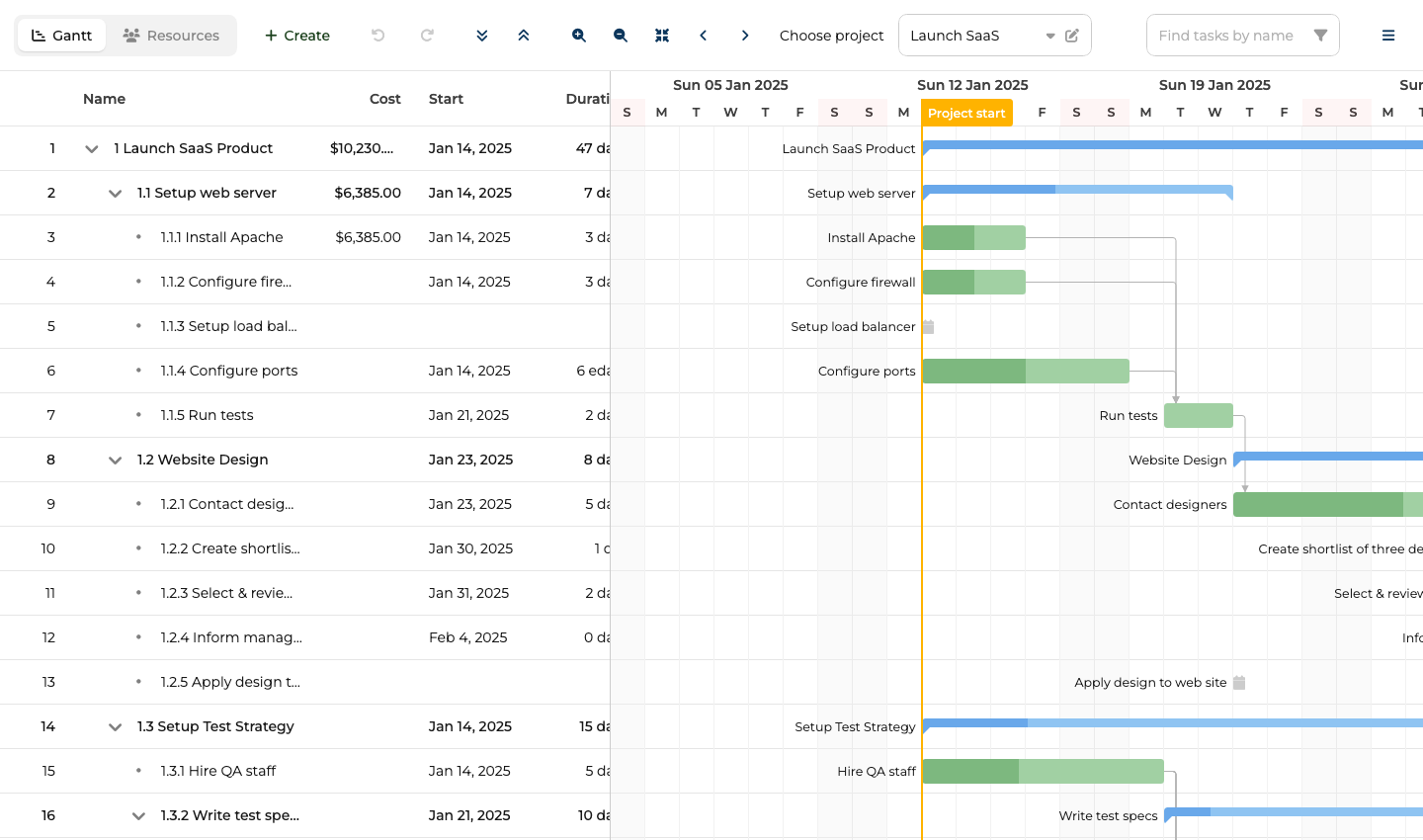
ChronoGraph scheduling engine, auto-scheduling, critical path, and client-side export
The ChronoGraph scheduling engine is the primary differentiator. Auto-scheduling, dependencies, constraints, and project, task, and resource calendars work together through the engine. ChronoGraph is open-source under the MIT license, so the reactive scheduling logic is auditable.
The base license also includes:
- Auto-scheduling and critical path
- Resource management and baselines
- Task splitting and undo/redo
- Client-side export to PDF, PNG, Excel, ICS, and MS Project XML
- MS Project and Primavera P6 import through MPXJ
- 45 built-in locales
- Virtual rendering for large datasets
Bryntum Gantt: 4 MB bundle and separate project and Gantt configuration objects
The trial watermark persists during evaluation, which complicates stakeholder demos before a license purchase. The API surface is large: project-level and Gantt-level configuration are separate objects with different responsibilities. Mixing the project prop with inline data props (tasks, dependencies, resources) throws at runtime. The uncompressed bundle exceeds 4 MB.
Bryntum Gantt pricing: $940 per developer, perpetual license with 12 months of updates
Per-developer licensing starts at $940. A three-person team pays $2,820 as an entry cost. All licenses are perpetual and include 12 months of updates. OEM licensing for SaaS applications requires a separate quote.
MCP server and Claude Code skill
Bryntum ships two complementary AI tools: an MCP server for documentation retrieval and a Claude Code skill for agent-level judgment about common coding mistakes.
The MCP server at mcp.bryntum.com exposes a search_bryntum_docs tool that returns version-specific documentation, source code examples, and API references for Gantt and the rest of the Bryntum suite. The Claude Code skill covers the mistakes documentation retrieval alone misses: CSS import order, the project-vs-inline-data constraint, and the correct dark mode pattern via DomHelper.setTheme().
Bryntum also ships an experimental, disabled-by-default AI assistant for Gantt. End users interact with the project data through natural language without touching the interface directly.
The Bryntum Gantt free trial includes auto-scheduling, critical path, and client-side export alongside the MCP server, Claude Code skill, and public npm trial package.