Best Angular calendar components

When choosing a calendar component for an Angular application, it helps to know where each library stops. A calendar component in this article means an appointment calendar with day, week, and month views where users create, edit, and move events. That is a different problem from selecting a date in a form. For a framework-agnostic perspective, our article on the best JavaScript calendar components covers more options.
This article compares five Angular calendar options using the criteria below.
- Installation and Angular integration.
- Resource scheduling and recurring events.
- Pricing and license tiers.
- Trade-offs that matter before production use.
- When Bryntum Calendar is the better fit.
Bryntum Calendar
Bryntum Calendar is a full-featured scheduling component built by Bryntum. It ships a dedicated Angular wrapper, so it fits naturally into Angular projects without manual DOM manipulation. The Bryntum Calendar Angular quick start covers the full setup path.
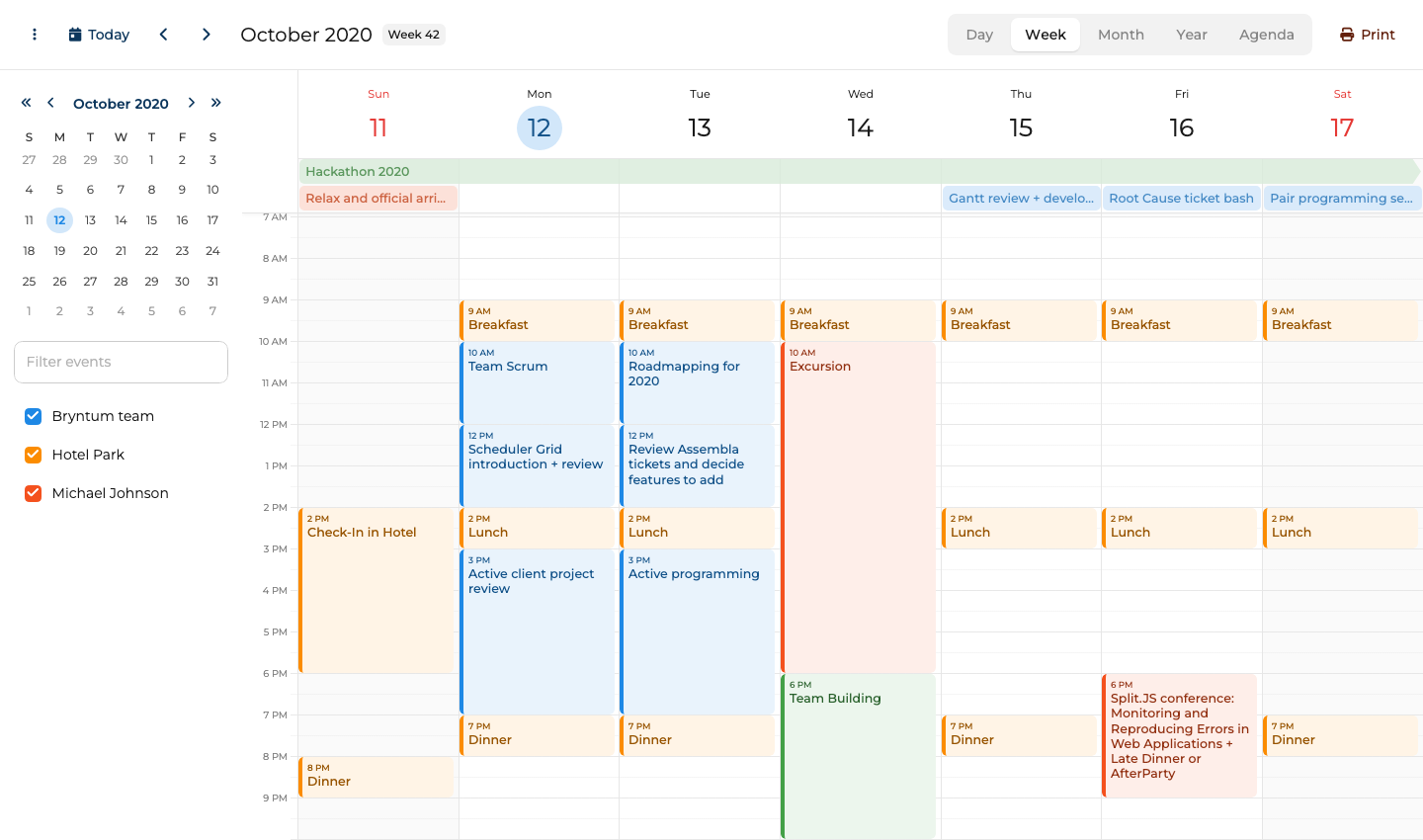
Bryntum Calendar setup with Angular
Bryntum packages are hosted on a private npm registry, so authentication is required before installing. Once authenticated, install the trial package and the Angular wrapper:
npm install @bryntum/calendar@npm:@bryntum/calendar-trial@7.3.0
npm install @bryntum/calendar-angular@7.3.0
Add the required stylesheets to angular.json. The order matters: Font Awesome base styles must come before the icon variant, and the theme file must come after the core calendar stylesheet.
"styles": [
    "node_modules/@bryntum/calendar/fontawesome/css/fontawesome.css",
    "node_modules/@bryntum/calendar/fontawesome/css/solid.css",
    "node_modules/@bryntum/calendar/calendar.css",
    "node_modules/@bryntum/calendar/svalbard-light.css"
]
Import BryntumCalendarModule in your app module:
import { NgModule } from '@angular/core';
import { BrowserModule } from '@angular/platform-browser';
import { BryntumCalendarModule } from '@bryntum/calendar-angular';
import { AppComponent } from './app.component';

@NgModule({
    declarations : [AppComponent],
    imports      : [BrowserModule, BryntumCalendarModule],
    bootstrap    : [AppComponent]
})
export class AppModule {}
Then create a calendar component. All configuration goes through a single CalendarConfig object, which keeps the template clean:
import { Component } from '@angular/core';
import { CalendarConfig } from '@bryntum/calendar';

@Component({
    selector : 'app-calendar',
    template : '<bryntum-calendar [config]="calendarConfig"></bryntum-calendar>',
    styles   : [':host { display: block; height: 100vh; }']
})
export class CalendarComponent {
    calendarConfig: Partial<CalendarConfig> = {
        date      : '2025-10-12',
        resources : [
          { id : 'bryntum', name : 'Bryntum team',     eventColor : 'blue' },
          { id : 'hotel',   name : 'Hotel Park',       eventColor : 'orange' },
          { id : 'michael', name : 'Michael Johnson', eventColor : 'deep-orange' }
        ],
        events    : [
          { id : 1, name : 'Hackathon 2025',                       startDate : '2025-10-11T14:00:00', endDate : '2025-10-18T12:00:00', allDay : true, resourceId : 'bryntum', eventColor : 'green' },
          { id : 2, name : 'Breakfast',                            startDate : '2025-10-12T09:00:00', endDate : '2025-10-12T10:00:00', resourceId : 'hotel' },
          { id : 3, name : 'Team Scrum',                           startDate : '2025-10-12T10:00:00', endDate : '2025-10-12T12:00:00', resourceId : 'bryntum' },
          { id : 4, name : 'Scheduler Grid introduction + review', startDate : '2025-10-12T12:00:00', endDate : '2025-10-12T14:00:00', resourceId : 'bryntum' }
        ]
    };
}
Bryntum Calendar gives Angular apps built-in resource scheduling
Bryntum Calendar covers a full set of scheduling features.
- Day, week, month, year, and agenda views available out of the box without plugins.
- RFC 5545 RRULE recurring events so patterns like "every weekday" or "last Friday of the month" work without custom logic.
- Drag-and-drop for both moving and resizing events.
- Resource calendar view to display multiple calendars side by side, each with its own color.
- Event editor dialog for create and edit flows with built-in validation.
- Ten built-in themes, including dark mode variants.
Bryntum Calendar starts with a Small Team license
Bryntum Calendar costs $680 per developer for the Small Team license, with a three-developer minimum and 12 months of updates. A free trial is available without a time limit, though a watermark appears.
Bryntum Calendar brings resource, recurrence, and editing features to Angular
Bryntum Calendar stands out in five areas.
- Native Angular wrapper with a fully typed configuration API.
- RFC 5545 RRULE support for complex recurring event patterns.
- Resource calendar included at no extra cost.
- Ten themes, including dark mode, with the ability to create custom themes.
- Active support team and detailed documentation.
Bryntum Calendar adds cost and setup rules to Angular
Two limitations apply when evaluating Bryntum Calendar.
- Commercial license required for production use.
- The private npm registry adds a one-time authentication step during setup.
FullCalendar
FullCalendar is one of the most widely used open-source calendar libraries across the JavaScript ecosystem. Its Angular package wraps the core library in a component that accepts a configuration object.
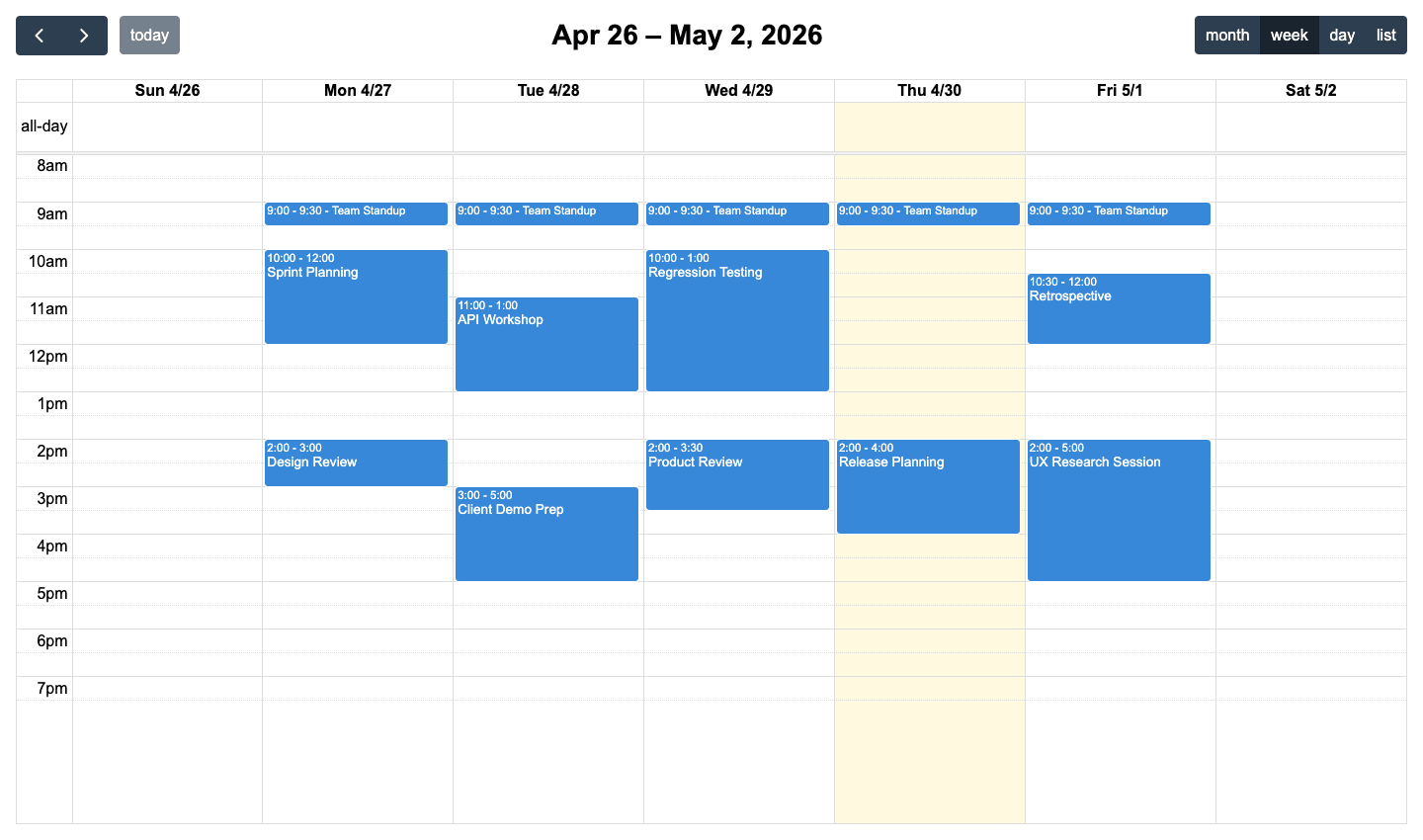
FullCalendar setup with Angular plugins
Install the Angular package along with the plugins you need:
npm install @fullcalendar/angular @fullcalendar/core @fullcalendar/daygrid @fullcalendar/timegrid @fullcalendar/list @fullcalendar/interaction @fullcalendar/rrule
Add FullCalendarModule to your app module imports:
import { FullCalendarModule } from '@fullcalendar/angular';
// add to imports array
Configure the calendar in your component:
import { Component } from '@angular/core';
import { CalendarOptions } from '@fullcalendar/core';
import dayGridPlugin from '@fullcalendar/daygrid';
import timeGridPlugin from '@fullcalendar/timegrid';
import listPlugin from '@fullcalendar/list';
import interactionPlugin from '@fullcalendar/interaction';
import rrulePlugin from '@fullcalendar/rrule';

@Component({
    selector : 'app-calendar',
    template : '<full-calendar [options]="calendarOptions"></full-calendar>'
})
export class CalendarComponent {
    calendarOptions: CalendarOptions = {
        plugins      : [dayGridPlugin, timeGridPlugin, listPlugin, interactionPlugin, rrulePlugin],
        initialView  : 'dayGridMonth',
        headerToolbar : { left : 'prev,next today', center : 'title', right : 'dayGridMonth,timeGridWeek,listWeek' },
        editable   : true,
        selectable : true,
        events     : [
            { title : 'Team standup', rrule : { freq : 'weekly', byweekday : ['mo','tu','we','th','fr'], dtstart : '2026-01-15T09:00:00' }, duration : '00:30' },
            { title : 'Sprint review', start : '2026-01-16T14:00:00', end : '2026-01-16T15:00:00' }
        ]
    };
}
FullCalendar keeps standard Angular calendars free
FullCalendar covers day, week, month, and list views through its plugin system. Recurring events are handled via the @fullcalendar/rrule plugin, which follows the iCalendar RRULE format. Drag-and-drop and resize are provided by the @fullcalendar/interaction plugin. Resource views, which display events grouped by person, room, or asset, require the Premium package. Dark mode is not built in but can be achieved with custom CSS overrides.
FullCalendar works well for standard Angular calendars, but Bryntum Calendar is the better fit once resource scheduling becomes part of the product instead of a paid add-on.
FullCalendar resource views require a paid add-on
The core FullCalendar library is MIT-licensed and free for all projects. The Premium package, which adds resource timeline and resource grid views, starts at $480 per year.
FullCalendar suits Angular teams that need a mature free core
FullCalendar has four clear advantages.
- MIT license for the core library with no cost for most use cases.
- Large community and extensive documentation.
- Plugin architecture keeps the bundle lean when only specific features are needed.
- Angular integration follows standard Angular patterns.
FullCalendar needs plugins and CSS work for richer Angular apps
Three limitations come with FullCalendar.
- Resource views require a paid premium license.
- Dark mode requires custom CSS overrides.
- The plugin system means more packages to manage compared to an all-in-one library.
Schedule-X
Schedule-X takes a framework-agnostic, TypeScript-first core built around a plugin architecture and wraps it in framework-specific packages, including one for Angular.
Schedule-X setup with its Angular adapter
npm install @schedule-x/angular @schedule-x/calendar @schedule-x/theme-default @schedule-x/event-recurrence
Import ScheduleXModule in your app module. Then create the calendar instance in your component:
import { Component } from '@angular/core';
import { createCalendar, createViewWeek, createViewMonthGrid } from '@schedule-x/calendar';
import { createEventRecurrencePlugin } from '@schedule-x/event-recurrence';
import '@schedule-x/theme-default/dist/index.css';

@Component({
    selector : 'app-calendar',
    template : '<sx-calendar [calendarApp]="calendar"></sx-calendar>'
})
export class CalendarComponent {
    calendar = createCalendar({
        views   : [createViewWeek(), createViewMonthGrid()],
        events  : [
            { id : '1', title : 'Team standup',  start : '2026-01-15 09:00', end : '2026-01-15 09:30' },
            { id : '2', title : 'Sprint review', start : '2026-01-16 14:00', end : '2026-01-16 15:00' }
        ],
        plugins : [createEventRecurrencePlugin()]
    });
}
Schedule-X gives Angular teams a TypeScript-first calendar core
Schedule-X provides week and month grid views, with a day view and agenda view also available as plugins. Recurring events are handled through the recurrence plugin using the iCalendar RRULE format. Drag-and-drop is available as a separate plugin. Dark mode is supported through CSS custom properties that ship with the default theme. The library is written entirely in TypeScript, so type inference works well across the configuration API.
Schedule-X keeps the Angular setup lighter than Bryntum Calendar, but that smaller footprint comes with fewer built-in scheduling features.
Schedule-X keeps core views free and charges for Premium plugins
Schedule-X core is MIT-licensed and free for commercial use. Premium plugins, including resource view, drag-and-drop, drag-to-create, and event forms, require a paid Schedule-X Premium license.
Schedule-X keeps lightweight Angular calendars simple
Schedule-X suits TypeScript-first teams for four reasons.
- MIT license with no commercial restrictions.
- TypeScript-first design with strong type inference.
- Built-in dark mode support.
- Lightweight plugin architecture.
Schedule-X leaves resource scheduling to Premium plugins
Three limitations restrict Schedule-X for some projects.
- No resource calendar view.
- Smaller community than FullCalendar.
- Fewer built-in view options than more mature libraries.
DHTMLX Scheduler
DHTMLX Scheduler has a long track record as a JavaScript scheduling component. DHTMLX offers Angular integration guidance and a Scheduler for Angular product page, while the public dhtmlx-scheduler package still uses direct initialization with Angular lifecycle hooks.
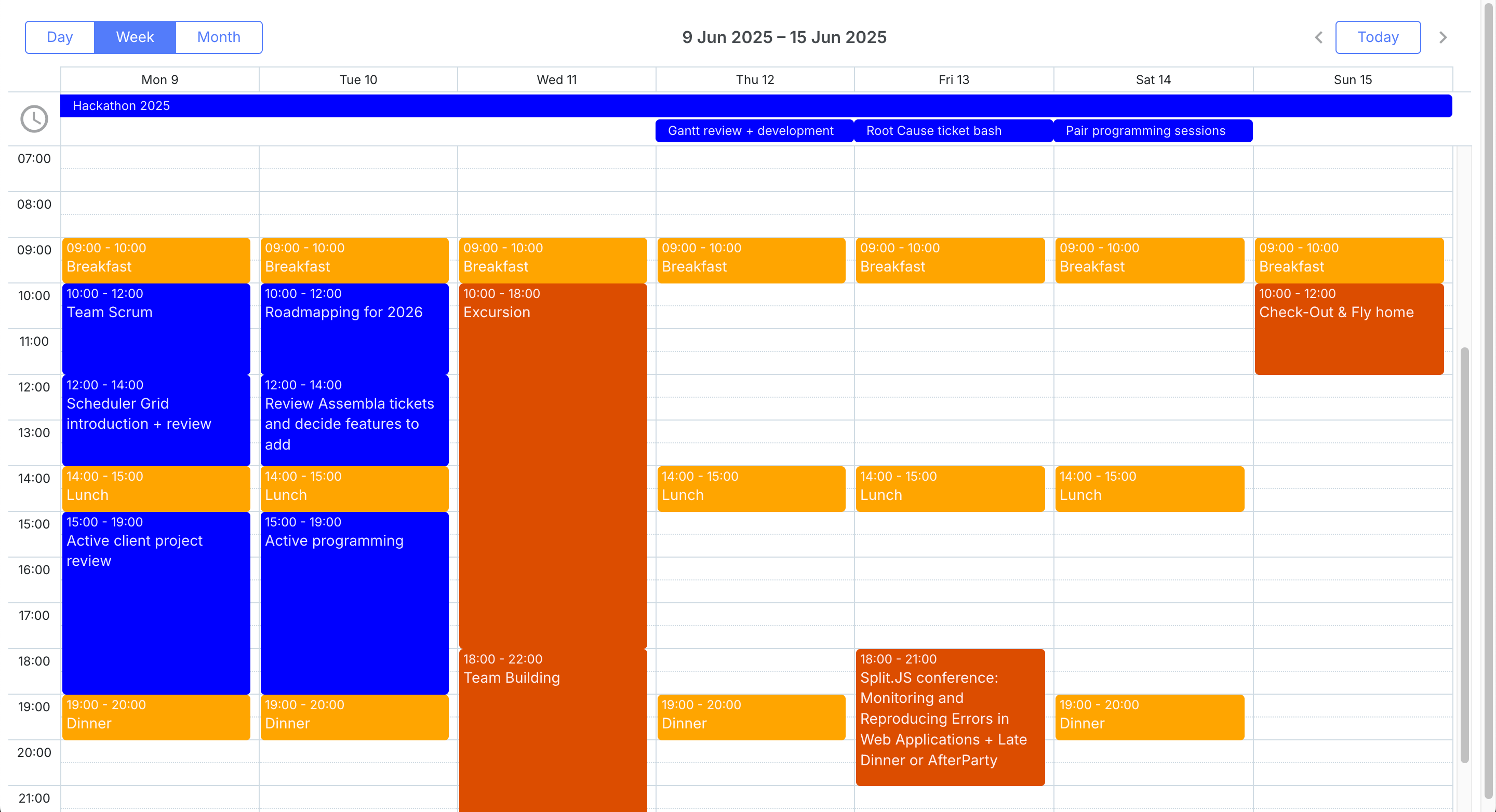
DHTMLX Scheduler setup with Angular lifecycle hooks
npm install dhtmlx-scheduler
The public package can be initialized directly against a DOM element inside ngAfterViewInit:
import { Component, AfterViewInit, ViewChild, ElementRef, OnDestroy } from '@angular/core';
import 'dhtmlx-scheduler/codebase/dhtmlxscheduler_material.css';
import scheduler from 'dhtmlx-scheduler';

@Component({
    selector : 'app-dhtmlx-calendar',
    template : '<div #container style="width:100%;height:100vh;"></div>'
})
export class DhtmlxCalendarComponent implements AfterViewInit, OnDestroy {
    @ViewChild('container') containerRef!: ElementRef;

    ngAfterViewInit(): void {
        scheduler.config.xml_date = '%Y-%m-%d %H:%i';
        scheduler.init(this.containerRef.nativeElement, new Date(2026, 0, 15), 'month');
        scheduler.parse([
            { id : 1, text : 'Team standup',  start_date : '2026-01-15 09:00', end_date : '2026-01-15 09:30' },
            { id : 2, text : 'Sprint review', start_date : '2026-01-16 14:00', end_date : '2026-01-16 15:00' }
        ]);
    }

    ngOnDestroy(): void { scheduler.destructor(); }
}
Note that direct DOM manipulation sits outside the Angular change detection cycle. Updates to the scheduler from Angular need to be applied through the DHTMLX API rather than through data bindings.
DHTMLX Scheduler suits Angular apps that can use imperative setup
DHTMLX Scheduler offers day, week, and month views, plus a timeline view and mini-calendar. Recurring events are supported through an extension that follows the iCalendar RRULE standard. Drag-and-drop is built in. A resource timeline extension allows displaying events grouped by resource. The scheduler has been in active development for many years, which means it covers a wide range of edge cases.
DHTMLX Scheduler has a long feature history, but Bryntum Calendar fits Angular's component model more cleanly through its first-party wrapper.
DHTMLX Scheduler separates GPL use from paid PRO tiers
DHTMLX Scheduler Standard is free for GPL-compatible open-source projects. Paid PRO licenses start with the Individual tier at $599, and DHTMLX lists Commercial, Enterprise, and Ultimate tiers for larger teams.
DHTMLX Scheduler brings mature views to Angular projects
DHTMLX Scheduler has three notable strengths.
- Mature library with a long history of production use.
- Wide range of views including timeline and mini-calendar.
- Free for open-source GPL projects.
DHTMLX Scheduler creates Angular change detection friction
Three drawbacks apply when using DHTMLX Scheduler in Angular.
- The public package uses manual DOM initialization in Angular.
- Direct DOM manipulation creates friction with Angular change detection.
- Commercial pricing varies and is difficult to compare at a glance.
Mobiscroll Event Calendar
Mobiscroll Event Calendar ships a native Angular package and focuses on touch-friendly interactions that look polished on small screens without extra configuration.
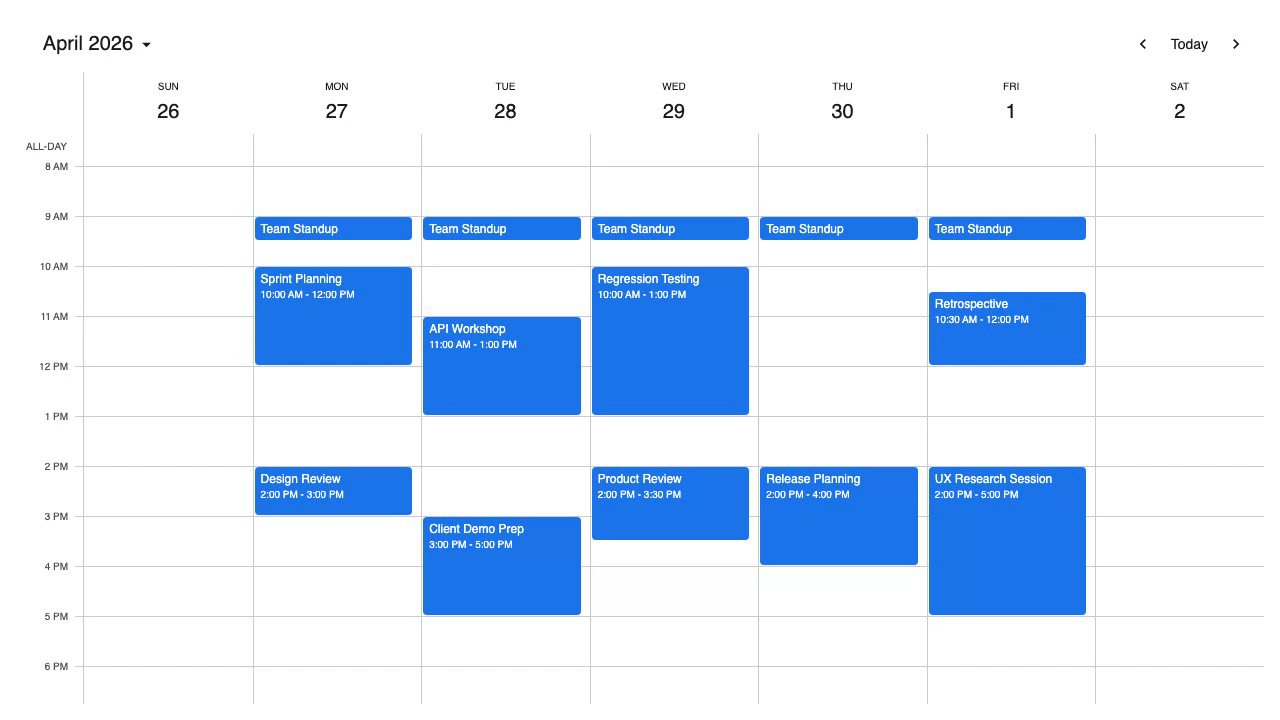
Mobiscroll Event Calendar setup with Angular
Configure the Mobiscroll private npm registry before installing the Angular package:
npm install @mobiscroll/angular
Add the stylesheet in angular.json:
"styles": [
    "node_modules/@mobiscroll/angular/dist/css/mobiscroll.min.css"
]
Import MbscModule in your app module, then configure the component:
import { Component } from '@angular/core';
import { MbscCalendarEvent } from '@mobiscroll/angular';

@Component({
    selector : 'app-calendar',
    template : `
        <mbsc-eventcalendar [data]="events" [view]="myView" [dragToMove]="true" [dragToCreate]="true">
        </mbsc-eventcalendar>
    `
})
export class CalendarComponent {
    events: MbscCalendarEvent[] = [
        { id : 1, title : 'Team standup',  start : '2026-01-15T09:00:00', end : '2026-01-15T09:30:00', recurring : { repeat : 'weekly', weekDays : 'MO,TU,WE,TH,FR' } },
        { id : 2, title : 'Sprint review', start : '2026-01-16T14:00:00', end : '2026-01-16T15:00:00' }
    ];
    myView = { calendar : { type : 'week', popover : true } };
}
Mobiscroll Event Calendar focuses on mobile Angular scheduling
Mobiscroll Event Calendar provides day, week, and month views, along with an agenda view and timeline view. Recurring events are configured through a simple object API rather than raw RRULE strings, which lowers the learning curve for common patterns. Drag-and-drop and resize are included with the dragToMove and dragToResize options. A resource calendar view is available through the scheduler component. Dark mode is available via a built-in theme option. The mobile-first design means touch interactions such as swipe-to-scroll and pinch-to-zoom work without extra setup.
Mobiscroll gives Angular teams stronger touch-first interactions, while Bryntum Calendar gives them a deeper scheduling model for resource calendars and recurring events.
Mobiscroll Event Calendar starts with an internal project license
Mobiscroll Event Calendar starts at $995 for a single internal project as a perpetual license. The Complete internal project license starts at $1,955 and adds the full product set, source code, and priority support.
Mobiscroll Event Calendar gives Angular apps touch-first controls
Mobiscroll Event Calendar is a strong fit for mobile-first Angular projects.
- Mobile-first design with polished touch interactions out of the box.
- Native Angular wrapper with data-binding support.
- Built-in dark mode.
- The Complete internal project license covers the full Mobiscroll product set.
Mobiscroll Event Calendar costs more for multi-project teams
Three limitations apply before choosing Mobiscroll.
- Multi-project product teams need a higher tier or a SaaS license.
- The starting price is higher than some single-component alternatives.
- Resource calendar requires switching to the scheduler component rather than the event calendar component.
Which Angular calendar component should you choose?
The table below compares the five libraries across the features that matter most for appointment-style calendar applications.
| Feature | Bryntum Calendar | FullCalendar | Schedule-X | DHTMLX Scheduler | Mobiscroll |
|---|---|---|---|---|---|
| Day/week/month views | Yes | Yes | Yes | Yes | Yes |
| Recurring events | Yes (RFC 5545) | Yes (plugin) | Yes (plugin) | Yes (extension) | Yes |
| Drag-and-drop | Yes | Yes (plugin) | Yes (plugin) | Yes | Yes |
| Resource calendar | Yes | Premium only | No | Yes (extension) | Yes (scheduler) |
| Dark mode | Yes | CSS only | Yes | No | Yes |
| Native Angular wrapper | Yes | Yes | Yes | No | Yes |
| Free/open-source | No | Core only | Yes | GPL only | No |
The table below maps common scenarios to the most appropriate option.
| Scenario | Recommended option |
|---|---|
| Production app needing resource calendars, recurring events, and full Angular support | Bryntum Calendar |
| Open-source or budget-constrained project that needs a proven calendar without resource views | FullCalendar (core) |
| Modern TypeScript project that values a lightweight, plugin-based approach | Schedule-X |
| Mobile-heavy Angular app where touch UX is the top priority | Mobiscroll Event Calendar |
For applications centered on scheduling appointments, managing team calendars, or building any kind of day/week/month planner, Bryntum Calendar offers the most complete Angular-native solution. It handles resource views, RRULE recurring events, and dark mode without reaching for external plugins or workarounds, and the commercial license includes long-term support.
FullCalendar remains a strong choice when budget is the primary constraint and resource views are not required. Schedule-X is worth considering for TypeScript-first projects that want a lightweight foundation to build on. DHTMLX Scheduler suits teams that are comfortable with imperative DOM initialization and need a mature feature set. Mobiscroll Event Calendar stands out for teams building mobile-first Angular apps where touch interaction quality is non-negotiable.
The code samples above provide a working starting point for each library. Each library has detailed documentation covering data loading from APIs, custom event rendering, timezone handling, and accessibility considerations.