Best Gantt chart components for Salesforce Lightning Web Components

Salesforce developers who need a custom Gantt view inside a Lightning page face a specific integration challenge. Lightning Web Components render inside Shadow DOM, which means external libraries cannot use document.querySelector to find a container element. Instead, the component must use this.template.querySelector, and any container where an external library injects DOM must carry the lwc:dom="manual" directive.
External JavaScript packages reach the browser either as Salesforce static resources or, for API version 54 and above, as npm modules configured through the Salesforce DX project. Both paths require extra setup that a standard web project does not need. This comparison covers five Gantt libraries that are compatible with the LWC environment: Bryntum Gantt, DHTMLX Gantt, Syncfusion Gantt, DayPilot Gantt, and Frappe Gantt.
The comparison uses these criteria: Salesforce DX installation, LWC initialization pattern, scheduling features, export support, pricing, and integration documentation.
Bryntum Gantt
Bryntum Gantt is a commercial JavaScript Gantt component built on ChronoGraph, an open-source reactive scheduling engine. Bryntum provides official LWC support documentation and the npm package works with Salesforce DX npm modules support (API v54+).
Getting started with Bryntum Gantt in LWC
Install the trial package in your Salesforce DX project:
npm install @bryntum/gantt@npm:@bryntum/gantt-trial@7.3.0
Create the LWC HTML template (ganttChart.html):
<template>
    <div class="container" lwc:dom="manual" style="height: 600px;"></div>
</template>
Create the LWC JavaScript file (ganttChart.js):
import { LightningElement } from 'lwc';
import { Gantt } from '@bryntum/gantt';

export default class GanttChart extends LightningElement {
    _gantt = null;

    renderedCallback() {
        if (this._gantt) return;
        this._gantt = new Gantt({
            appendTo : this.template.querySelector('.container'),
            project  : {
              startDate : '2025-01-14',
              tasks : [
                  {
                      id : 1000, name : 'Launch SaaS Product', expanded : true, percentDone : 35.7,
                      children : [
                          { id : 11, name : 'Install Apache',      startDate : '2025-01-14', duration : 3, percentDone : 50 },
                          { id : 12, name : 'Configure firewall', startDate : '2025-01-14', duration : 3, percentDone : 50 },
                          { id : 15, name : 'Run tests',          startDate : '2025-01-21', duration : 2, percentDone : 0 }
                      ]
                  }
              ],
              dependencies : [
                  { fromTask : 11, toTask : 15, lag : 2 },
                  { fromTask : 12, toTask : 15 }
              ]
            }
        });
    }

    disconnectedCallback() {
        this._gantt?.destroy();
        this._gantt = null;
    }
}
The lwc:dom="manual" directive on the container div is required so that LWC does not clear the DOM injected by Bryntum. The guard in renderedCallback prevents re-initialization on subsequent renders. CSS must be loaded via the @salesforce/resourceUrl static resource API or configured via the Salesforce DX project settings. Bryntum publishes a dedicated Salesforce integration guide that covers both the static resource and npm module paths in full.
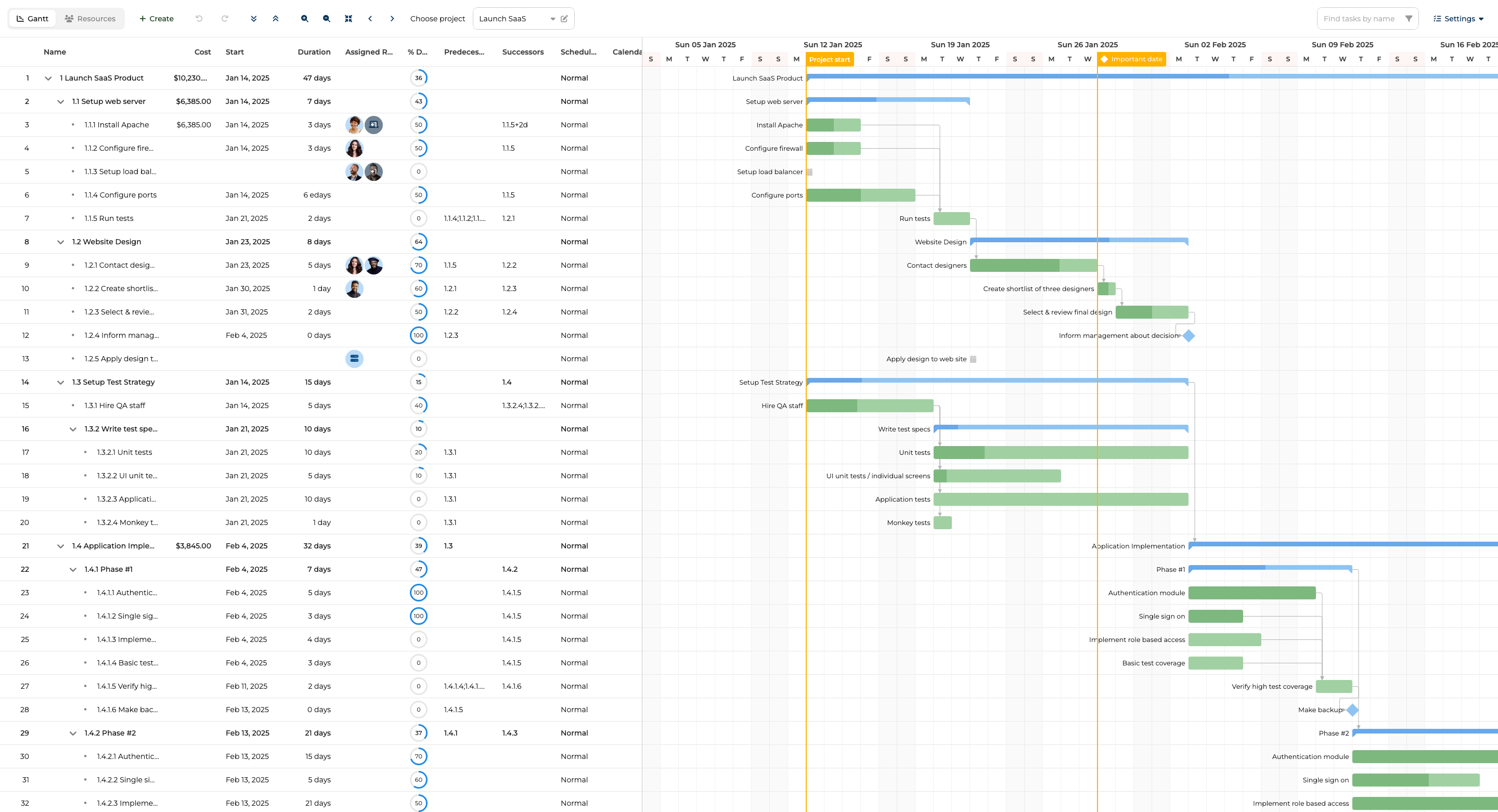
Bryntum Gantt features
Bryntum Gantt includes the ChronoGraph scheduling engine, which recalculates dependent task dates automatically when any predecessor changes. Additional features include critical path analysis, baselines, four dependency types, resource management, work breakdown structure (WBS), and undo/redo. Client-side export covers PDF, PNG, Excel, ICS, and MS Project XML without requiring a server-side module. Ten built-in themes and 45 locales are included in the base license. Bryntum also ships an MCP server and a Claude Code skill, so AI coding agents can reference the API documentation directly during development.
Bryntum Gantt pricing
The license costs $940 per developer as a perpetual license that includes 12 months of updates. After the update period, you keep the last version you received. A free 45-day trial is available at bryntum.com/download.
Pros of Bryntum Gantt
- Official Salesforce LWC integration guide with both static resource and npm module paths documented.
- The ChronoGraph scheduling engine handles all dependency recalculation, constraint resolution, and calendar-aware scheduling automatically.
- All features (export, baselines, resource management, critical path) are included in the base license without add-ons.
- Ten built-in themes cover most visual requirements without custom CSS.
- MCP server and Claude Code skill support AI-assisted development workflows.
Cons of Bryntum Gantt
- No free tier beyond the 45-day trial.
- CSS must be configured as a static resource or through Salesforce DX project settings, which adds setup overhead.
DHTMLX Gantt
DHTMLX Gantt is one of the oldest JavaScript Gantt libraries available. It ships as a global singleton, which means there is one shared gantt instance per page. DHTMLX does not publish an official LWC integration guide, but the vanilla JavaScript API is compatible with the manual DOM injection pattern that LWC requires.
Getting started with DHTMLX Gantt in LWC
Install the package from npm:
npm install dhtmlx-gantt
Create the LWC HTML template (dhtmlxGantt.html):
<template>
    <div class="container" lwc:dom="manual" style="width: 100%; height: 600px;"></div>
</template>
Create the LWC JavaScript file (dhtmlxGantt.js):
import { LightningElement } from 'lwc';
import gantt from 'dhtmlx-gantt';

export default class DhtmlxGantt extends LightningElement {
    renderedCallback() {
        if (this._initialized) return;
        this._initialized = true;
        gantt.config.date_format = '%Y-%m-%d';
        gantt.init(this.template.querySelector('.container'));
        gantt.parse({
            data  : [
                { id : 1, text : 'Phase 1', start_date : '2026-01-01', duration : 10, open : true },
                { id : 2, text : 'Requirements', start_date : '2026-01-01', duration : 5, parent : 1 },
                { id : 3, text : 'Design', start_date : '2026-01-08', duration : 8, parent : 1 }
            ],
            links : [{ id : 1, source : 2, target : 3, type : '0' }]
        });
    }
}
Because gantt is a global singleton, calling gantt.init more than once on a page will reinitialize the same instance against the new container. The CSS file must be uploaded to Salesforce as a static resource and loaded using the @salesforce/resourceUrl import. There is no official LWC guide from DHTMLX, but the vanilla JS initialization pattern shown above works with the manual DOM injection approach.
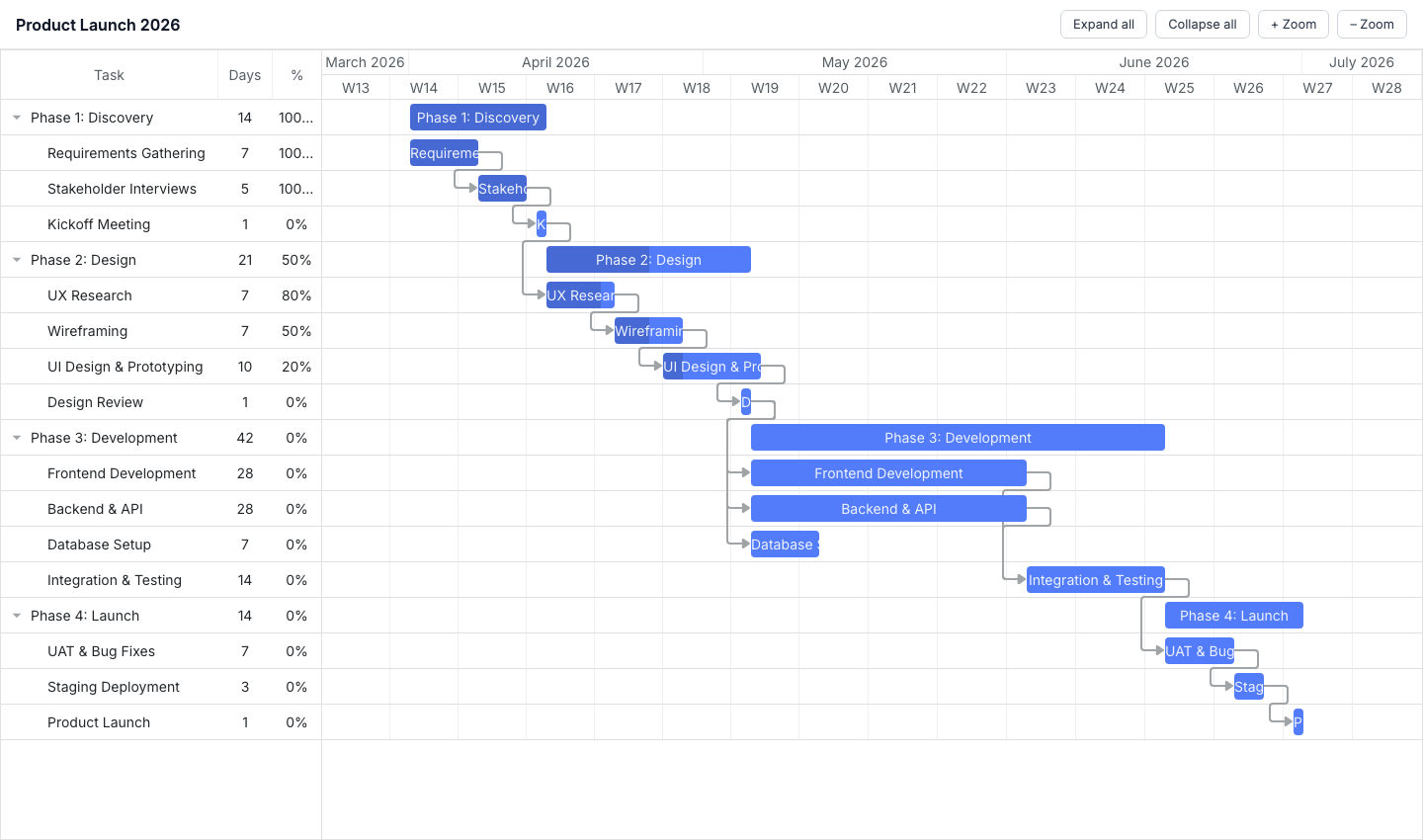
DHTMLX Gantt features
The Standard (GPL) edition includes drag-and-drop task editing, dependency links, zoom levels, and collapsible task trees. Auto-scheduling, critical path analysis, resource management, baselines, and split tasks are available in the Pro edition only.
DHTMLX Gantt pricing
The Standard edition is free under the GPL license for open-source projects. Commercial licenses are per-developer perpetual: Individual at $699, Commercial at $1,399, Enterprise at $2,999, and Ultimate at $5,999.
Pros of DHTMLX Gantt
- GPL Standard edition is genuinely free for open-source projects.
- Pricing is published and per-developer perpetual.
- Package is available on the public npm registry without authentication.
Cons of DHTMLX Gantt
- No official LWC integration guide.
- The global singleton architecture means only one Gantt instance can run per page.
- Auto-scheduling, critical path, and resource management require the Pro edition.
Syncfusion Gantt
Syncfusion Gantt provides EJ2 components that work in LWC environments through the npm modules path. Syncfusion publishes a dedicated Salesforce integration guide covering the setup steps specific to Salesforce DX. The library covers the full scheduling feature set and is available under a Community License for qualifying teams.
Getting started with Syncfusion Gantt in LWC
Install the package:
npm install @syncfusion/ej2-gantt
Create the LWC HTML template (syncfusionGantt.html):
<template>
    <div class="container" lwc:dom="manual" style="height: 600px;"></div>
</template>
Create the LWC JavaScript file (syncfusionGantt.js):
import { LightningElement } from 'lwc';
import { registerLicense } from '@syncfusion/ej2-base';
import { Gantt } from '@syncfusion/ej2-gantt';

registerLicense('YOUR_LICENSE_KEY');

export default class SyncfusionGantt extends LightningElement {
    _gantt = null;

    renderedCallback() {
        if (this._gantt) return;
        this._gantt = new Gantt(this.template.querySelector('.container'), {
            dataSource   : [
                { TaskID : 1, TaskName : 'Phase 1', StartDate : new Date('2026-01-01'), Duration : 10,
                  subtasks : [
                      { TaskID : 2, TaskName : 'Requirements', StartDate : new Date('2026-01-01'), Duration : 5 },
                      { TaskID : 3, TaskName : 'Design', StartDate : new Date('2026-01-08'), Duration : 8 }
                  ]
                }
            ],
            taskFields   : { id : 'TaskID', name : 'TaskName', startDate : 'StartDate', duration : 'Duration', child : 'subtasks' },
            enableCriticalPath : true
        });
    }

    disconnectedCallback() {
        this._gantt?.destroy();
        this._gantt = null;
    }
}
Syncfusion requires all dependency CSS files to be loaded as static resources in Salesforce. The required packages are base, buttons, calendars, dropdowns, grids, inputs, layouts, navigations, and gantt. Each CSS file must be uploaded as a separate static resource or bundled before upload.
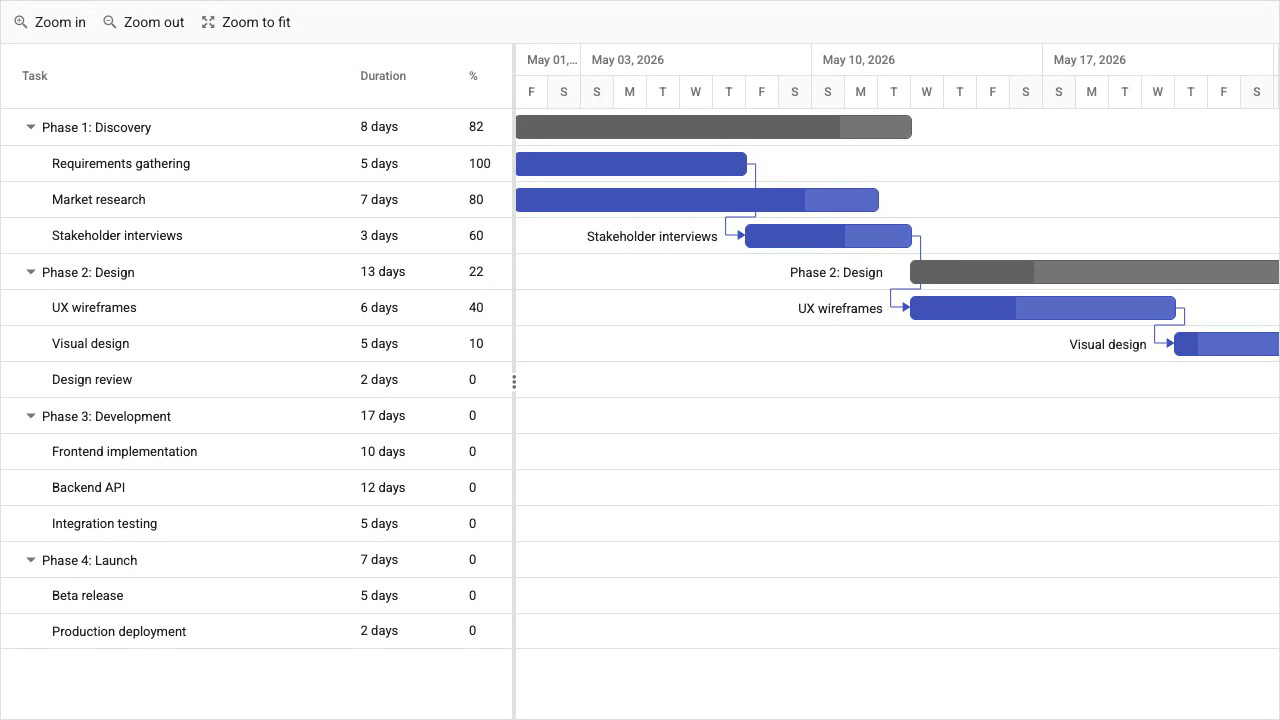
Syncfusion Gantt features
Syncfusion Gantt includes auto-scheduling, critical path analysis, baselines, split tasks, resource management, undo/redo, and export. The feature set is comparable to Bryntum Gantt in breadth.
Syncfusion Gantt pricing
The Community License is free for organizations with annual gross revenue under $1 million and five or fewer developers. Commercial licensing is quote-based. The Community License covers the full feature set with no feature restrictions.
Pros of Syncfusion Gantt
- Official Salesforce integration guide covers the full setup.
- Community License covers all features at no cost for qualifying teams.
- Comprehensive feature set including auto-scheduling, baselines, and export.
Cons of Syncfusion Gantt
- Loading multiple CSS static resources adds significant Salesforce deployment overhead.
- Commercial pricing is not publicly listed.
- License key registration must happen at module load time, which requires care in Salesforce's module execution model.
DayPilot Gantt
DayPilot provides framework-agnostic JavaScript scheduler components that can be embedded in LWC using manual DOM injection. The free lite package is available on the public npm registry. The Pro version unlocks timeline extensions, drag-and-drop, and row headers.
Getting started with DayPilot Gantt in LWC
Install the lite package:
npm install @daypilot/daypilot-lite-javascript
Create the LWC HTML template (daypilotGantt.html):
<template>
    <div class="container" lwc:dom="manual" style="height: 400px;"></div>
</template>
Create the LWC JavaScript file (daypilotGantt.js):
import { LightningElement } from 'lwc';
import { DayPilot } from '@daypilot/daypilot-lite-javascript';

export default class DaypilotGantt extends LightningElement {
    _gantt = null;

    renderedCallback() {
        if (this._gantt) return;
        this._gantt = new DayPilot.Gantt(this.template.querySelector('.container'), {
            startDate : '2026-01-01',
            days      : 30,
            tasks     : [
                { id : 1, text : 'Requirements', start : '2026-01-01', end : '2026-01-06' },
                { id : 2, text : 'Design', start : '2026-01-07', end : '2026-01-15' }
            ]
        });
        this._gantt.init();
    }
}
There is no official LWC guide from DayPilot. The component works through the same manual DOM injection pattern used by the other libraries in this comparison.
DayPilot Gantt features
DayPilot Gantt supports dependency links, drag-and-drop task editing, task completion percentages, and a UI Builder for configuring the component visually. It does not include an auto-scheduling engine, so task dates do not recalculate automatically when dependencies change.
DayPilot Gantt pricing
DayPilot Pro licenses start at $899 per developer as a perpetual license. The lite package is free.
Pros of DayPilot Gantt
- Lite package is free and available on the public npm registry.
- UI Builder lets you configure the Gantt visually and export the resulting configuration.
- Framework-agnostic API works with LWC's manual DOM injection pattern.
Cons of DayPilot Gantt
- No auto-scheduling engine: dependent task dates must be managed manually.
- No official LWC integration guide.
- The Pro package is not available on the public npm registry.
Frappe Gantt
Frappe Gantt is an MIT-licensed open-source Gantt component built with vanilla JavaScript and SVG. It renders entirely to an SVG element, which means the LWC template must contain an svg element inside the manual DOM container rather than a plain div.
Getting started with Frappe Gantt in LWC
Install the package:
npm install frappe-gantt
Create the LWC HTML template (frappeGantt.html):
<template>
    <div class="container" lwc:dom="manual">
        <svg class="gantt"></svg>
    </div>
</template>
Create the LWC JavaScript file (frappeGantt.js):
import { LightningElement } from 'lwc';
import Gantt from 'frappe-gantt';

export default class FrappeGantt extends LightningElement {
    _gantt = null;

    renderedCallback() {
        if (this._gantt) return;
        const tasks = [
            {
                id           : 'task-1',
                name         : 'Requirements',
                start        : '2026-01-01',
                end          : '2026-01-06',
                progress     : 100,
                dependencies : ''
            },
            {
                id           : 'task-2',
                name         : 'Design',
                start        : '2026-01-07',
                end          : '2026-01-15',
                progress     : 20,
                dependencies : 'task-1'
            }
        ];
        this._gantt = new Gantt(
            this.template.querySelector('.gantt'),
            tasks,
            { view_mode : 'Week' }
        );
    }
}
CSS must be loaded as a static resource in Salesforce. Frappe Gantt has no auto-scheduling engine, no resource management, and no critical path. Tasks are positioned by explicit start and end dates only.
Frappe Gantt features
Frappe Gantt renders a visual timeline from explicit task dates with progress indicators and dependency arrows between tasks. It supports view mode switching between Hour, Quarter Day, Half Day, Day, Week, and Month. There is no scheduling engine, no resource management, and no export functionality.
Frappe Gantt pricing
Frappe Gantt is free under the MIT license. There is no commercial tier.
Pros of Frappe Gantt
- MIT license with no cost and no usage restrictions.
- Zero configuration for basic timeline visualization.
- SVG-based rendering is lightweight and has no external style dependencies beyond the single CSS file.
Cons of Frappe Gantt
- No auto-scheduling engine, no critical path, and no resource management.
- No export functionality.
- No official LWC integration guide.
- SVG-based rendering requires an
svgelement in the LWC template rather than a plain container div.
Conclusion
The table below summarizes the key capabilities across all five libraries.
| Feature | Bryntum Gantt | DHTMLX Gantt | Syncfusion Gantt | DayPilot Gantt | Frappe Gantt |
|---|---|---|---|---|---|
| Auto-scheduling | Yes | Pro only | Yes | No | No |
| Critical path | Yes | Pro only | Yes | No | No |
| LWC support | Official guide | Manual (no guide) | Official guide | Manual (no guide) | Manual (no guide) |
| Client-side export | PDF/PNG/Excel/XML | Pro only | Yes | Limited | No |
| Free or open-source tier | Trial only | GPL Standard | Community License | Lite package | MIT |
The table below maps common project requirements to the library best suited for each.
| Use case | Recommended library |
|---|---|
| Enterprise Salesforce app requiring a full scheduling engine and official LWC guide | Bryntum Gantt |
| Full-featured Gantt with a free Community License for qualifying teams | Syncfusion Gantt |
| Open-source or GPL-licensed project with minimal integration requirements | DHTMLX Gantt Standard |
| Simple read-only Gantt visualization with no licensing cost | Frappe Gantt |
For most Salesforce teams building a project management interface, Bryntum Gantt and Syncfusion Gantt are the strongest choices. Both provide official Salesforce integration documentation, and both include a complete scheduling engine in the base product. Bryntum Gantt adds MCP server support and a Claude Code skill that make it well suited to teams using AI coding assistants. Syncfusion Gantt's Community License is the practical choice for smaller teams that qualify.
DHTMLX Gantt is worth evaluating when the project is open-source and the GPL license fits. The absence of an official LWC guide is a real integration cost, and the global singleton architecture means only one instance can run per Lightning page. DayPilot is a reasonable option when you need a lightweight component and do not require automatic dependency scheduling. Frappe Gantt covers the narrow case where you need a simple, free Gantt timeline with no scheduling logic and no licensing overhead.