Best JavaScript event calendar components

When choosing a JavaScript event calendar, the main risk is not picking the wrong month grid. The risk is choosing a library that cannot support the next requirement: resource scheduling, recurrence, mobile interaction, time zone handling, or framework integration. That mistake turns a component decision into weeks of custom scheduling work.
This article compares five JavaScript event calendar components using the criteria below.
- Installation and package access.
- Standard calendar views.
- Resource scheduling and recurring events.
- Pricing and license tiers.
- When Bryntum Calendar is the better production choice.
Bryntum Calendar
Built by Bryntum, a Swedish software company specializing in scheduling and data visualization products, Bryntum Calendar is a commercial JavaScript component. The Bryntum Calendar JavaScript quick start covers the full setup path. It is part of a larger suite that includes Gantt, Scheduler, and Grid components, all of which share a common core and can be combined in a single application. Bryntum Calendar stands out for the depth of its view options, its resource scheduling capabilities, and CSS variable theming that covers most white-labeling requirements without custom overrides.
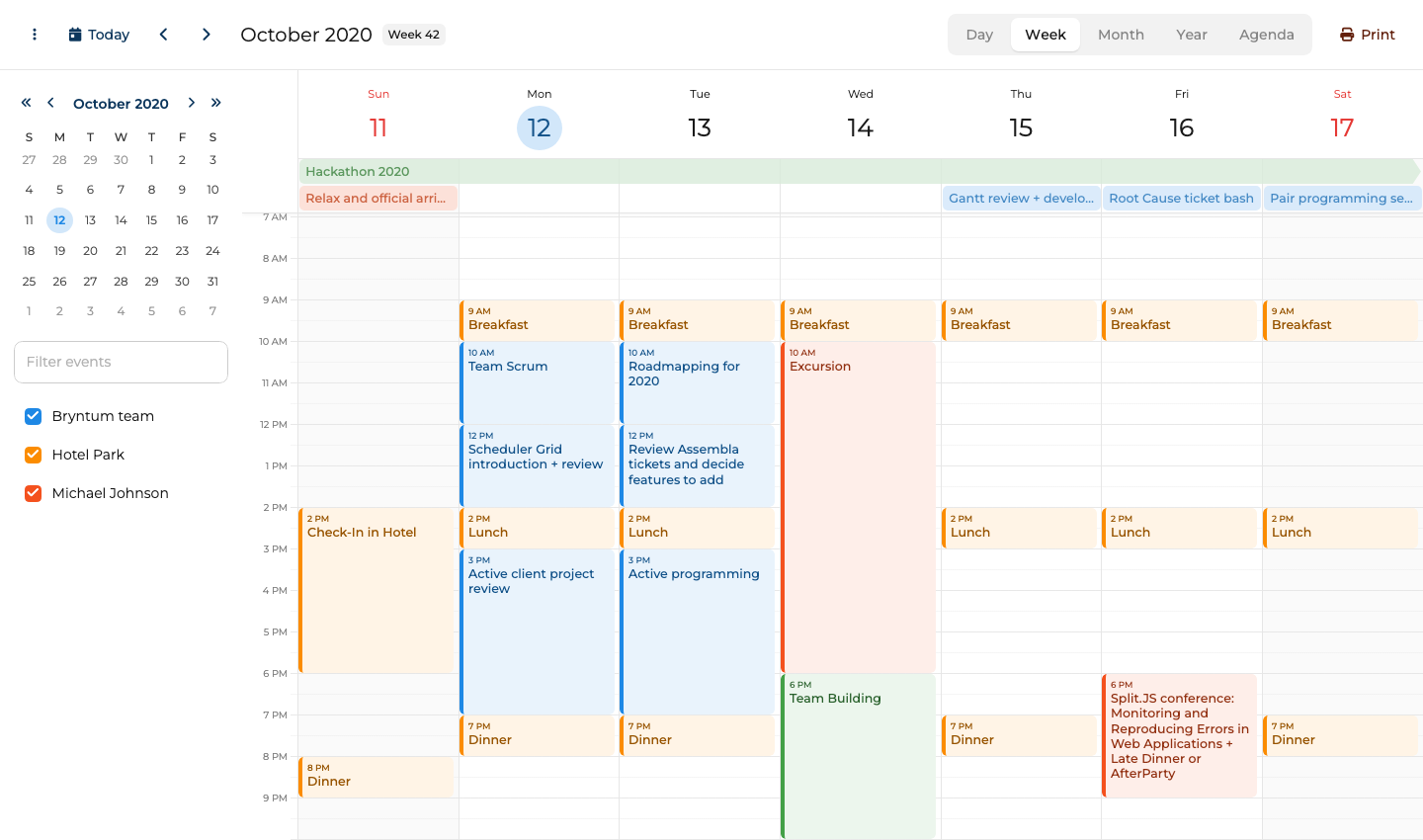
Bryntum Calendar setup with plain JavaScript
Install the package from the Bryntum npm registry after registering for a trial or purchasing a license.
npm install @bryntum/calendar@7.3.0
CSS files must be imported in a specific order for the component to render correctly.
import '@bryntum/calendar/fonts/fontawesome.css';
import '@bryntum/calendar/fonts/solid.css';
import '@bryntum/calendar/calendar.css';
import '@bryntum/calendar/calendar.svalbard-light.css';

import { Calendar } from '@bryntum/calendar';

const calendar = new Calendar({
  appendTo : 'app',
  date     : '2025-10-12',
  resources : [
    { id : 'bryntum', name : 'Bryntum team',     eventColor : 'blue' },
    { id : 'hotel',   name : 'Hotel Park',       eventColor : 'orange' },
    { id : 'michael', name : 'Michael Johnson', eventColor : 'deep-orange' }
  ],
  events   : [
    { id : 1, name : 'Hackathon 2025',                       startDate : '2025-10-11T14:00:00', endDate : '2025-10-18T12:00:00', allDay : true, resourceId : 'bryntum', eventColor : 'green' },
    { id : 2, name : 'Breakfast',                            startDate : '2025-10-12T09:00:00', endDate : '2025-10-12T10:00:00', resourceId : 'hotel' },
    { id : 3, name : 'Team Scrum',                           startDate : '2025-10-12T10:00:00', endDate : '2025-10-12T12:00:00', resourceId : 'bryntum' },
    { id : 4, name : 'Scheduler Grid introduction + review', startDate : '2025-10-12T12:00:00', endDate : '2025-10-12T14:00:00', resourceId : 'bryntum' }
  ]
});
Bryntum Calendar includes resource scheduling and theming depth
Bryntum Calendar ships with a comprehensive set of built-in capabilities.
- Multiple views: Day, week, month, agenda, and year views are all included without requiring separate plugins.
- Resource scheduling: Events can be assigned to named resources and displayed in a resource-aware calendar view for room booking or staff planning scenarios.
- Recurring events with RRULE: The component supports the iCalendar RRULE standard, so recurring patterns such as "every second Tuesday" work without custom logic.
- Drag-and-drop and event resizing: Both are built in and work across all views without any additional configuration.
- Time zone support: The component handles time zone conversion internally, which is critical for applications with users across multiple regions.
- CSS variable theming: All visual properties are exposed as CSS custom properties, making it possible to match any design system without overriding internal styles.
Bryntum Calendar starts with the Small Team license
Bryntum Calendar requires a paid license at $680 per developer for the Small Team license, with a minimum of three developers and 12 months of updates included. A free trial is available from the Bryntum website.
Bryntum Calendar scales with growing scheduling requirements
Bryntum Calendar stands out for three reasons.
- All major calendar views and resource scheduling are available without add-on purchases.
- The TypeScript definitions are comprehensive and maintained alongside the component source.
- The shared core with other Bryntum products means adding a Gantt or Scheduler to the same project requires no new dependencies.
Bryntum Calendar adds commercial cost and bundle weight
Three limitations apply when evaluating Bryntum Calendar.
- The per-developer cost adds up quickly for larger teams.
- The learning curve for the configuration API is steeper than lighter alternatives.
- Licensed packages require Bryntum npm access, while trial packages can be installed from the public npm registry using package aliases.
FullCalendar
Maintained by a small commercial team that also sells premium add-ons, FullCalendar ranks among the most widely used open-source JavaScript calendar libraries. The core package is MIT-licensed and covers the most common calendar views, while resource scheduling and a few other features are gated behind FullCalendar Premium. FullCalendar has integrations for React, Vue, and Angular in addition to the framework-agnostic plain JavaScript package.
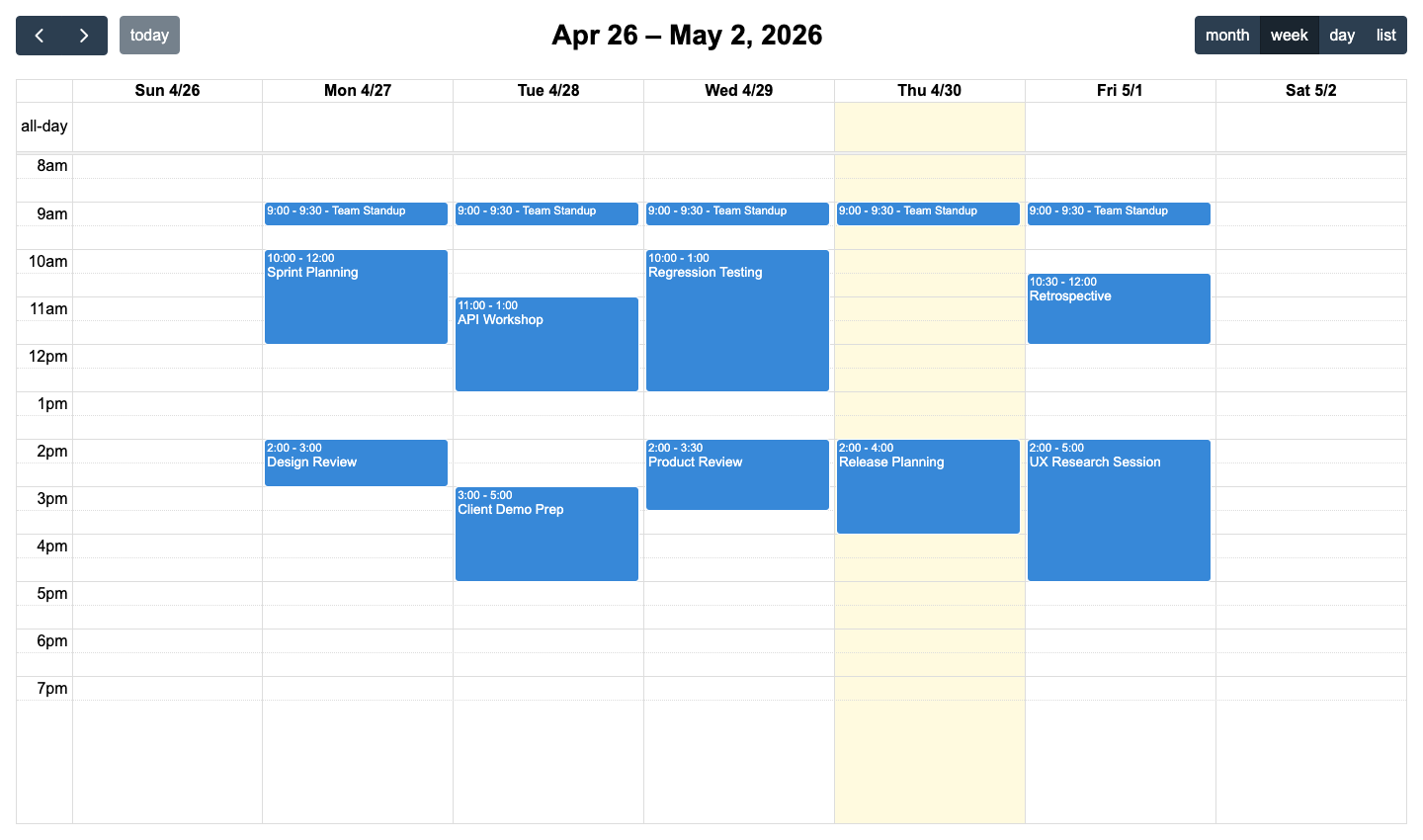
FullCalendar setup with plain JavaScript plugins
Install the core package along with the view plugins you need.
npm install @fullcalendar/core @fullcalendar/daygrid @fullcalendar/timegrid @fullcalendar/list
Pass the plugins to the Calendar constructor and call render() to mount the component.
import { Calendar } from '@fullcalendar/core';
import dayGridPlugin from '@fullcalendar/daygrid';

const el = document.getElementById('calendar');

const cal = new Calendar(el, {
  plugins     : [dayGridPlugin],
  initialView : 'dayGridMonth',
  events      : [
    {
      title : 'Team standup',
      start : '2024-06-10T09:00:00',
      end   : '2024-06-10T09:30:00',
    },
  ],
});

cal.render();
FullCalendar covers standard event calendars without resource views
The FullCalendar core offers a solid baseline for most calendar use cases.
- Standard calendar views: Day, week, month, and list views are available as separate plugins, so only the needed views are bundled.
- Locale support: More than 70 locales are included, covering date formatting, week start day, and direction for right-to-left languages.
- RRULE recurring events: The
@fullcalendar/rruleplugin adds iCalendar-compliant recurring event support. - Resource views (premium): Room and staff scheduling views are available through the premium
@fullcalendar/resource-*packages. - Drag-and-drop via plugin: The
@fullcalendar/interactionplugin adds dragging, resizing, and date selection. - JSON data source: Events can be loaded from a remote URL with built-in fetch and date-range parameters.
FullCalendar is easier to start with for a free event calendar, but Bryntum Calendar covers more production scheduling needs without assembling plugins.
FullCalendar keeps core views free and charges for resource scheduling
The core library is MIT-licensed and free. FullCalendar Premium, which includes resource scheduling features, starts at $480 per year.
FullCalendar has extensive open-source documentation and examples
FullCalendar has three clear advantages.
- The MIT core covers a large portion of common calendar requirements at no cost.
- The large community means abundant tutorials, Stack Overflow answers, and third-party plugins.
- Framework adapters for React, Vue, and Angular are maintained by the same team as the core library.
FullCalendar needs paid add-ons for scheduler-style features
Three limitations come with FullCalendar.
- Resource scheduling sits behind FullCalendar Premium.
- The plugin architecture means more packages to install and manage for a fully featured setup.
- The API surface has changed significantly across major versions, so upgrading can require code changes.
Schedule-X
Schedule-X takes a TypeScript-first, framework-agnostic approach to event calendars, built as a modern alternative to older libraries. It is designed around a plugin architecture where functionality such as drag-and-drop and recurrence are optional add-ons rather than bundled defaults. The project is open source under the MIT license, with Premium plugins available for more advanced features.
Schedule-X setup with its TypeScript-first calendar core
Install the calendar core package and the default theme.
npm install @schedule-x/calendar @schedule-x/theme-default
Use the createCalendar factory function and call render with a DOM element.
import { createCalendar } from '@schedule-x/calendar';
import '@schedule-x/theme-default/dist/index.css';

const cal = createCalendar({
  selectedDate : '2024-06-10',
  events       : [
    {
      id    : '1',
      title : 'Team standup',
      start : '2024-06-10 09:00',
      end   : '2024-06-10 09:30',
    },
  ],
});

cal.render(document.getElementById('calendar'));
Schedule-X keeps plain JavaScript calendars modular and typed
Schedule-X keeps the core lean and builds additional capability through plugins.
- Day, week, and month views: The standard calendar views are included in the core package with a clean default visual style.
- Plugin architecture: Features like event recurrence and scroll-to-time are individual plugins, keeping bundle size controlled.
- Premium drag-and-drop plugin: Moving and resizing events requires a Schedule-X Premium drag-and-drop plugin.
- Recurrence via plugin: The
@schedule-x/event-recurrencepackage adds RRULE support without bloating the core. - Custom event rendering: A custom render function controls how events appear in any view.
- Keyboard navigation: Built-in keyboard support improves accessibility without requiring additional configuration.
Schedule-X keeps the JavaScript calendar core smaller, while Bryntum Calendar ships more of the scheduling workflow in the base package.
Schedule-X pricing separates free core and Premium plugins
Schedule-X core is MIT-licensed and free. Premium plugins, including resource view, drag-and-drop, drag-to-create, and event forms, start at €479 per year for two to three developers or €999 for a lifetime license with one year of updates.
Schedule-X prioritizes bundle size and type safety
Schedule-X has three notable advantages for TypeScript-first projects.
- The TypeScript-first design gives excellent editor autocompletion and type safety out of the box.
- The plugin architecture keeps the default bundle small, with byte cost proportional to what is used.
- Framework adapters for React, Vue, and Angular are available alongside the plain JavaScript package.
Schedule-X lacks the view depth of older calendar libraries
Three limitations restrict Schedule-X for some projects.
- Resource scheduling is not available in the current version, which rules out room booking and staff planning use cases.
- The community is smaller than FullCalendar, meaning fewer third-party resources and forum answers.
- As a newer project, it has less production mileage than the more established alternatives on this list.
DHTMLX Scheduler
Produced by DHTMLX, a company with more than 20 years of experience in web UI components, DHTMLX Scheduler is a commercial JavaScript event calendar. The library follows a global-singleton API pattern where a single scheduler object manages all calendar state, which differs from the instance-based approach used by most other libraries on this list. It is available as a trial package on npm and as a licensed package for production use.
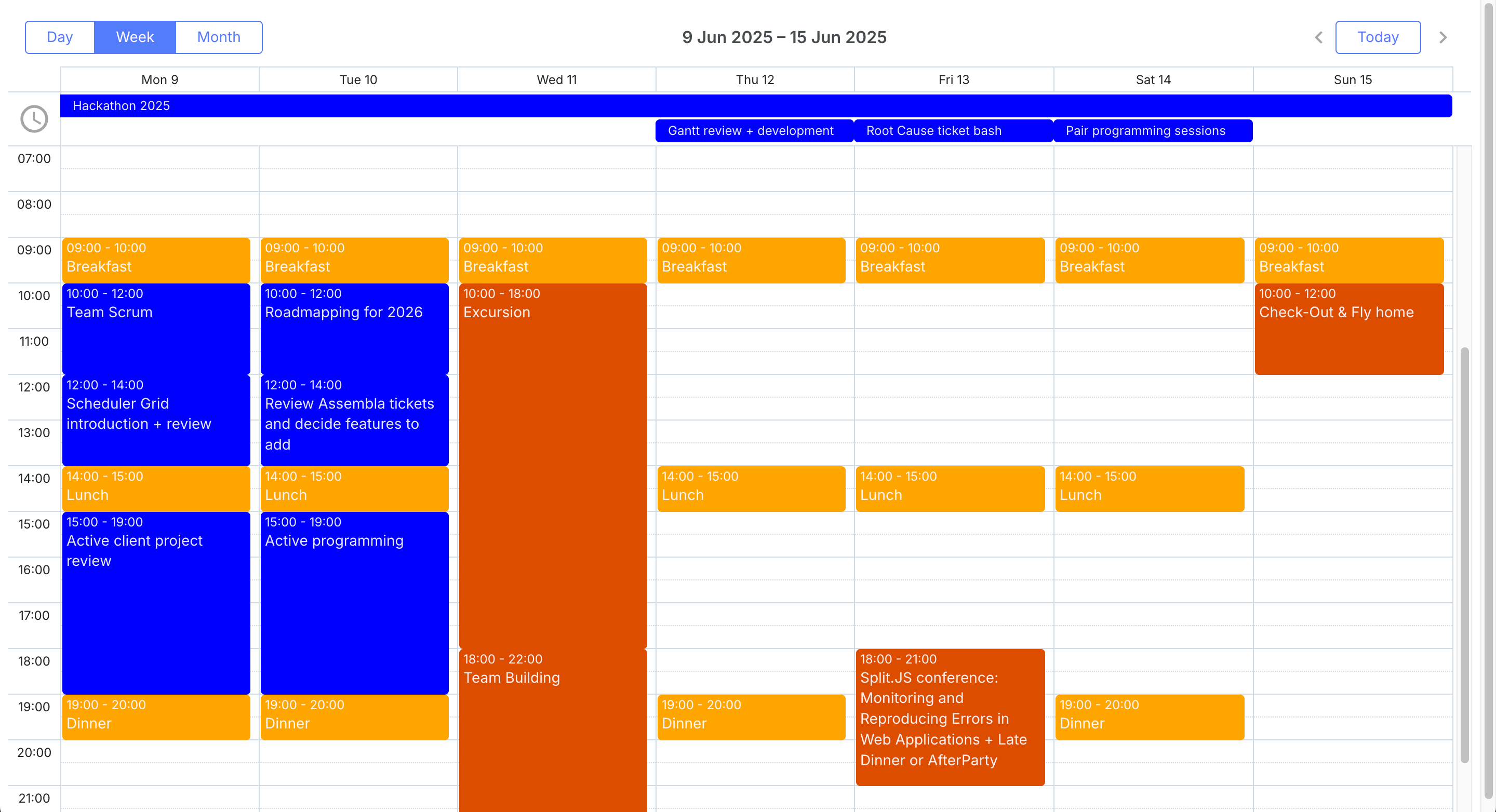
DHTMLX Scheduler setup with its singleton API
Install the trial package to evaluate the library.
npm install @dhtmlx/trial-scheduler
Initialize the scheduler on a container element, then load events using parse.
import { scheduler } from '@dhtmlx/trial-scheduler';
import '@dhtmlx/trial-scheduler/codebase/dhtmlxscheduler.css';

scheduler.init('calendar', new Date(), 'month');

scheduler.parse([
  {
    id        : 1,
    text      : 'Team standup',
    start_date: '2024-06-10 09:00',
    end_date  : '2024-06-10 09:30',
  },
]);

// When unmounting, clear the scheduler state:
// scheduler.clearAll();
DHTMLX Scheduler uses an imperative singleton API
DHTMLX Scheduler covers a broad range of calendar and scheduling views.
- Multiple views: Day, week, month, timeline, and agenda views are included, with the timeline view being particularly useful for resource scheduling.
- Recurring events: The built-in recurring event module supports daily, weekly, monthly, and yearly patterns with exception handling.
- Resource view (PRO): The PRO Timeline extension displays events across multiple resources in a horizontal swimlane layout.
- Drag-and-drop: Events can be dragged and resized within and across views without any additional plugins.
- Data export: Built-in support for exporting calendar data to PDF and Excel is available through server-side and client-side export modules.
- REST backend integration: The
dataProcessormodule keeps the calendar in sync with a REST API, handling create, update, and delete operations automatically.
DHTMLX Scheduler gives teams a mature imperative API, but Bryntum Calendar offers a more modern package for teams working across React, Angular, Vue, and plain JavaScript.
DHTMLX Scheduler pricing separates GPL and PRO use
DHTMLX Scheduler Standard is available under GPL v2 for GPL-compatible open-source projects. Paid PRO licenses start with the Individual tier at $599, and DHTMLX lists Commercial, Enterprise, and Ultimate tiers for larger teams.
DHTMLX Scheduler brings mature scheduler features to JavaScript apps
DHTMLX Scheduler has three notable strengths.
- The timeline and swimlane views are well-suited to resource scheduling scenarios such as room booking and equipment allocation.
- The data export capabilities for PDF and Excel are built in rather than requiring third-party libraries.
- The long product history means the library is stable and well-documented with many real-world usage examples.
DHTMLX Scheduler feels older than modern modular calendars
Three limitations apply when using DHTMLX Scheduler.
- The global-singleton API makes it harder to mount more than one calendar instance on the same page.
- TypeScript support is available but less comprehensive than TypeScript-first alternatives.
- The trial package on npm displays a watermark, so switching to the licensed package requires changing the import path.
Mobiscroll Event Calendar
Produced by Mobiscroll, a company focused on mobile-optimized UI components, Mobiscroll Event Calendar is a commercial component. The library is distributed as part of the @mobiscroll/javascript package and is designed to deliver native-quality touch interactions on iOS and Android web views as well as desktop browsers. It supports multiple themes including iOS, Material, and Windows to match platform conventions.
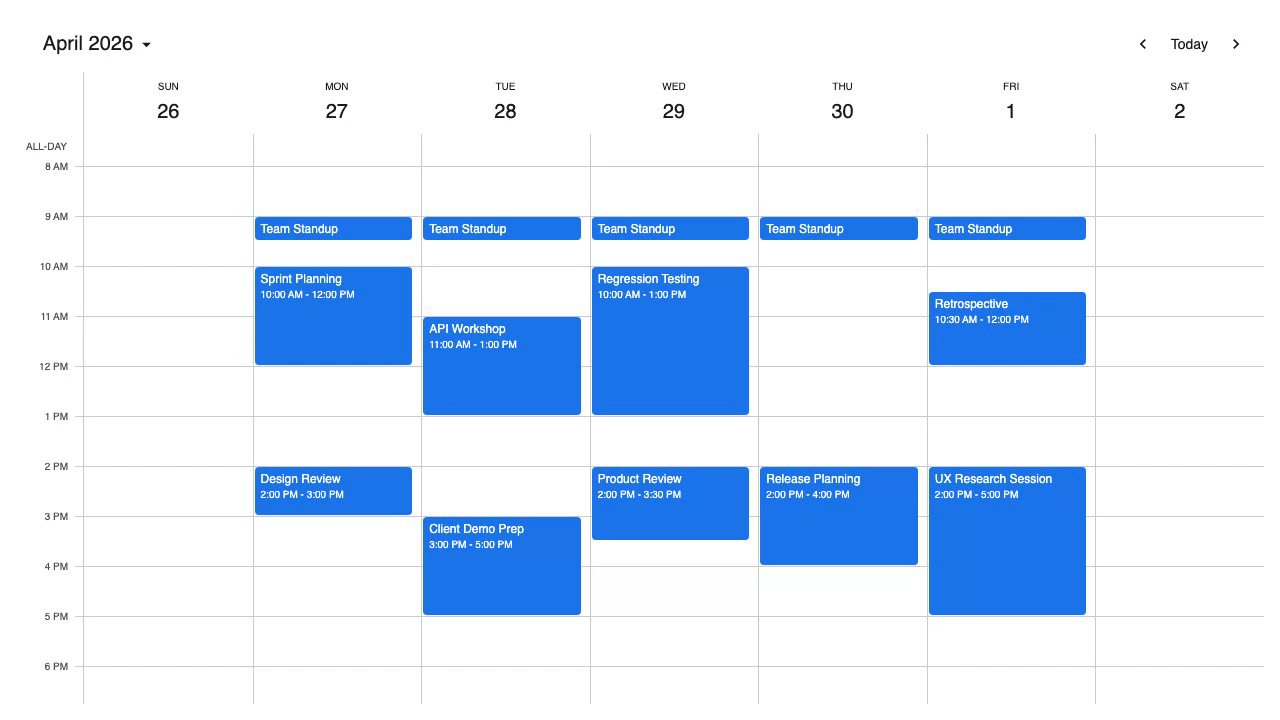
Mobiscroll Event Calendar setup with private registry access
Install the Mobiscroll JavaScript package after registering on the Mobiscroll website.
npm install @mobiscroll/javascript
Import the CSS and initialize the event calendar on a container element.
import '@mobiscroll/javascript/dist/css/mobiscroll.min.css';
import mobiscroll from '@mobiscroll/javascript';

const events = [
  {
    id    : 1,
    title : 'Team standup',
    start : '2024-06-10T09:00',
    end   : '2024-06-10T09:30',
  },
];

mobiscroll.eventcalendar('#calendar', {
  view : {
    calendar : { type: 'month' },
  },
  data : events,
});
Mobiscroll Event Calendar focuses on mobile web calendars
Mobiscroll Event Calendar covers a wide range of views with a strong emphasis on touch usability.
- Calendar, agenda, timeline, and scheduler views: All four view types are included, making it possible to switch between summary and detailed resource views within the same application.
- Native-quality touch gestures: Swipe navigation, pinch-to-zoom on timeline views, and momentum scrolling are implemented to match the behavior of native mobile calendar apps.
- Recurring events: The Mobiscroll-specific recurrence configuration handles common patterns and exception dates.
- Resource scheduling: Events can be assigned to resources and displayed in a swimlane timeline or scheduler view.
- Platform themes: Built-in iOS, Material, and Windows themes mean the component can match the platform conventions of the surrounding app without custom CSS.
- Offline data support: The component works with locally cached event data, which is important for progressive web apps that need to function without a network connection.
Mobiscroll has the advantage for mobile-first interaction, while Bryntum Calendar has the advantage for resource scheduling depth and multi-framework use.
Mobiscroll Event Calendar starts with an internal project license
Mobiscroll Event Calendar starts at $995 for a single internal project as a perpetual license. The Complete internal project license starts at $1,955 and adds the full product set, source code, and priority support.
Mobiscroll Event Calendar prioritizes touch interaction
Mobiscroll Event Calendar is the strongest choice for mobile-first projects.
- The mobile touch experience is the best of any component on this list, making it the right choice for web apps that must feel native on phones and tablets.
- All four view types, including resource scheduling, are available under a single license with no premium tier.
- The platform-matching themes reduce the amount of custom CSS needed when targeting iOS or Android web views.
Mobiscroll Event Calendar adds project licensing and registry setup
Three limitations apply before choosing Mobiscroll.
- Multi-project product teams need a higher tier or a SaaS license.
- The package requires registration with Mobiscroll before installation, adding friction compared to public npm packages.
- Framework-specific integrations are sold as separate packages, so teams using React or Angular need to purchase the corresponding product rather than the plain JavaScript one.
Which JavaScript event calendar should you choose?
The table below summarizes how each component compares across the features that matter most in a production calendar implementation.
| Component | Open source | Resource scheduling | Recurring events | TypeScript | Mobile optimized | Price |
|---|---|---|---|---|---|---|
| Bryntum Calendar | ✗ | ✓ | ✓ | ✓ | ✓ | $680/developer |
| FullCalendar | ✓ (core) | ✓ (premium) | ✓ | ✓ | ✓ | Free / from $480 per year |
| Schedule-X | ✓ | Premium | ✓ (plugin) | ✓ | ✓ | Free core / Premium plugins |
| DHTMLX Scheduler | ✗ | ✓ (PRO) | ✓ | Partial | ✓ | From $599 |
| Mobiscroll Event Calendar | ✗ | ✓ | ✓ | ✓ | ✓ | From $995/internal project |
The table below maps common project requirements to the component that fits best.
| Use case | Recommended component |
|---|---|
| Best for enterprise apps with resource scheduling | Bryntum Calendar |
| Best free and open-source option | FullCalendar |
| Best TypeScript-first modern API | Schedule-X |
| Best mobile and touch UX | Mobiscroll Event Calendar |
For teams building an enterprise scheduling application where resource views, recurring events, and TypeScript support are all required from day one, Bryntum Calendar is the strongest all-around choice. The licensing cost is justified by the depth of built-in functionality and the fact that nothing critical sits behind a secondary purchase.
If budget is the primary constraint, the FullCalendar core covers most standard calendar requirements at no cost. Teams that later need resource scheduling can upgrade to the premium tier without migrating to a different library. For projects where TypeScript type safety and a minimal bundle are the priority, Schedule-X offers the cleanest developer experience of any open-source option on this list, provided resource scheduling is not a requirement.
Mobiscroll Event Calendar earns a clear recommendation for any application where mobile users are the primary audience. No other component on this list matches its touch gesture quality, and having all four view types available under a single license removes the uncertainty that comes with tiered pricing.