Best JavaScript resource scheduler components

A resource scheduler is a component that places resources along the Y-axis and time along the X-axis, then renders event bars that span one or more cells to show when each resource is occupied. The "resources" can be people, machines, rooms, vehicles, or any entity that has limited availability. Unlike a general event calendar, a resource scheduler centers on the resource rather than the event. Five libraries cover this category with vanilla JavaScript APIs: Bryntum Scheduler, DHTMLX Scheduler, Syncfusion Schedule, DayPilot Scheduler, and Mobiscroll Event Calendar.
The comparison uses four resource management capabilities that distinguish these libraries from simpler timeline displays:
- Multi-resource assignment: a single event assigned to more than one resource row simultaneously
- Hierarchical resource grouping: resources organized in a parent-child tree the user can expand and collapse
- Resource utilization: a histogram or summary view showing how heavily each resource is loaded over time
- Work calendars: specific hours or days marked as unavailable per individual resource
For a broader comparison that covers non-resource scheduling features, see our article on best JavaScript scheduler components.
Bryntum Scheduler
Bryntum Scheduler is a commercial vanilla JavaScript component built for resource scheduling. It is the core product in the Bryntum suite, which also includes Scheduler Pro, Gantt, Calendar, Grid, and TaskBoard. The library publishes trial packages to the public npm registry, which means you can evaluate it without creating a customer account first.
Getting started with Bryntum Scheduler
Install the trial package:
npm install @bryntum/scheduler@npm:@bryntum/scheduler-trial@7.3.0
Add the container element to your HTML:
<style>
    html, body { margin: 0; height: 100%; }
    #container { height: 100vh; }
</style>
<div id="container"></div>
CSS imports must arrive in this exact order. The theme file overrides defaults set by the base stylesheet:
import '@bryntum/scheduler/fontawesome/css/fontawesome.css';
import '@bryntum/scheduler/fontawesome/css/solid.css';
import '@bryntum/scheduler/scheduler.css';
import '@bryntum/scheduler/svalbard-light.css';

import { Scheduler } from '@bryntum/scheduler';

const scheduler = new Scheduler({
    appendTo   : 'container',
    startDate  : '2025-05-07',
    endDate    : '2025-05-26',
    viewPreset : 'hourAndDay',
    columns    : [{ text : 'Team member', field : 'name', width : 160 }],
    // Grouped resources: department > individual
    resources  : [
      { id : 1,  name : 'Celia',          title : 'Sales' },
      { id : 11, name : 'Fancy law firm', eventColor : 'teal' },
      { id : 12, name : 'Small boutique', eventColor : 'blue' },
      { id : 13, name : 'Grocery store',  eventColor : 'lime' }
    ],
    events     : [
      { id : 1, resourceId : 1,  name : 'Busy',              startDate : '2025-05-07', endDate : '2025-05-09', eventColor : 'red' },
      { id : 2, resourceId : 11, name : 'Meeting',           startDate : '2025-05-07', endDate : '2025-05-09', location : 'clients office' },
      { id : 3, resourceId : 12, name : 'Phone',             startDate : '2025-05-07', endDate : '2025-05-08', location : 'office' },
      { id : 4, resourceId : 13, name : 'Suggested meeting', startDate : '2025-05-09', endDate : '2025-05-11', location : 'grocery store' }
    ]
});
Multi-resource assignment is expressed directly in the event's resourceId field as an array. Hierarchical resource grouping uses parentId on resource records. Both capabilities are available without any extra configuration or module injection.
For remote data, replace inline arrays with a CrudManager configuration:
crudManager : {
    loadUrl  : '/api/load',
    syncUrl  : '/api/sync',
    autoLoad : true,
    autoSync : true
}
The CrudManager loads all stores (resources, events, assignments, dependencies) in a single HTTP request and batches writes back in the same structure, which prevents the data inconsistency problems that arise when stores are managed independently.
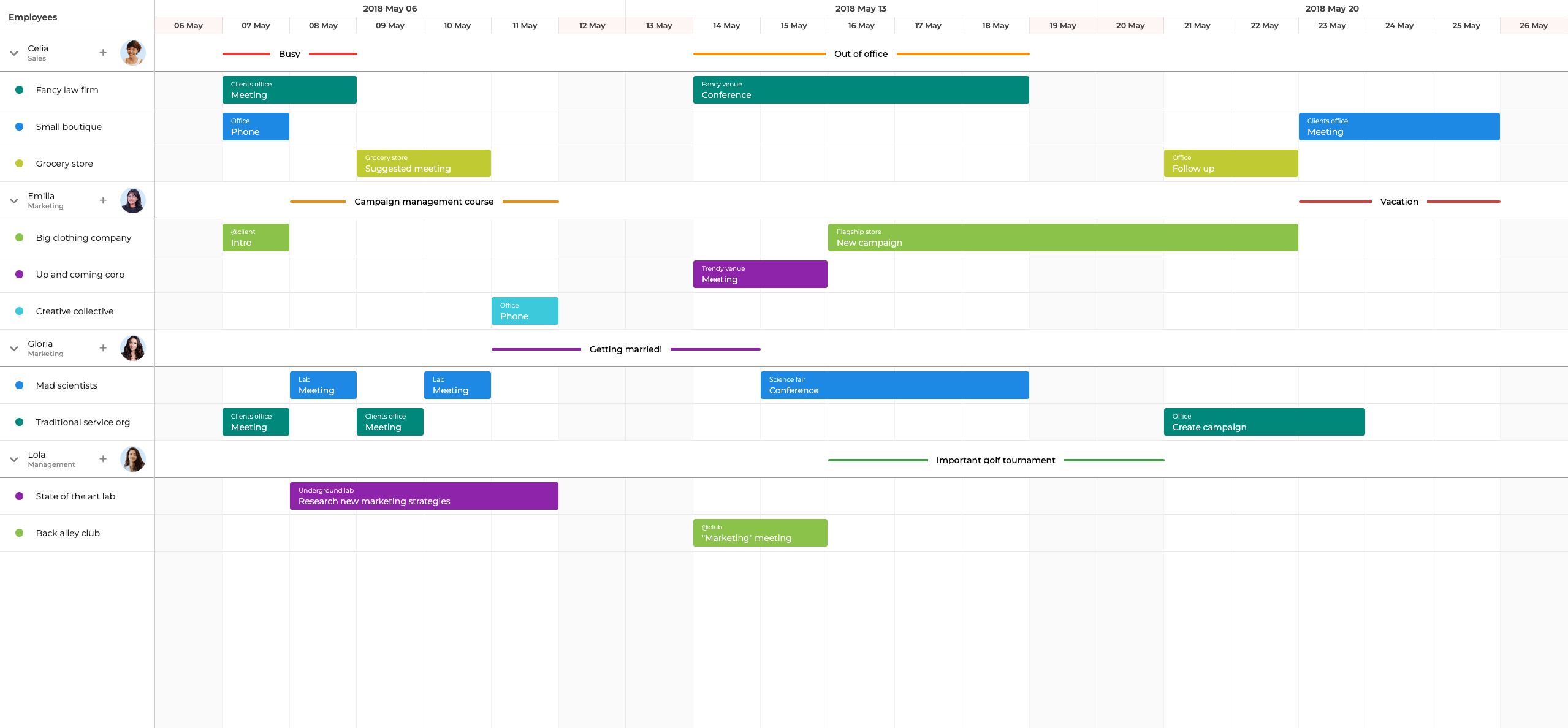
Bryntum Scheduler resource management features
Bryntum Scheduler covers all four resource management capabilities described in the introduction.
Multi-resource assignment works by passing an array to resourceId. The scheduler creates an assignment record for each entry and renders the event bar across every assigned resource row. Assignments are stored in a separate AssignmentStore, which means the same event object can have different visual positions without duplicating event data.
Hierarchical resource grouping uses the same tree model as Bryntum Grid. Resources can be nested to any depth using parentId references. Parent rows render a summary of their children and support expand-collapse interaction out of the box.
The ResourceUtilization widget renders a histogram below or alongside the scheduler that shows each resource's load over time. It reads directly from the AssignmentStore, so it updates automatically when assignments change.
Work calendars can be defined per resource using the CalendarManagerStore. Calendars specify working hours, holidays, and exceptions for individual resources. The scheduler shades non-working time and prevents drag-and-drop from placing events in unavailable intervals when skipNonWorkingTime is enabled.
Additional resource-relevant features include resource filtering, resource time ranges (which mark specific intervals on individual resource rows), and virtual scrolling that keeps performance stable when the resource list grows to thousands of rows.
Bryntum also provides an MCP server at mcp.bryntum.com that exposes the full API documentation for AI-assisted development, and a Claude Code skill that catches common setup mistakes such as import order errors and CrudManager configuration issues.
Bryntum Scheduler pricing
Bryntum Scheduler costs $680 per developer for the small-team license, with a three-developer minimum and 12 months of updates. A 45-day free trial is available at bryntum.com/download.
Pros of Bryntum Scheduler
- Multi-resource assignment, hierarchical grouping, utilization histogram, and work calendars are all available in the base product with no extra modules required
- The
AssignmentStoremodel separates event identity from resource assignment, which simplifies data synchronization with REST backends - Virtual scrolling keeps the component responsive with thousands of resource rows
- MCP server and Claude Code skill reduce friction during AI-assisted development
- Five built-in themes, with a custom theme API for full visual control
Cons of Bryntum Scheduler
- Commercial license required for production use, with per-developer pricing that becomes significant on large teams
- The API surface is large, and the learning curve for advanced features like the CrudManager and CalendarManagerStore is noticeable
- OEM and SaaS distribution pricing requires a separate quote
DHTMLX Scheduler
DHTMLX Scheduler is part of the DHTMLX suite of components for project management and data visualization. The Standard edition is available under the GPL license. The Timeline view that enables resource scheduling is a PRO-only feature.
Getting started with DHTMLX Scheduler
Install from the public npm registry:
npm install dhtmlx-scheduler
DHTMLX Scheduler exposes a global scheduler singleton. The Timeline view requires the PRO edition and must be activated as a plugin before calling init:
import 'dhtmlx-scheduler/codebase/dhtmlxscheduler_material.css';
import scheduler from 'dhtmlx-scheduler';

scheduler.config.xml_date = '%Y-%m-%d %H:%i';

// Create timeline view for resource scheduling (PRO only)
scheduler.createTimelineView({
    name       : 'timeline',
    x_unit     : 'hour',
    x_date     : '%H:%i',
    x_step     : 1,
    x_size     : 8,
    x_start    : 8,
    x_length   : 8,
    y_unit     : scheduler.serverList('resources'),
    y_property : 'section_id',
    render     : 'bar',
    // Group resources by department
    second_scale : { x_unit : 'day', x_date : '%D' }
});

scheduler.init(document.getElementById('container'), new Date(2026, 0, 2), 'timeline');
scheduler.serverList('resources', [
    { key : 'dev-1', label : 'Alice' },
    { key : 'dev-2', label : 'Bob' },
    { key : 'design-1', label : 'Charlie' }
]);
scheduler.parse([
    { id : 1, text : 'Sprint planning', start_date : '2026-01-02 10:00', end_date : '2026-01-02 11:00', section_id : 'dev-1' },
    { id : 2, text : 'Design review',   start_date : '2026-01-04 14:00', end_date : '2026-01-04 16:00', section_id : 'design-1' }
]);
Each event maps to one section_id (resource). The second_scale option adds a second header row for grouping labels but does not create a tree structure. Loading data uses the parse method for inline data or the load method for a URL. The DataProcessor API handles write-back:
scheduler.load('/data');
const dp = scheduler.createDataProcessor({ url : '/data', mode : 'REST' });
dp.init(scheduler);
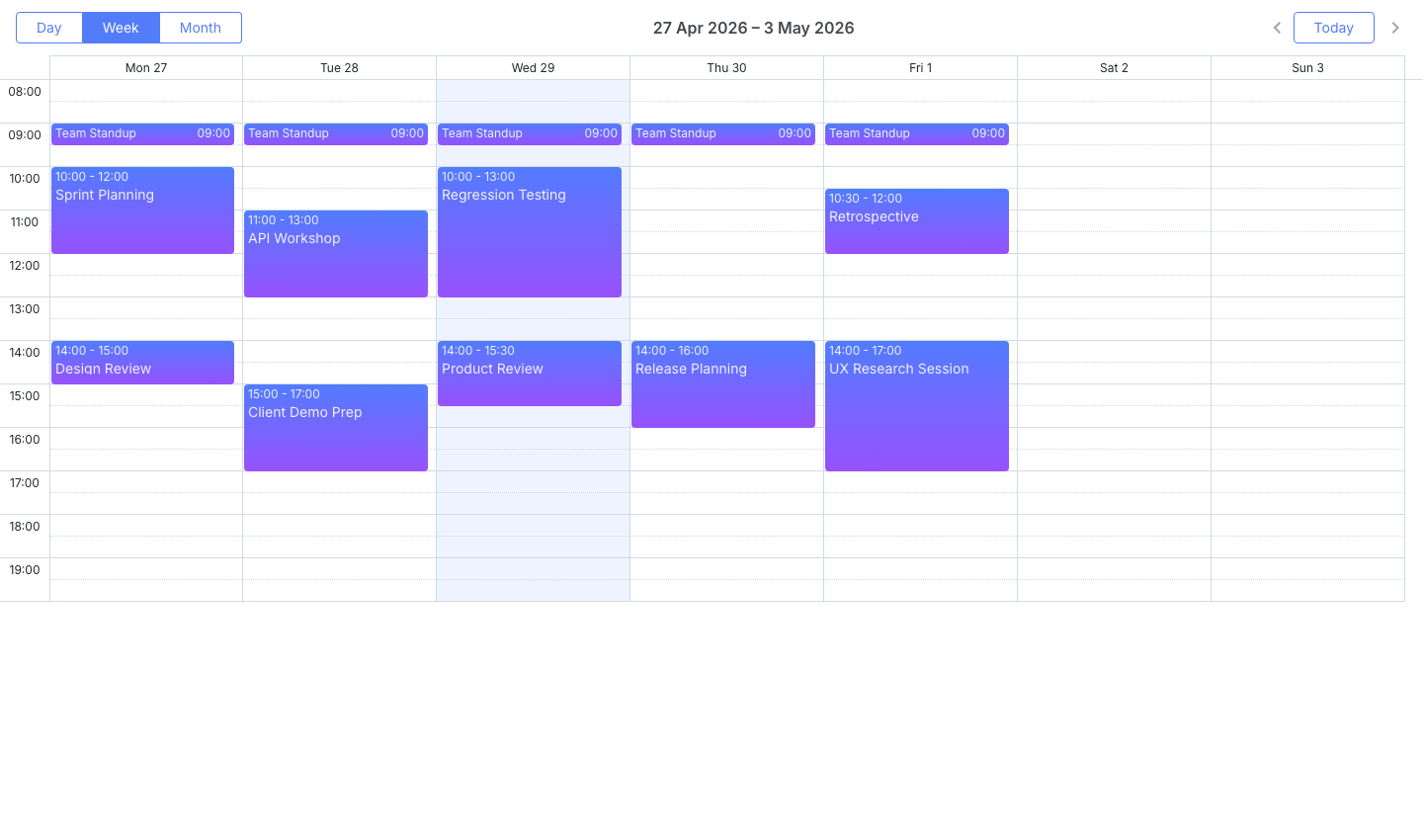
DHTMLX Scheduler resource management features
The resource management capabilities of DHTMLX Scheduler are limited compared to the other libraries in this comparison.
The Timeline view arranges flat resource rows on the Y-axis with one event per row at a time. There is no native multi-resource assignment: each event record has a single section_id property. Duplicating an event record across multiple section IDs is a common workaround, but it creates separate event objects rather than a single assignment.
Resource grouping in the Timeline view uses the second_scale option to add a secondary header that labels groups visually, but it does not create collapsible parent rows. Nesting with expand-collapse behavior requires significant custom development.
A separate ResourceHistogram extension renders a bar chart of resource load. It requires the PRO edition and must be configured separately from the timeline view.
Work calendars are supported via the scheduler_calendar extension, which can mark custom working hours and non-working days. Individual resource calendars are possible but require manual association between calendar rules and resource records.
DHTMLX provides an HTTP MCP server that exposes the Scheduler documentation for AI-assisted development.
DHTMLX Scheduler pricing
The Standard edition is free under the GPL license. PRO licenses are perpetual and range from $599 for an Individual license to $3,999 for an Enterprise license. The Timeline view and ResourceHistogram extension both require the PRO edition.
Pros of DHTMLX Scheduler
- Standard edition is free and open source under the GPL license
- Published, transparent pricing across all tiers
- DataProcessor API simplifies write-back to PHP, Java, and .NET backends
- HTTP MCP server available for AI-assisted development
Cons of DHTMLX Scheduler
- No native multi-resource assignment, so workarounds require duplicating event records
- Resource grouping does not support collapsible parent rows without custom code
- Timeline view, ResourceHistogram, and most resource management features require the PRO edition
- Global singleton architecture complicates running multiple scheduler instances on one page
Syncfusion Schedule
Syncfusion Schedule is part of the Syncfusion Essential JS 2 component suite. It uses a module injection pattern where views and features are explicitly registered before instantiation. The Community License covers all features at no cost for teams that qualify.
Getting started with Syncfusion Schedule
Install from npm:
npm install @syncfusion/ej2-schedule
Syncfusion requires several CSS imports covering peer dependency packages, and a license key must be registered before instantiation:
import '@syncfusion/ej2-base/styles/material.css';
import '@syncfusion/ej2-buttons/styles/material.css';
import '@syncfusion/ej2-calendars/styles/material.css';
import '@syncfusion/ej2-dropdowns/styles/material.css';
import '@syncfusion/ej2-inputs/styles/material.css';
import '@syncfusion/ej2-navigations/styles/material.css';
import '@syncfusion/ej2-popups/styles/material.css';
import '@syncfusion/ej2-schedule/styles/material.css';
import { registerLicense } from '@syncfusion/ej2-base';
import { Schedule, TimelineViews } from '@syncfusion/ej2-schedule';

registerLicense('YOUR_LICENSE_KEY');
Schedule.Inject(TimelineViews);

const resourceData = [
    { text : 'Alice', id : 1, groupId : 1 },
    { text : 'Bob',   id : 2, groupId : 1 },
    { text : 'Charlie', id : 3, groupId : 2 }
];

const eventData = [
    { Id : 1, Subject : 'Sprint planning', StartTime : new Date(2026, 0, 2, 10), EndTime : new Date(2026, 0, 2, 11), ResourceId : [1, 2] },
    { Id : 2, Subject : 'Design review',   StartTime : new Date(2026, 0, 4, 14), EndTime : new Date(2026, 0, 4, 16), ResourceId : 3 }
];

const schedule = new Schedule({
    height         : '550px',
    selectedDate   : new Date(2026, 0, 2),
    views          : [{ option : 'TimelineWeek' }],
    group          : { resources : ['Resources'] },
    resources      : [
        {
            field      : 'ResourceId',
            title      : 'Member',
            name       : 'Resources',
            dataSource : resourceData,
            textField  : 'text',
            idField    : 'id',
            allowMultiple : true
        }
    ],
    eventSettings  : { dataSource : eventData }
});

schedule.appendTo('#container');
Setting allowMultiple: true on the resource definition enables multi-resource assignment. Injecting TimelineViews is required before the component can render timeline views. Missing either step causes silent failures with weak error output.
Syncfusion Schedule resource management features
Syncfusion Schedule supports multi-resource assignment natively when allowMultiple: true is set on the resource definition. An event with an array in its ResourceId field renders a separate bar on each assigned resource row.
Resource grouping uses the group configuration object, which accepts a list of resource field names that define the grouping hierarchy. Rows are grouped and labeled accordingly in the timeline header, but the grouping does not produce collapsible tree rows in the same way as Bryntum or DayPilot.
There is no built-in resource utilization histogram in Syncfusion Schedule. Utilization views require custom rendering using the component's template system or a separate charting component.
Work calendars are supported via the workHours configuration, which sets global working hours for the scheduler. Per-resource calendars are not directly supported, but custom business hours can be applied to groups using the group.byDate or custom cell templates.
The DataManager class handles remote data loading and write-back, supporting a range of adaptors including REST, OData, and WebAPI. Feature modules such as DragAndDrop and Resize are injected separately from views, which keeps bundle size small but adds boilerplate.
Syncfusion Schedule pricing
The Community License is free and covers all features. Eligibility requires annual gross revenue under $1 million, five or fewer developers, and outside capital under $3 million. Commercial licensing for teams that exceed those thresholds is quote-based.
Pros of Syncfusion Schedule
- Multi-resource assignment supported natively via
allowMultiple: true - Community License provides full feature access at no cost for qualifying teams
DataManagerabstracts REST, OData, and WebAPI backends with minimal configuration- 13 built-in themes with a GUI Theme Studio for visual customization
- Framework wrappers for React, Angular, Vue, and Blazor
Cons of Syncfusion Schedule
- No built-in resource utilization histogram, so building one requires custom templates or a separate chart
- Resource grouping does not produce collapsible tree rows
- Eight CSS imports are required and missing any one breaks the layout
Schedule.Inject()must be called for every feature module before instantiation- Commercial pricing is not published
DayPilot Scheduler
DayPilot Scheduler is part of the DayPilot Pro commercial suite for scheduling and calendar views. A Lite version is available as open source. The Pro edition adds hierarchical resource grouping, multi-resource assignment, and a graphical UI Builder for configuration.
Getting started with DayPilot Scheduler
Install the Lite version from the public npm registry:
npm install @daypilot/daypilot-lite-javascript
For full resource scheduling features, use daypilot-pro-javascript, which is available after purchasing a license or starting a trial.
import { DayPilot } from '@daypilot/daypilot-lite-javascript';

const scheduler = new DayPilot.Scheduler('container', {
    startDate  : '2026-01-01',
    days       : 7,
    scale      : 'Hour',
    cellWidth  : 40,
    resources  : [
        { name : 'Development', id : 'grp-dev', expanded : true, children : [
            { name : 'Alice', id : 'R1' },
            { name : 'Bob',   id : 'R2' }
        ]},
        { name : 'Design', id : 'grp-design', expanded : true, children : [
            { name : 'Charlie', id : 'R3' }
        ]}
    ],
    events     : [
        { id : 1, text : 'Sprint planning', start : '2026-01-02T10:00:00', end : '2026-01-02T11:00:00', resource : 'R1' },
        { id : 2, text : 'Design review',   start : '2026-01-04T14:00:00', end : '2026-01-04T16:00:00', resource : 'R3' }
    ]
});
scheduler.init();
Hierarchical resource groups are defined using the children property on resource objects. The structure is readable and does not require a separate parentId reference. Calling scheduler.init() after construction is required. Skipping it leaves the component unrendered.
DayPilot Scheduler resource management features
Hierarchical resource grouping with expand-collapse behavior is supported in both the Lite and Pro editions. Resource objects nest children to any depth using the children array, and parent rows expand or collapse on user interaction.
Multi-resource assignment is a Pro-only feature. In the Lite edition, each event maps to a single resource via the resource field. Pro adds support for an array of resource IDs, which renders the event bar across multiple rows.
There is no built-in resource utilization histogram in DayPilot Scheduler. Custom row summaries can be added using the rowHeaderCellHtml callback, but building a full histogram view requires custom rendering logic.
Work hours per resource are not directly configurable as named calendar objects. Non-working time can be marked by rendering custom cell styles using the cellHtml callback, but there is no dedicated calendar or constraint model that prevents events from being placed in those intervals during drag-and-drop.
DayPilot Pro does not include a scheduling engine. Constraint enforcement and conflict detection must be implemented in application code or on the server.
The online UI Builder generates scheduler configuration code from a visual interface, which is useful during initial setup.
DayPilot Scheduler pricing
DayPilot Pro starts at $899 per developer. The Lite edition is open source under the Apache 2.0 license. A 60-day trial of the Pro edition is available on the DayPilot website.
Pros of DayPilot Scheduler
- Hierarchical resource grouping with expand-collapse is available in both Lite and Pro editions
- Resource nesting uses an intuitive
childrenarray that is easy to read and maintain - UI Builder generates starter configuration code from a visual interface
- Lite edition covers basic resource scheduling under the Apache 2.0 license
Cons of DayPilot Scheduler
- Multi-resource assignment requires the Pro edition
- No built-in resource utilization histogram
- No named work calendar model, so preventing events from landing in non-working time requires custom logic
- No scheduling engine, so constraint enforcement must be handled outside the component
Mobiscroll Event Calendar
Mobiscroll Event Calendar is a commercial, mobile-first scheduling component that is part of the Mobiscroll UI suite. It supports vanilla JavaScript, React, Angular, Vue, and Ionic. The timeline view positions resources on the Y-axis and renders event bars across assigned resource rows, making it a resource scheduler.
Getting started with Mobiscroll Event Calendar
Install from npm after creating a Mobiscroll account to access the trial:
npm install @mobiscroll/javascript
import mobiscroll from '@mobiscroll/javascript';
import '@mobiscroll/javascript/dist/css/mobiscroll.min.css';

mobiscroll.eventcalendar('#container', {
    view      : { timeline : { type : 'week' } },
    resources : [
        { id : 1, name : 'Alice' },
        { id : 2, name : 'Bob' },
        { id : 3, name : 'Charlie' }
    ],
    data      : [
        { id : 1, resource : [1, 2], title : 'Sprint planning', start : '2026-01-02T10:00:00', end : '2026-01-02T11:00:00' },
        { id : 2, resource : 3,      title : 'Design review',   start : '2026-01-04T14:00:00', end : '2026-01-04T16:00:00' }
    ]
});
Multi-resource assignment is expressed by passing an array to the resource field on an event object. A single CSS import covers the full component stylesheet, and there is no module injection step required.
Mobiscroll Event Calendar resource management features
Multi-resource assignment is supported natively. Setting the resource field to an array assigns the event to multiple resource rows. The event bar renders in each assigned row, and the assignment is stored as part of the event data object rather than in a separate assignment model.
Mobiscroll supports resource grouping through the resources option, which accepts nested objects with a children array. Parent rows collapse and expand, and the behavior is available out of the box without additional configuration.
There is no built-in resource utilization histogram. Mobiscroll does not ship a separate histogram widget, so utilization visualization requires a custom implementation using external charting libraries.
Work hours are configurable globally using the invalid option, which accepts date ranges, recurring time intervals, and specific dates that should be blocked. Per-resource invalid intervals are also supported by adding a resource field to entries in the invalid array, which makes it possible to define different unavailability rules for individual resources.
The Mobiscroll mobile-first design means the timeline view is optimized for touch interaction, with large tap targets and swipe navigation. This makes it a strong choice when a high proportion of users access the scheduler on phones or tablets.
A theme builder lets you customize the three built-in themes visually and download the resulting CSS.
Mobiscroll Event Calendar pricing
Mobiscroll Event Calendar starts at $995 per internal project as a perpetual license. A 90-day free trial is available on the Mobiscroll website.
Pros of Mobiscroll Event Calendar
- Multi-resource assignment supported natively with a simple array syntax
- Resource grouping with expand-collapse available out of the box
- Per-resource work hour restrictions supported via the
invalidarray - Single CSS import with no peer-dependency stylesheets required
- Mobile-first design with touch-optimized interactions
- Theme builder for visual customization
Cons of Mobiscroll Event Calendar
- No built-in resource utilization histogram
- SaaS and multi-customer product pricing requires a custom quote
- Event assignments are stored on the event object rather than in a separate assignment model, which complicates scenarios where the same event appears in multiple resource contexts with different metadata
Conclusion
The table below compares the five libraries against the resource management capabilities described in the introduction, plus a few general-purpose features that affect production deployments:
| Feature | Bryntum | DHTMLX | Syncfusion | DayPilot | Mobiscroll |
|---|---|---|---|---|---|
| Multi-resource assignment | Yes | No | Yes | Pro only | Yes |
| Resource grouping / nesting | Yes | Partial | Partial | Yes | Yes |
| Resource utilization view | Yes (histogram widget) | Yes (PRO) | No | No | No |
| Resource filtering | Yes | Yes | Yes | Yes | Yes |
| Work calendars per resource | Yes | Yes (PRO) | Partial | No | Yes |
| Virtual scrolling | Yes | Yes | Yes | No | Yes |
| Free tier | No | Yes (GPL) | Yes (Community) | Yes (Lite) | No |
The table below maps specific use cases to the best-fit library:
| Use case | Best fit | Reason |
|---|---|---|
| Enterprise resource management with utilization tracking | Bryntum Scheduler | Only library with a built-in histogram widget. AssignmentStore model handles complex assignment data |
| Budget-constrained project with basic resource rows | DHTMLX Standard or DayPilot Lite | Both are free for open-source projects. DayPilot Lite supports hierarchical grouping out of the box |
| Qualifying startup needing full features at no cost | Syncfusion Schedule | Community License covers all features including multi-resource assignment |
| Mobile-heavy application with multi-resource needs | Mobiscroll Event Calendar | Mobile-first design with native multi-resource support and per-resource invalid intervals |
Bryntum Scheduler has the most complete resource management feature set of the five. The combination of a dedicated AssignmentStore, the ResourceUtilization histogram widget, per-resource work calendars, and virtual scrolling addresses the full range of resource scheduling scenarios without requiring custom development for the core use cases. The MCP server and Claude Code skill also reduce the time spent resolving configuration issues during development.
For teams that qualify for the Syncfusion Community License, Syncfusion Schedule is the strongest free option. Multi-resource assignment works natively, the DataManager handles backend integration, and the full feature set is available without cost. The absence of a built-in utilization histogram is the most significant gap relative to Bryntum.
DHTMLX Standard and DayPilot Lite are the right choices when budget constraints are the primary concern and the application does not require multi-resource assignment or utilization views. DayPilot Lite has cleaner hierarchical grouping syntax. DHTMLX Standard has the more complete general feature set and the DataProcessor API for backend integration. Mobiscroll Event Calendar is the best option when mobile usability is a primary requirement and multi-resource assignment must work out of the box.