Best React Gantt chart libraries

Choosing the right Gantt chart library for a React application depends on the scheduling features the product needs, how the library integrates with React's component model, and what the license costs at team scale. This comparison covers five libraries: Bryntum Gantt, DHTMLX Gantt, Syncfusion Gantt, DayPilot Gantt, and gantt-task-react.
The libraries range from a free MIT-licensed component suited to simple project timelines to full-featured enterprise schedulers with auto-scheduling engines, resource management, and client-side export. Four of the five provide a React-specific wrapper package. DHTMLX Gantt is a vanilla JavaScript library that must be initialized manually inside a React component using a container ref. For a broader comparison that also covers non-React contexts, see our guide to the best JavaScript Gantt chart libraries.
Bryntum Gantt
Bryntum Gantt is a commercial Gantt chart built on vanilla JavaScript with a React wrapper available as a separate package. It is backed by the ChronoGraph reactive scheduling engine, which recalculates dependent task dates automatically. You can explore the full range of capabilities in the Bryntum Gantt demos.
Getting started with Bryntum Gantt
Install the trial package from the public npm registry along with the React wrapper:
npm install @bryntum/gantt@npm:@bryntum/gantt-trial@7.3.0
npm install @bryntum/gantt-react@7.3.0
CSS imports must appear in this specific order. The FontAwesome stylesheets must come first because the Gantt's toolbar icons depend on them. The core gantt.css file follows, and the theme file comes last so its variables override the defaults correctly:
import '@bryntum/gantt/fontawesome/css/fontawesome.css';
import '@bryntum/gantt/fontawesome/css/solid.css';
import '@bryntum/gantt/gantt.css';
import '@bryntum/gantt/svalbard-light.css';
The BryntumGantt component accepts a ref for accessing the underlying Gantt instance and spreads a config object as props. Pass all data through the project prop. Never mix the project prop with inline data props (tasks, dependencies, resources) directly on BryntumGantt, as using both simultaneously throws a runtime error:
import { BryntumGantt } from '@bryntum/gantt-react';
import { useRef, useState } from 'react';

const App = () => {
    const ganttRef = useRef();
    const [ganttConfig] = useState({
        columns : [
            { type : 'name',        width : 250 },
            { type : 'duration',    width : 80  },
            { type : 'percentdone', width : 60  }
        ],
        project : {
          startDate : '2025-01-14',
          tasks : [
              {
                  id : 1000, name : 'Launch SaaS Product', expanded : true, percentDone : 35.7,
                  children : [
                      { id : 11, name : 'Install Apache',      startDate : '2025-01-14', duration : 3, percentDone : 50 },
                      { id : 12, name : 'Configure firewall', startDate : '2025-01-14', duration : 3, percentDone : 50 },
                      { id : 15, name : 'Run tests',          startDate : '2025-01-21', duration : 2, percentDone : 0 }
                  ]
              }
          ],
          dependencies : [
              { fromTask : 11, toTask : 15, lag : 2 },
              { fromTask : 12, toTask : 15 }
          ]
        }
    });

    return <BryntumGantt ref={ganttRef} {...ganttConfig} />;
};
For server-backed data, configure a CrudManager in the project prop. The CrudManager handles loading and syncing through a JSON protocol, so you do not need to write manual fetch logic:
project : {
    loadUrl  : '/api/load',
    syncUrl  : '/api/sync',
    autoLoad : true,
    autoSync : true
}
Bryntum ships 10 themes across five light/dark pairs: svalbard-light, svalbard-dark, stockholm-light, stockholm-dark, visby-light, visby-dark, material3-light, material3-dark, fluent2-light, and fluent2-dark. To switch themes, replace the theme CSS import.
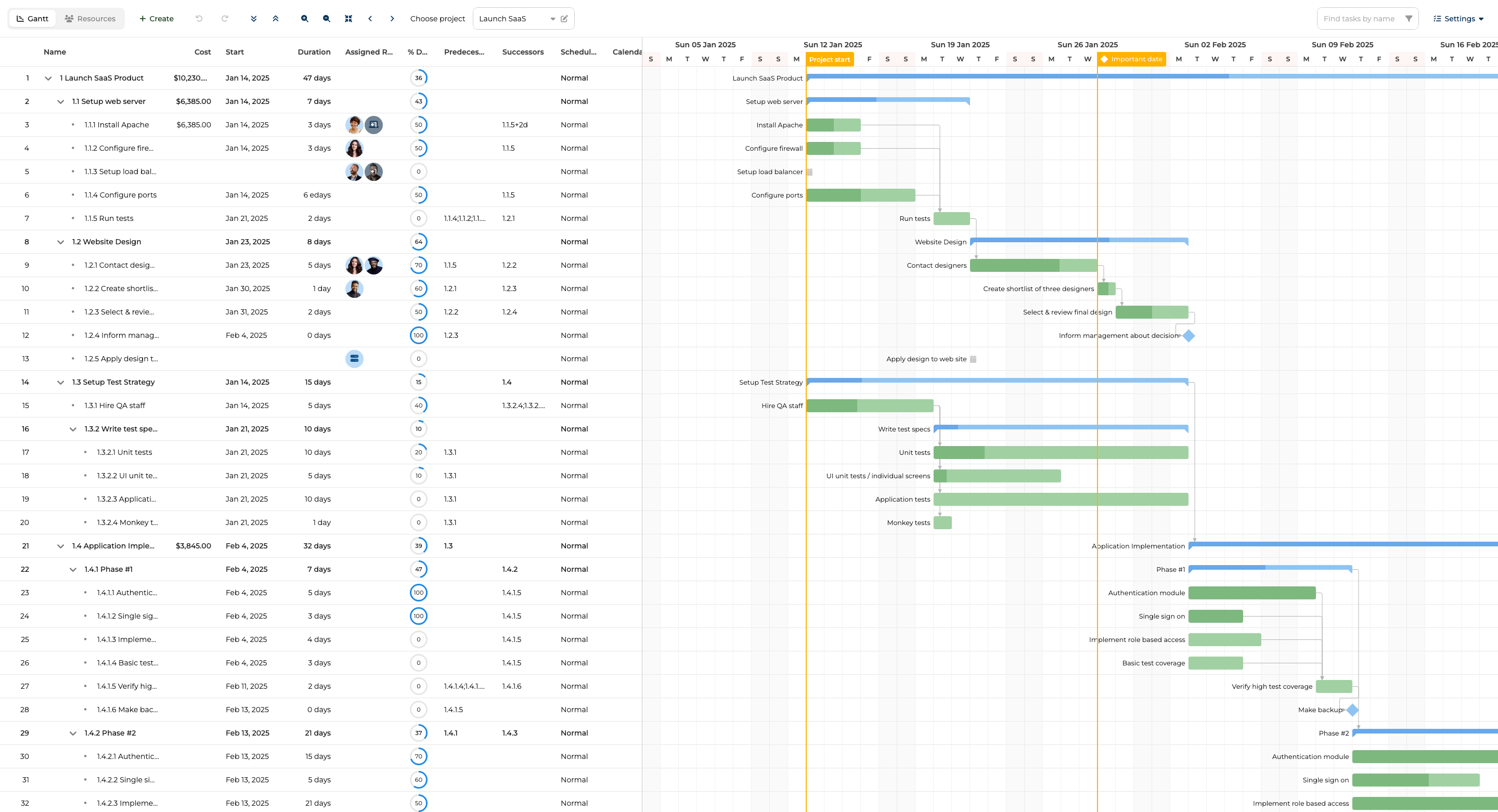
Bryntum Gantt features
- Auto-scheduling with the ChronoGraph reactive engine: task dates recalculate when predecessors or constraints change
- Critical path visualization
- Resource management and baselines
- Split tasks and undo/redo
- Client-side export to PDF, PNG, Excel, ICS, and MS Project XML with no server required
- MS Project and Primavera P6 import via MPXJ
- 10 themes across five light/dark pairs
- 45 built-in locales
- React, Angular, Vue, and plain JavaScript wrappers
- HTTP MCP server at mcp.bryntum.com for AI-assisted development
- Claude Code skill for common setup mistakes
Bryntum Gantt pricing
Bryntum Gantt is sold on a per-developer basis, starting at $940 per developer. The license is perpetual and includes 12 months of updates. OEM and SaaS usage requires a separate quote. A free 45-day trial is available at bryntum.com/download/?product=gantt.
Pros of Bryntum Gantt
- Comprehensive scheduling engine (ChronoGraph) with automatic dependency propagation
- Client-side export to PDF, Excel, and MS Project XML without a server-side component
- All features included in the base license, with no feature-gated tiers
- 10 themes covering both light and dark variants
- HTTP MCP server and Claude Code skill for AI-assisted development
- Extensive documentation, demos, and forum support
Cons of Bryntum Gantt
There is no free tier beyond the 45-day trial. The per-developer entry cost is higher than some alternatives, which may be a consideration for small teams or individual developers evaluating options.
DHTMLX Gantt
DHTMLX Gantt is a JavaScript Gantt library with no official React wrapper. In a React project, you initialize it imperatively inside a useEffect hook using a container ref.
Getting started with DHTMLX Gantt
Install the package from the public npm registry:
npm install dhtmlx-gantt@9.1.4
Because DHTMLX Gantt uses a global singleton, initialization requires a specific sequence: gantt.init() must be called before gantt.parse(). Reversing this order leaves the chart without a DOM target and produces a silent failure. The clearAll() call in the cleanup function prevents data from persisting across React strict-mode remounts:
import { useEffect, useRef } from 'react';
import { gantt } from 'dhtmlx-gantt';
import 'dhtmlx-gantt/codebase/dhtmlxgantt.css';

const DHtmlxGanttChart = ({ tasks, links }) => {
    const containerRef = useRef(null);

    useEffect(() => {
        gantt.config.date_format = '%Y-%m-%d';
        gantt.init(containerRef.current);
        gantt.parse({ data: tasks, links });
        return () => gantt.clearAll();
    }, []);

    return <div ref={containerRef} style={{ width : '100%', height : '500px' }} />;
};
The global singleton pattern also means that rendering multiple DHTMLX Gantt instances on the same page requires the Commercial license or higher.
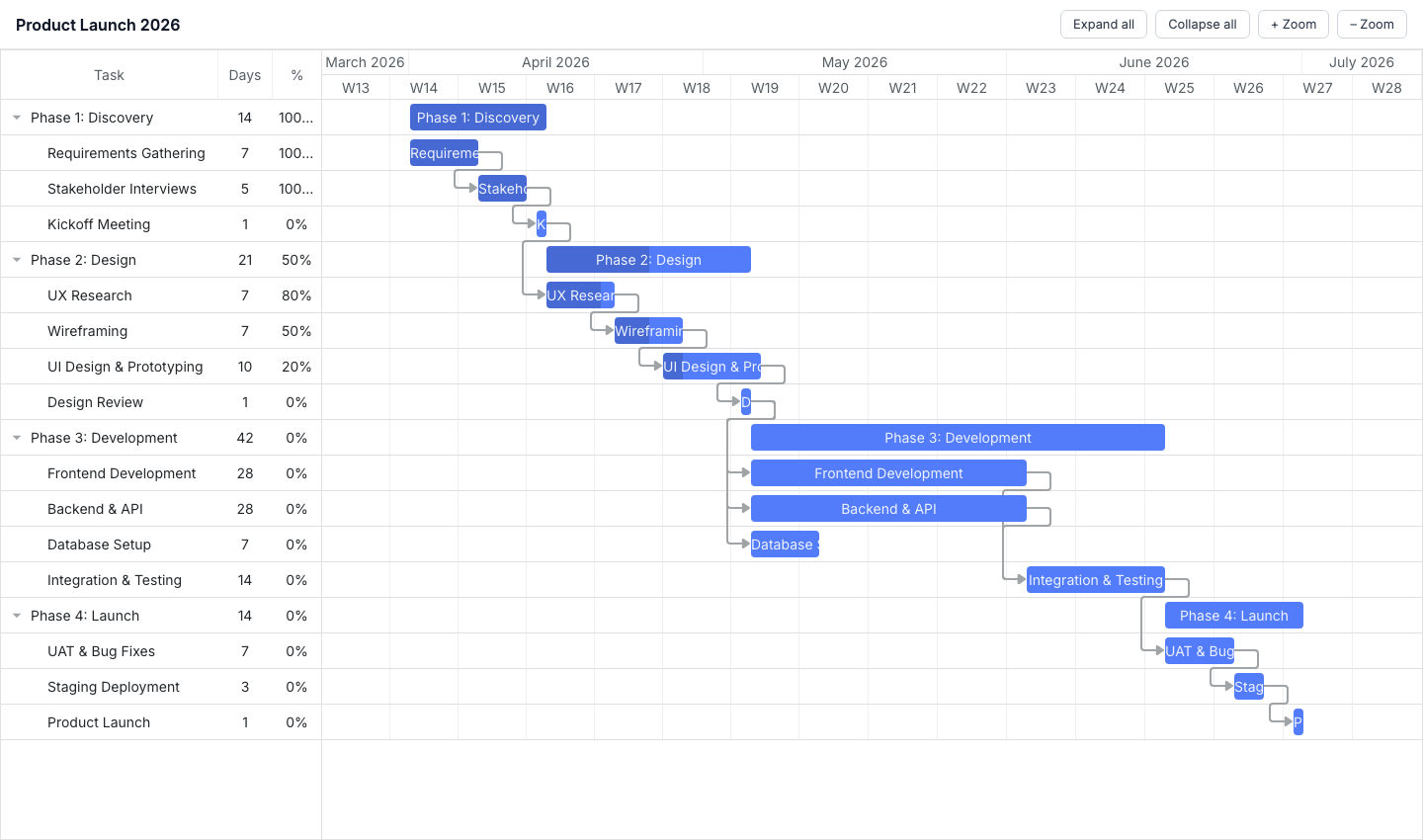
DHTMLX Gantt features
- Drag-and-drop task editing
- Dependency links
- Zoom levels
- Task trees and subtasks
- Auto-scheduling, critical path, resource management, baselines, and split tasks (Pro license required)
DHTMLX Gantt pricing
DHTMLX Gantt Standard is available under the GPL license at no cost for open-source projects. Commercial licenses are perpetual: Individual at $699, Commercial at $1,399, Enterprise at $2,999, and Ultimate at $5,999.
Pros of DHTMLX Gantt
- GPL Standard edition is free for open-source projects
- Published, tiered pricing
- Available on the public npm registry
- HTTP MCP server available for AI-assisted development
Cons of DHTMLX Gantt
There is no official React wrapper, so you must manage the global singleton lifecycle manually inside useEffect, including cleanup to avoid issues with React strict mode. Auto-scheduling, critical path visualization, resource management, baselines, and split tasks are locked behind the Pro upgrade and are not available in the Standard edition.
Syncfusion Gantt
Syncfusion Gantt is a full-featured Gantt component with a native React package, @syncfusion/ej2-react-gantt.
Getting started with Syncfusion Gantt
Install the React package:
npm install @syncfusion/ej2-react-gantt@33.2.4
The Syncfusion component system is modular, so the Gantt's CSS depends on several sibling packages. All of the following imports are required. Omitting any one of them results in missing styles for buttons, dropdowns, popups, or the grid panel:
import { registerLicense } from '@syncfusion/ej2-base';
import { GanttComponent, Inject, Edit, Selection, Toolbar } from '@syncfusion/ej2-react-gantt';
import '@syncfusion/ej2-base/styles/material.css';
import '@syncfusion/ej2-buttons/styles/material.css';
import '@syncfusion/ej2-calendars/styles/material.css';
import '@syncfusion/ej2-dropdowns/styles/material.css';
import '@syncfusion/ej2-inputs/styles/material.css';
import '@syncfusion/ej2-navigations/styles/material.css';
import '@syncfusion/ej2-popups/styles/material.css';
import '@syncfusion/ej2-richtexteditor/styles/material.css';
import '@syncfusion/ej2-treegrid/styles/material.css';
import '@syncfusion/ej2-grids/styles/material.css';
import '@syncfusion/ej2-gantt/styles/material.css';
registerLicense() must be called before any Syncfusion component mounts. Placing it at the top of your entry file is the safest approach. The taskFields mapping connects your data model to the Gantt's internal field names:
registerLicense('your-license-key-here');

const taskFields = {
    id         : 'TaskID',
    name       : 'TaskName',
    startDate  : 'StartDate',
    duration   : 'Duration',
    progress   : 'Progress',
    dependency : 'Predecessor',
    child      : 'subtasks'
};

const data = [
    {
        TaskID : 1, TaskName : 'Phase 1',
        subtasks : [
            { TaskID : 2, TaskName : 'Requirements', StartDate : new Date('2026-01-01'), Duration : 5, Progress : 100 },
            { TaskID : 3, TaskName : 'Design',       StartDate : new Date('2026-01-08'), Duration : 8, Progress : 20, Predecessor : '2' }
        ]
    }
];

const App = () => (
    <GanttComponent dataSource={data} taskFields={taskFields} height="100%">
        <Inject services={[Edit, Selection, Toolbar]} />
    </GanttComponent>
);
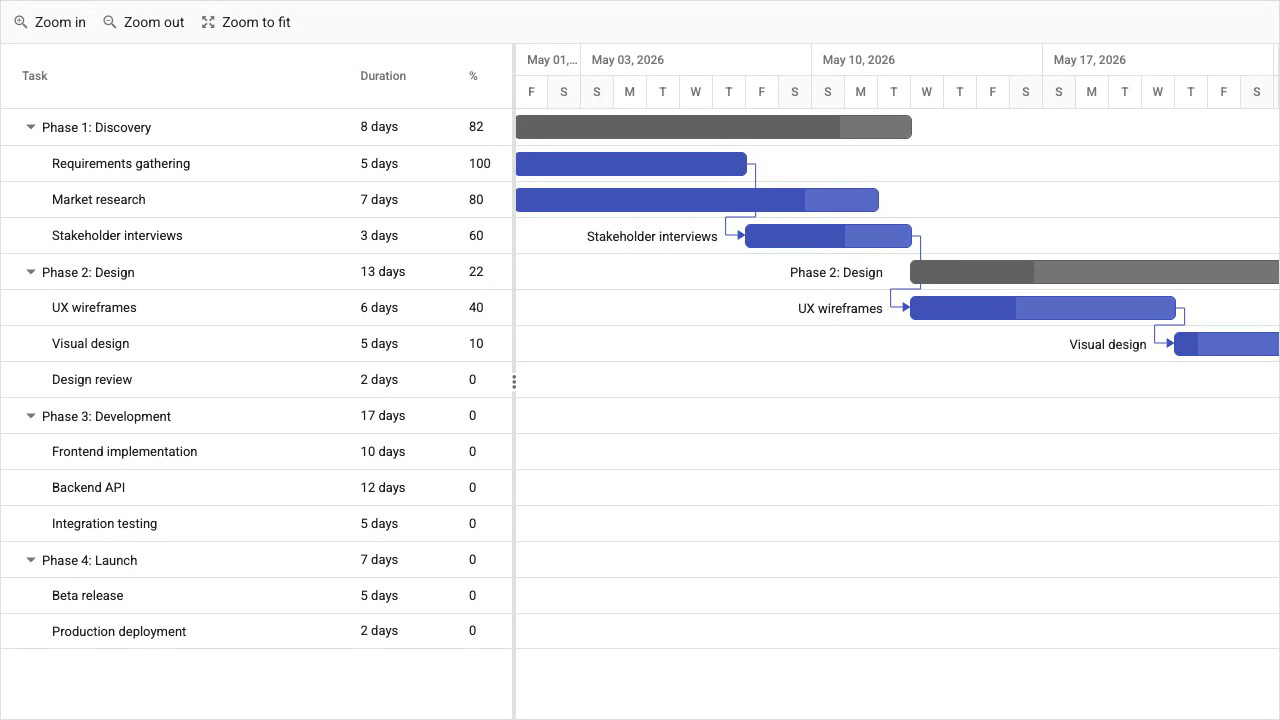
Syncfusion Gantt features
- Auto-scheduling
- Critical path visualization
- Baselines and split tasks
- Resource management
- Undo/redo
- Client-side export to PDF, Excel, and CSV
- React, Angular, Vue, and Blazor wrappers
- TypeScript support
Syncfusion Gantt pricing
Syncfusion offers a Community License at no cost for teams with under $1M in annual revenue, five or fewer developers, and ten or fewer employees. Commercial pricing is not published and requires a quote from Syncfusion sales.
Pros of Syncfusion Gantt
- Community License covers all features at no cost for qualifying teams
- Native React component via
@syncfusion/ej2-react-gantt - Comprehensive feature set including auto-scheduling, critical path, and export
Cons of Syncfusion Gantt
CSS setup requires importing stylesheets for all dependency packages, which adds boilerplate compared to single-file approaches. The available MCP servers are stdio-based only and require API key configuration. Commercial pricing is not published, so teams that exceed the Community License thresholds cannot evaluate cost without contacting sales.
DayPilot Gantt
DayPilot Pro for JavaScript includes a Gantt chart component with a React package. The library is aimed at calendar and scheduling use cases, and the Gantt is one component within a broader scheduling suite.
Getting started with DayPilot Gantt
The daypilot-pro-react package requires a DayPilot Pro license and access to their npm registry:
npm install daypilot-pro-react
Configuration is passed as props, and task and link data are provided inline in the config object. Event listeners such as onTaskMove and onTaskResize allow you to respond to user interactions and persist changes to your backend:
import { DayPilotGantt } from 'daypilot-pro-react';
import { useState } from 'react';

const App = () => {
    const [config] = useState({
        startDate  : '2026-01-01',
        days       : 30,
        tasks      : [
            { id : '1', start : '2026-01-01', end : '2026-01-15', text : 'Phase 1', completion : 50 },
            { id : '2', start : '2026-01-08', end : '2026-01-20', text : 'Design',  completion : 20 }
        ],
        links : [
            { from : '1', to : '2' }
        ]
    });

    return <DayPilotGantt {...config} />;
};
DayPilot Gantt features
- Dependency links
- Drag-and-drop task editing
- Task resizing
- Task completion bars
- Row creation
- Event listeners for move and resize (
onTaskMove,onTaskResize) - UI Builder configurator for visual configuration
- 60-day free trial
DayPilot Gantt pricing
DayPilot Pro starts at $649 per developer for a perpetual license. Maintenance periods of six or 12 months are available. Internal and SaaS applications are priced separately.
Pros of DayPilot Gantt
- UI Builder configurator lets you visually configure the component and copy the generated code
- Native React component
- 60-day free trial
Cons of DayPilot Gantt
DayPilot Gantt is less feature-rich than Bryntum or Syncfusion, with no auto-scheduling engine and no resource management panel in the Gantt component. The community and ecosystem around the library are smaller than those of the other options in this list.
gantt-task-react
gantt-task-react is a free, MIT-licensed React Gantt library for rendering project timelines. It covers common visualization needs without requiring a license or any authentication.
Getting started with gantt-task-react
Install from the public npm registry:
npm install gantt-task-react
Data is passed as a typed Task array, and the viewMode prop controls the time scale. The onDateChange and onProgressChange callbacks give you hooks to persist user edits:
import { Gantt, Task, ViewMode } from 'gantt-task-react';
import 'gantt-task-react/dist/index.css';

const tasks: Task[] = [
    {
        start        : new Date(2026, 0, 1),
        end          : new Date(2026, 0, 15),
        name         : 'Phase 1',
        id           : 'task-1',
        type         : 'project',
        progress     : 45,
        isDisabled   : false,
        hideChildren : false
    },
    {
        start    : new Date(2026, 0, 1),
        end      : new Date(2026, 0, 8),
        name     : 'Requirements',
        id       : 'task-2',
        type     : 'task',
        progress : 100,
        project  : 'task-1'
    }
];

const App = () => (
    <Gantt
        tasks={tasks}
        viewMode={ViewMode.Week}
        onDateChange={(task, children) => console.log(task, children)}
        onProgressChange={(task, progress) => console.log(task, progress)}
    />
);
gantt-task-react features
- Task grouping and progress bars
- Drag to resize and drag to move
- Dependency arrows
- Multiple view modes: hour, quarter day, half day, day, week, and month
- TypeScript types included
- MIT license
gantt-task-react pricing
Free under the MIT license. No trial period or registration required.
Pros of gantt-task-react
- Free and open source with no license required
- Zero setup friction: install and render
- TypeScript types bundled in the package
- Good fit for simple project timelines and read-mostly dashboards
Cons of gantt-task-react
There is no scheduling engine, no critical path analysis, no resource management, and no export functionality. Theming options are limited. This library is not suitable for enterprise project management tools that require scheduling logic or multi-resource coordination.
Feature comparison
The table below summarizes the main differences between the React Gantt libraries.
| Feature | Bryntum Gantt | DHTMLX Gantt | Syncfusion Gantt | DayPilot Gantt | gantt-task-react |
|---|---|---|---|---|---|
| Auto-scheduling | Yes | Pro only | Yes | No | No |
| Critical path | Yes | Pro only | Yes | No | No |
| Resource management | Yes | Pro only | Yes | No | No |
| Baselines | Yes | Pro only | Yes | No | No |
| Split tasks | Yes | Pro only | Yes | No | No |
| Export (client-side) | Yes | No | Yes | No | No |
| React wrapper | Yes | No (manual) | Yes | Yes | Yes (native) |
| TypeScript | Yes | Yes | Yes | Yes | Yes |
| Open-source / free tier | No | GPL Standard | Community License | No | MIT |
| MCP server | Yes (HTTP) | Yes (HTTP) | Stdio only | No | No |
Use-case recommendations
The table below maps common React Gantt requirements to the best-fit library.
| Use case | Best choice |
|---|---|
| Enterprise project management with a scheduling engine | Bryntum Gantt |
| Full-featured Gantt with a free Community License | Syncfusion Gantt |
| Open-source or GPL project | DHTMLX Gantt Standard |
| Simple project timeline at zero cost | gantt-task-react |
For teams building enterprise project management applications, Bryntum Gantt is the best fit in this list. The ChronoGraph scheduling engine, client-side export, comprehensive React wrapper, and HTTP MCP server for AI-assisted development combine into a single base license with no feature gating. The per-developer cost is higher than some alternatives, but the breadth of what ships in the standard package supports the premium for production applications.
Teams that qualify for Syncfusion's Community License (under $1M revenue, five or fewer developers, ten or fewer employees) get access to the full Syncfusion feature set at no cost. This makes Syncfusion a compelling choice for small teams with comprehensive feature requirements who fall within the eligibility criteria.
DHTMLX Gantt Standard is the natural choice for open-source projects, since the GPL license costs nothing and the published pricing tiers make commercial upgrade paths predictable. For the simplest case, a read-mostly project timeline in a React app that does not require scheduling logic or resource management, gantt-task-react removes all licensing friction and gets a chart on screen with minimal configuration.