Bryntum Calendar vs FullCalendar

If you're choosing between Bryntum Calendar and FullCalendar, you're deciding whether your application needs a standard event calendar or a calendar with resource scheduling, Excel and ICS export, and undo/redo built in. FullCalendar covers standard calendar views under an MIT-licensed core. Bryntum Calendar includes resource views, Excel and ICS export, and AI support in a commercial package.
Start with these questions:
- Does the application need resource scheduling?
- Does the team need export, localization, and undo and redo in the calendar component?
- Does the team use AI coding agents that need documentation tooling?
This comparison uses these criteria:
- Installation and setup
- Licensing and cost
- Calendar views
- Resource scheduling
- Export support
- Framework and TypeScript support
- AI support
Bryntum Calendar vs FullCalendar: licensing model and feature set
The table below covers the criteria most relevant to a production integration decision.
| Feature | Bryntum Calendar | FullCalendar |
|---|---|---|
| License | Commercial (perpetual) | MIT (core) / Annual subscription (Premium) |
| Free tier | Trial only | MIT (no watermark) |
| View types | 11 | Standard plugin families + Premium resource views |
| Day / Week / Month views | ✔️ | ✔️ (Standard) |
| Resource scheduling | ✔️ | Premium only |
| Export (PDF / Excel / ICS) | ✔️ (client-side) | ❌ |
| Built-in localization | 45 locales | 50+ locales |
| Drag-and-drop | ✔️ | ✔️ (via @fullcalendar/interaction) |
| Undo / redo | ✔️ | ❌ |
| Multiple instances per page | ✔️ | ✔️ |
| React / Angular / Vue wrappers | ✔️ | ✔️ |
| TypeScript | ✔️ | ✔️ |
| MCP server | ✔️ | ❌ |
| Claude Code skill | ✔️ | ❌ |
| Built-in AI assistant | Experimental feature | ❌ |
Bryntum Calendar
Bryntum Calendar is a commercial JavaScript calendar component with 11 view types. Standard views cover day, week, month, year, agenda, list, and multi-day. Resource views cover resource day, resource week, resource month, and scheduler resource. Resources (people, rooms, and equipment) appear as color-coded lanes in the resource views, and the same resource data populates filters in a configurable sidebar. The component sits on Bryntum Grid, so sorting, filtering, and grouping carry over without extra configuration.
Installing Bryntum Calendar
The trial package is available on the public npm registry without authentication:
npm install @bryntum/calendar@npm:@bryntum/calendar-trial@7.2.4
This minimal team calendar shows five team members across a work week. The container sets min-height: 100vh to fill the viewport:
<!-- index.html -->
<style>
  html, body { margin: 0; padding: 0; }
  #app { padding: 1rem; background: #f8f9fa; min-height: 100vh; }
</style>
<div id="app"></div>
import '@bryntum/calendar/fontawesome/css/fontawesome.css';
import '@bryntum/calendar/fontawesome/css/solid.css';
import '@bryntum/calendar/calendar.css';
import '@bryntum/calendar/svalbard-light.css';
import { Calendar } from '@bryntum/calendar';

new Calendar({
  appendTo : 'app',
  date     : '2025-10-12',
  height   : 700,
  mode     : 'week',

  modes : {
    week  : { showAllDayHeader : true },
    month : true,
    day   : true
  },

  resources : [
    { id : 'bryntum', name : 'Bryntum team',     eventColor : 'blue' },
    { id : 'hotel',   name : 'Hotel Park',       eventColor : 'orange' },
    { id : 'michael', name : 'Michael Johnson', eventColor : 'deep-orange' }
  ],

  events : [
    { id : 1, name : 'Hackathon 2025',                       startDate : '2025-10-11T14:00:00', endDate : '2025-10-18T12:00:00', allDay : true, resourceId : 'bryntum', eventColor : 'green' },
    { id : 2, name : 'Breakfast',                            startDate : '2025-10-12T09:00:00', endDate : '2025-10-12T10:00:00', resourceId : 'hotel' },
    { id : 3, name : 'Team Scrum',                           startDate : '2025-10-12T10:00:00', endDate : '2025-10-12T12:00:00', resourceId : 'bryntum' },
    { id : 4, name : 'Scheduler Grid introduction + review', startDate : '2025-10-12T12:00:00', endDate : '2025-10-12T14:00:00', resourceId : 'bryntum' }
  ]
});
Three CSS imports are required in order: FontAwesome icons, the structural calendar.css, and a theme file. Bryntum ships ten themes across five light/dark pairs, all switchable at runtime via DomHelper.setTheme().
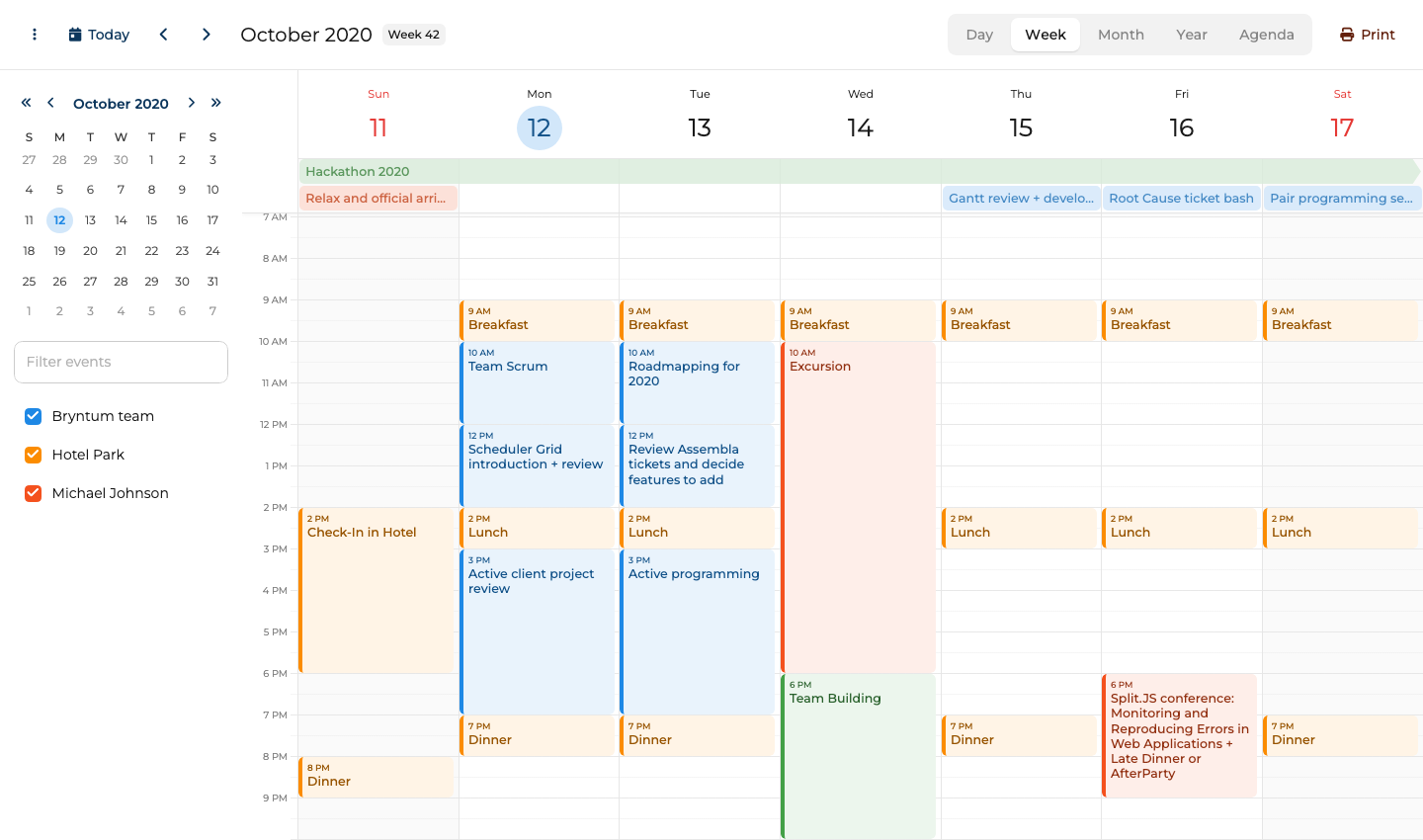
Resource scheduling, export, and undo/redo in the base license
The 11 view types include resource scheduling without a paid add-on. The base license also includes:
- Recurring events and all-day events
- Drag-and-drop across views
- Undo/redo
- Client-side export to Excel, ICS, and print
The built-in localization covers 45 languages. The theming system is consistent across the Bryntum product suite (Gantt, Scheduler, Grid, Task Board), so mixing components on the same page requires no visual reconciliation.
Bryntum Calendar: bundle size, trial watermark, and API surface
The trial watermark persists during evaluation, which complicates early stakeholder demos. The uncompressed bundle exceeds 4 MB. Applications where initial load time is critical should measure this impact early. The API surface (Calendar, ResourceStore, EventStore, and the view configuration layer) takes time to learn relative to a lighter alternative.
Bryntum Calendar pricing: perpetual license from $680 per developer
Per-developer licensing starts at $680 for a small team, with a $600-per-developer rate at volume. OEM licensing for SaaS applications requires a separate quote. All licenses are perpetual and include 12 months of updates.
TypeScript, live code examples, and React/Angular/Vue wrappers
TypeScript type definitions ship with the package. Documentation at bryntum.com includes live code examples with an in-browser editor covering all 11 view types.
Framework wrappers for React (@bryntum/calendar-react), Angular, and Vue 3 are published on the same version cycle as the core.
For runtime theme switching, load theme files with <link> tags marked for Bryntum theme detection and call DomHelper.setTheme(). Static themes can still be bundled in the normal build. Locale files for all 45 languages ship with the package. Activating a locale requires importing the relevant locale file.
Coding agent support: MCP server, Claude Code skill, and AI assistant
Bryntum ships two complementary AI tools: the MCP server handles documentation retrieval, and the Claude Code skill adds judgment about common coding mistakes.
The MCP server (mcp.bryntum.com) exposes a search_bryntum_docs tool that returns version-specific documentation, source code examples, and API references for Calendar and the rest of the Bryntum suite. The command to register it in Claude Code:
claude mcp add --transport http bryntum https://mcp.bryntum.com
The Claude Code skill guides agents through mistakes that documentation retrieval alone misses: CSS import order, view configuration structure, and the correct dark mode pattern via DomHelper.setTheme(). An agent with both the MCP server and the skill produces working Calendar code with fewer correction cycles.
Bryntum also ships an experimental, disabled-by-default AI chat panel for Calendar that connects to Anthropic, OpenAI, or Google models. End users give natural language instructions such as "move the team standup to 10 AM every day this week" without touching the interface directly. This combination of structured retrieval, agent-level judgment, and end-user AI is unusual among JavaScript calendar libraries.
Use Bryntum Calendar when scheduling features need to be built in
Bryntum Calendar is the right call when resource scheduling, export, localization, or undo/redo are production requirements. The full AI tooling stack makes it a better fit for teams building complex scheduling interfaces or using AI coding agents.
FullCalendar
FullCalendar is a JavaScript calendar library with an MIT-licensed core. The standard plugin set covers DayGrid, TimeGrid, List, and Multi-Month views. Drag-and-drop editing is free via the @fullcalendar/interaction plugin. Resource scheduling, the views that show events by person, room, or resource, sits behind the Premium license, which is an annual subscription.
Bryntum Calendar makes resource scheduling a product feature, while FullCalendar makes it a Premium path on top of the standard calendar core.
FullCalendar's architecture is plugin-based: each view type and feature is a separate importable package. The core package is empty without plugins.
Installing FullCalendar
The standard packages are available on the public npm registry under the MIT license:
npm install @fullcalendar/core@6.1.20 @fullcalendar/daygrid@6.1.20 @fullcalendar/timegrid@6.1.20 @fullcalendar/list@6.1.20 @fullcalendar/interaction@6.1.20
The following shows a team calendar week view with events spanning April 26 to May 1:
<!-- index.html -->
<style>
  html, body { margin: 0; padding: 0; height: 100%; font-family: Arial, sans-serif; }
  #app { padding: 16px; height: 100vh; box-sizing: border-box; }
  #calendar { height: calc(100vh - 32px); }
</style>
<div id="app">
  <div id="calendar"></div>
</div>
import { Calendar } from '@fullcalendar/core';
import dayGridPlugin    from '@fullcalendar/daygrid';
import timeGridPlugin   from '@fullcalendar/timegrid';
import listPlugin       from '@fullcalendar/list';
import interactionPlugin from '@fullcalendar/interaction';

const calendarEl = document.getElementById('calendar');

const calendar = new Calendar(calendarEl, {
  plugins : [dayGridPlugin, timeGridPlugin, listPlugin, interactionPlugin],

  initialView  : 'timeGridWeek',
  initialDate  : '2026-04-28',
  height       : '100%',

  headerToolbar : {
    left   : 'prev,next today',
    center : 'title',
    right  : 'dayGridMonth,timeGridWeek,timeGridDay,listWeek'
  },

  slotMinTime : '08:00:00',
  slotMaxTime : '20:00:00',

  events : [
    { id : '1',  title : 'Team Standup',       start : '2026-04-27T09:00', end : '2026-04-27T09:30' },
    { id : '2',  title : 'Sprint Planning',     start : '2026-04-27T10:00', end : '2026-04-27T12:00' },
    { id : '3',  title : 'Design Review',       start : '2026-04-27T14:00', end : '2026-04-27T15:00' },
    { id : '4',  title : 'Team Standup',        start : '2026-04-28T09:00', end : '2026-04-28T09:30' },
    { id : '5',  title : 'API Workshop',        start : '2026-04-28T11:00', end : '2026-04-28T13:00' },
    { id : '6',  title : 'Client Demo Prep',    start : '2026-04-28T15:00', end : '2026-04-28T17:00' },
    { id : '7',  title : 'Team Standup',        start : '2026-04-29T09:00', end : '2026-04-29T09:30' },
    { id : '8',  title : 'Regression Testing',  start : '2026-04-29T10:00', end : '2026-04-29T13:00' },
    { id : '9',  title : 'Product Review',      start : '2026-04-29T14:00', end : '2026-04-29T15:30' },
    { id : '10', title : 'Team Standup',        start : '2026-04-30T09:00', end : '2026-04-30T09:30' },
    { id : '11', title : 'Release Planning',    start : '2026-04-30T14:00', end : '2026-04-30T16:00' },
    { id : '12', title : 'Team Standup',        start : '2026-05-01T09:00', end : '2026-05-01T09:30' },
    { id : '13', title : 'Retrospective',       start : '2026-05-01T10:30', end : '2026-05-01T12:00' },
    { id : '14', title : 'UX Research Session', start : '2026-05-01T14:00', end : '2026-05-01T17:00' }
  ],

  editable : true
});

calendar.render();
The slotMinTime and slotMaxTime properties restrict the visible time range in the timeGridWeek and timeGridDay views.
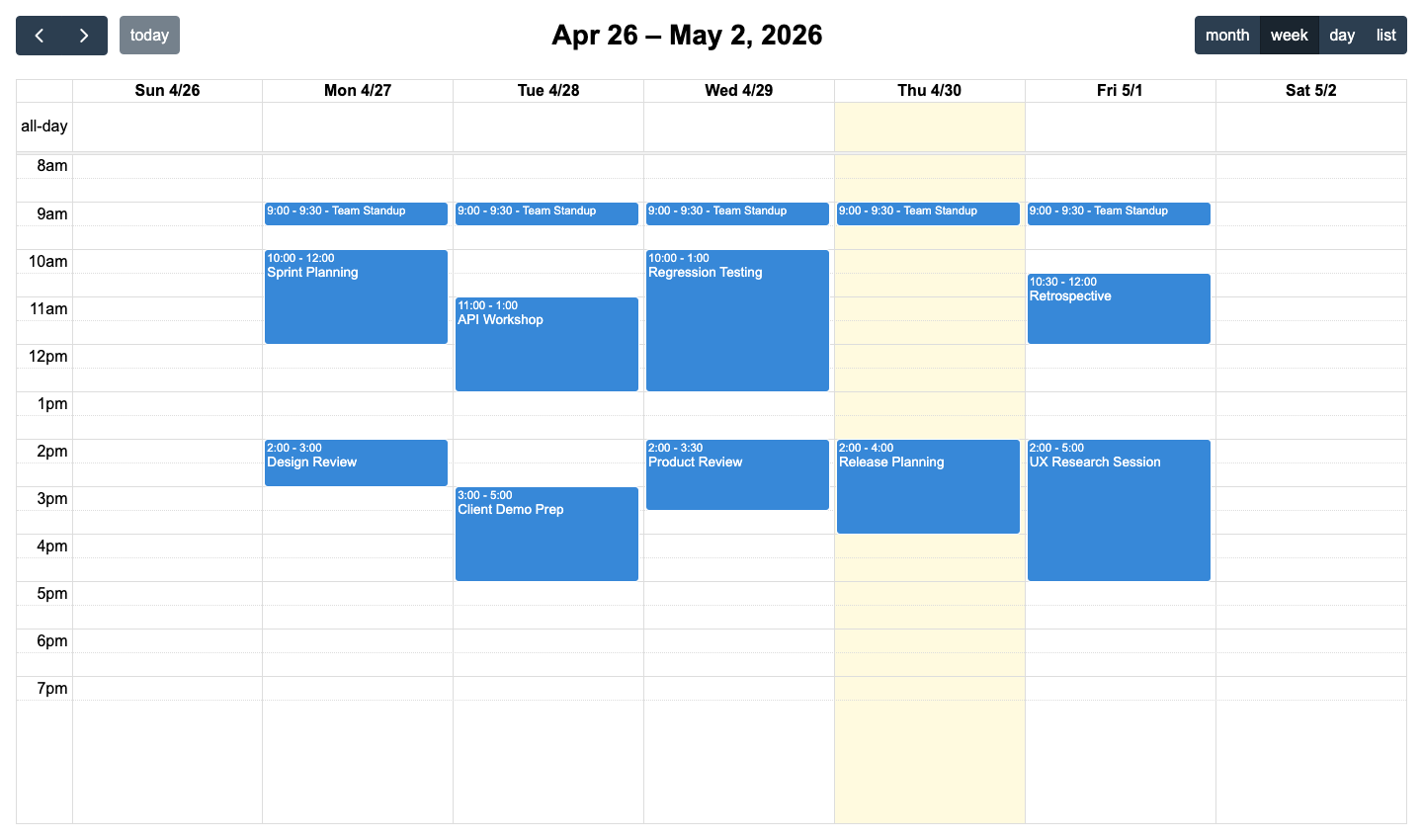
Free MIT core with drag-and-drop, multiple views, and 50+ locales
The MIT-licensed core carries no evaluation watermark, no per-developer fee, and no restriction on open-source use. DayGrid, TimeGrid, List, and Multi-Month views are fully functional with drag-and-drop and resize when the free interaction plugin is included.
Framework wrappers for React, Angular, and Vue are first-party and free. TypeScript type definitions ship with all packages.
FullCalendar has been in active development since 2010. The documentation at fullcalendar.io covers all view types, event sources, and framework integrations.
Resource scheduling costs $480/dev/year, no export or undo/redo
Resource scheduling is Premium-only. There is no path to resource views without the subscription license. Applications that start on the standard edition and later need resource scheduling require a license upgrade plus the Premium plugin packages.
FullCalendar has no built-in export to PDF, Excel, or ICS, and no undo/redo stack. Both features require custom implementation. The Premium license is an annual subscription at $480 per developer per year, not a perpetual purchase.
FullCalendar pricing: free MIT core, $480 per developer per year for Premium
The MIT-licensed core is free with no per-developer fee. Premium, which includes timeline/resource views and improved print support, starts at $480 per developer per year. The subscription covers updates for the license period. The last released version remains usable once the subscription ends, but receives no further updates.
Plugin architecture, TypeScript, and framework integrations
TypeScript type definitions ship with all packages. The config object passed to new Calendar() covers all settings.
Drag-and-drop and event resize require @fullcalendar/interaction in the plugins array. Without it, events are read-only regardless of the editable property setting.
Framework integrations ship as separate packages: @fullcalendar/react, @fullcalendar/angular, and @fullcalendar/vue3. Documentation is at fullcalendar.io with an API reference and code examples for each view type.
Locale support covers 50 or more languages via locale files included in @fullcalendar/core. Import the relevant locale file and set the locale property on the calendar config to activate it.
No AI tooling: agents rely on fullcalendar.io documentation
FullCalendar has no MCP server and no Claude Code skill. There is no structured documentation retrieval mechanism for AI agents. Documentation is available at fullcalendar.io, but an agent must locate and read the relevant pages independently.
Standard FullCalendar setup is well-represented in LLM training data, so agents generate correct code for the common views without needing current documentation. The main risk is that agents produce standard setup code and omit the Premium packages when a resource view is requested, since the distinction between free and Premium features requires current knowledge.
Use FullCalendar when standard calendar views are enough
FullCalendar is the right choice for applications that need standard day, week, and month calendar views under an MIT license. The free tier is genuinely capable: drag-and-drop, multiple view types, framework wrappers, and localization are all included. When resource scheduling enters the requirements, the Premium subscription is the only path, and the annual licensing model adds $480 per developer each year the subscription renews.
Which is better: Bryntum Calendar or FullCalendar?
For most production calendar applications, Bryntum Calendar is the better choice. Resource scheduling, drag-and-drop editing, export, localization, and undo/redo are default features. The perpetual license avoids recurring per-developer costs. The MCP server, Claude Code skill, and end-user AI chat panel make Bryntum easier to support in teams that use AI coding agents.
Bryntum Calendar is the better fit for production scheduling, while FullCalendar is a good fit when applications only use standard DayGrid, TimeGrid, List, or Multi-Month calendar views under an MIT license. Bryntum Calendar becomes the clearer choice once resource scheduling, export, undo/redo, or AI documentation support enter the requirements.