Bryntum Gantt vs Syncfusion Gantt

If you're choosing between Bryntum Gantt and Syncfusion Gantt, you're deciding whether your organization qualifies for the Syncfusion Community License and how much setup your team accepts for CSS, feature modules, and license registration. Both libraries handle automatic scheduling, critical path analysis, dependencies, and large datasets.
Start with these questions:
- Does the organization qualify for the Syncfusion Community License?
- How much scheduling logic should the Gantt library handle?
- Does the team need documentation tooling for AI coding agents?
This comparison uses these criteria:
- Installation and setup
- Licensing and cost
- Scheduling features
- Export and project file support
- Framework and TypeScript support
- AI support
Bryntum Gantt vs Syncfusion Gantt: feature parity and pricing
The table below covers the criteria most relevant to a production integration decision.
| Feature | Bryntum Gantt | Syncfusion Gantt |
|---|---|---|
| License | Commercial | Community License (free) / Commercial |
| Free tier | Trial only | Community License |
| Auto-scheduling | ✔️ | ✔️ |
| Critical path | ✔️ | ✔️ |
| Resource management | ✔️ | ✔️ |
| Baselines | ✔️ | ✔️ |
| Drag-and-drop editing | ✔️ | ✔️ |
| Task splitting | ✔️ | ✔️ |
| Undo / redo | ✔️ | ✔️ |
| React / Angular / Vue wrappers | ✔️ | ✔️ (+ Blazor) |
| TypeScript | ✔️ | ✔️ |
| Export to PDF / Excel | ✔️ (client-side) | ✔️ (client-side) |
| MS Project import / export | ✔️ | XML workflow / integration sample |
| Multiple instances per page | ✔️ | ✔️ |
| MCP server | ✔️ | ✔️ (React, stdio) |
| Claude Code skill | ✔️ | ❌ |
| Built-in AI assistant | Experimental feature | ❌ |
Bryntum Gantt
Bryntum Gantt is a commercial JavaScript component for building project management interfaces. It is built on ChronoGraph, an open-source reactive scheduling engine: task dates recalculate automatically when predecessors change, calendars skip non-working time, and constraints interact the way they do in Microsoft Project.
The left panel is built on Bryntum Grid, giving it full sorting, filtering, grouping, and column configuration without extra setup.
Installing Bryntum Gantt
The trial package is available on the public npm registry without authentication:
npm install @bryntum/gantt@npm:@bryntum/gantt-trial@7.2.4
This minimal setup shows a two-task project with a dependency. The container height drives the Gantt height via CSS:
<!-- index.html -->
<style>
  html, body { margin: 0; height: 100%; }
  #container { height: 100vh; }
</style>
<div id="container"></div>
import '@bryntum/gantt/fontawesome/css/fontawesome.css';
import '@bryntum/gantt/fontawesome/css/solid.css';
import '@bryntum/gantt/gantt.css';
import '@bryntum/gantt/svalbard-light.css';
import { Gantt } from '@bryntum/gantt';

new Gantt({
  appendTo : 'container',

  columns : [
    { type : 'name',        width : 250 },
    { type : 'duration',    width : 80  },
    { type : 'percentdone', width : 60  }
  ],

  project : {
    startDate : '2025-01-14',
    tasks : [
        {
            id : 1000, name : 'Launch SaaS Product', expanded : true, percentDone : 35.7,
            children : [
                { id : 11, name : 'Install Apache',      startDate : '2025-01-14', duration : 3, percentDone : 50 },
                { id : 12, name : 'Configure firewall', startDate : '2025-01-14', duration : 3, percentDone : 50 },
                { id : 15, name : 'Run tests',          startDate : '2025-01-21', duration : 2, percentDone : 0 }
            ]
        }
    ],
    dependencies : [
        { fromTask : 11, toTask : 15, lag : 2 },
        { fromTask : 12, toTask : 15 }
    ]
  }
});
Three CSS imports are required in order: FontAwesome icons, the structural gantt.css, and a theme file. Runtime theme switching uses DomHelper.setTheme().
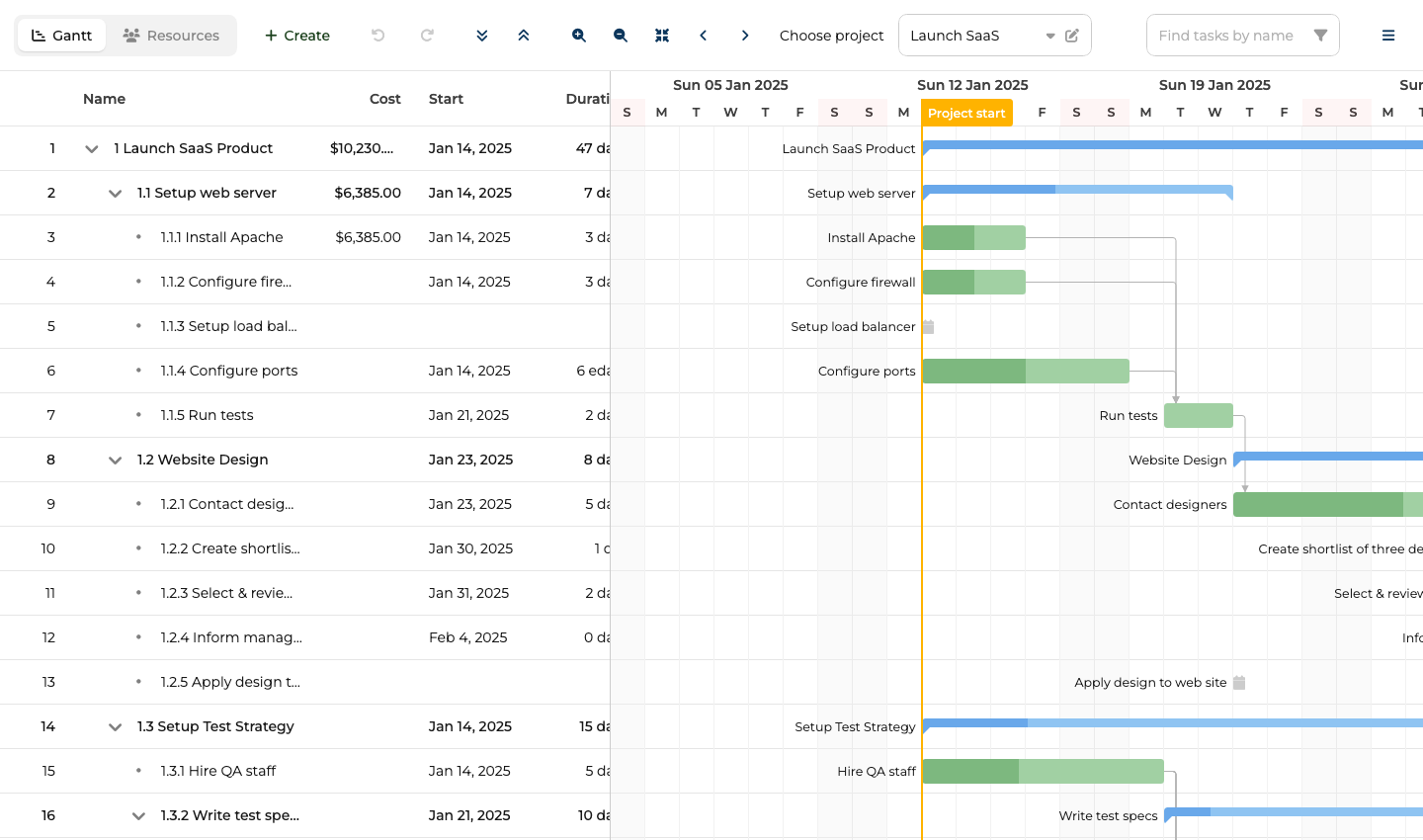
ChronoGraph scheduling engine: auto-scheduling, critical path, and client-side export
The ChronoGraph scheduling engine is the main differentiator. The following scheduling capabilities work together through the engine:
- Auto-scheduling
- Dependencies
- Constraints
- Project calendars
- Task calendars
- Resource calendars
ChronoGraph is open-source under the MIT license, so the reactive scheduling logic is auditable.
The export pipeline covers PDF, PNG, Excel, ICS, and MS Project XML without a server round-trip. Bryntum also imports MS Project and Primavera P6 files through MPXJ. The theming system ships ten themes across five light/dark pairs.
Bryntum Gantt: bundle size, trial watermark, and config structure
The trial watermark persists during evaluation, which complicates early stakeholder demos. The API surface is large: project-level and Gantt-level configuration are separate objects with different responsibilities. The uncompressed bundle reaches 4 MB or more, which is a meaningful consideration for applications where initial load time is critical.
Bryntum Gantt pricing: perpetual license from $940 per developer
Per-developer licensing starts at $940. A three-person team pays $2,820 as an entry cost. OEM licensing for SaaS products requires a separate quote. All licenses are perpetual and include 12 months of updates.
TypeScript, framework wrappers, and the project-vs-inline-data rule
TypeScript type definitions ship with the package, covering the full Gantt and project API. Documentation at bryntum.com includes live code examples with an in-browser editor.
Framework wrappers for React (@bryntum/gantt-react), Angular, and Vue 3 are published on the same version cycle as the core.
One rule to encode early: never mix the project prop with inline data props (tasks, dependencies, resources). Using both throws at runtime. Pass all data through project, or use the inline props directly with no project key.
For runtime theme switching, load theme files with <link> tags marked for Bryntum theme detection and call DomHelper.setTheme().
Coding agent support: MCP server, Claude Code skill, and AI assistant
Bryntum ships two complementary AI tools: the MCP server exposes documentation retrieval, and the Claude Code skill adds judgment.
The MCP server (mcp.bryntum.com) exposes a search_bryntum_docs tool that returns version-specific documentation, source code examples, and configuration options for Gantt, Scheduler, Calendar, Grid, Task Board, and Scheduler Pro. The command to register it in Claude Code:
claude mcp add --transport http bryntum https://mcp.bryntum.com
The Claude Code skill guides agents through common mistakes: CSS import order, mixing project config with inline data props, and the correct dark mode pattern via DomHelper.setTheme(). An agent with both the MCP server and the skill produces working Bryntum code with fewer correction cycles.
Bryntum also ships an experimental AI chat panel that connects to Anthropic, OpenAI, or Google models. End users give natural language instructions such as "move all tasks assigned to Alex to next week" without touching the interface directly.
Use Bryntum Gantt when setup predictability matters
Bryntum Gantt is the right call when scheduling correctness is a hard requirement: auto-scheduling, critical path analysis, resource calendars, and MS Project interop. The AI tooling, with both an MCP server and a dedicated Claude Code skill, gives it a meaningful edge for teams using AI coding agents.
Syncfusion Gantt
Syncfusion Gantt is a commercial JavaScript Gantt component part of the Essential Studio suite. It includes:
- Auto-scheduling
- Critical path
- Baselines
- Task splitting
- Resource management
- Undo/redo
The community license makes it free for qualifying organizations: companies with less than $1 million USD in annual gross revenue, five or fewer developers, and ten or fewer total employees. Teams receiving external funding must have less than $3 million from private equity or venture capital to qualify.
Bryntum Gantt is simpler to set up when the team does not qualify for the Community License, while Syncfusion Gantt can cost nothing for qualifying teams but depends on feature injection calls, a longer CSS dependency list, and license registration before first render.
Installing Syncfusion Gantt
The package is available on the public npm registry:
npm install @syncfusion/ej2-gantt@33.2.4
A license key suppresses the trial validation banner. Community License holders generate a key from the My Account section of the Syncfusion website, then register it before initializing any component:
import { registerLicense } from '@syncfusion/ej2-base';
registerLicense('your-license-key-here');
This minimal setup shows a two-task project with a dependency. CSS imports cover the Gantt component and all its dependencies:
<!-- index.html -->
<style>
  html, body { margin: 0; height: 100%; }
  #container { height: 100vh; }
</style>
<div id="container"></div>
import { registerLicense } from '@syncfusion/ej2-base';
import { Gantt, Edit, Selection, Toolbar } from '@syncfusion/ej2-gantt';
import '@syncfusion/ej2-base/styles/material.css';
import '@syncfusion/ej2-buttons/styles/material.css';
import '@syncfusion/ej2-calendars/styles/material.css';
import '@syncfusion/ej2-dropdowns/styles/material.css';
import '@syncfusion/ej2-inputs/styles/material.css';
import '@syncfusion/ej2-navigations/styles/material.css';
import '@syncfusion/ej2-popups/styles/material.css';
import '@syncfusion/ej2-richtexteditor/styles/material.css';
import '@syncfusion/ej2-treegrid/styles/material.css';
import '@syncfusion/ej2-grids/styles/material.css';
import '@syncfusion/ej2-gantt/styles/material.css';

registerLicense('your-license-key-here');

Gantt.Inject(Edit, Selection, Toolbar);

const data = [
  {
    TaskID   : 1,
    TaskName : 'Phase 1: Discovery',
    subtasks : [
      { TaskID : 2, TaskName : 'Requirements', StartDate : new Date('2026-05-01'), Duration : 5, Progress : 100 },
      { TaskID : 3, TaskName : 'Design',       StartDate : new Date('2026-05-08'), Duration : 8, Progress : 20, Predecessor : '2' }
    ]
  }
];

new Gantt({
  dataSource : data,
  height     : '100%',

  taskFields : {
    id         : 'TaskID',
    name       : 'TaskName',
    startDate  : 'StartDate',
    duration   : 'Duration',
    progress   : 'Progress',
    dependency : 'Predecessor',
    child      : 'subtasks'
  },

  columns : [
    { field : 'TaskName', headerText : 'Task',     width : 250 },
    { field : 'Duration', headerText : 'Duration', width : 80  },
    { field : 'Progress', headerText : '%',        width : 60  }
  ],

  labelSettings    : { leftLabel : 'TaskName' },
  splitterSettings : { position  : '40%' },

  projectStartDate  : new Date('2026-05-01'),
  projectEndDate    : new Date('2026-05-20'),
  toolbar           : ['ZoomIn', 'ZoomOut', 'ZoomToFit'],
  highlightWeekends : true
}).appendTo('#container');
Four setup details require attention:
- The
Gantt.Inject()call must come before instantiation with any feature modules in the config (Edit,Selection,Toolbar, and others). - CSS must cover the Gantt component and its dependencies. You can either import the dependency styles separately, as shown above, or use one of Syncfusion's combined theme files.
- The
taskFieldsconfig maps data property names to the Gantt field identifiers. - The
registerLicense()function must be called before the first component mounts.
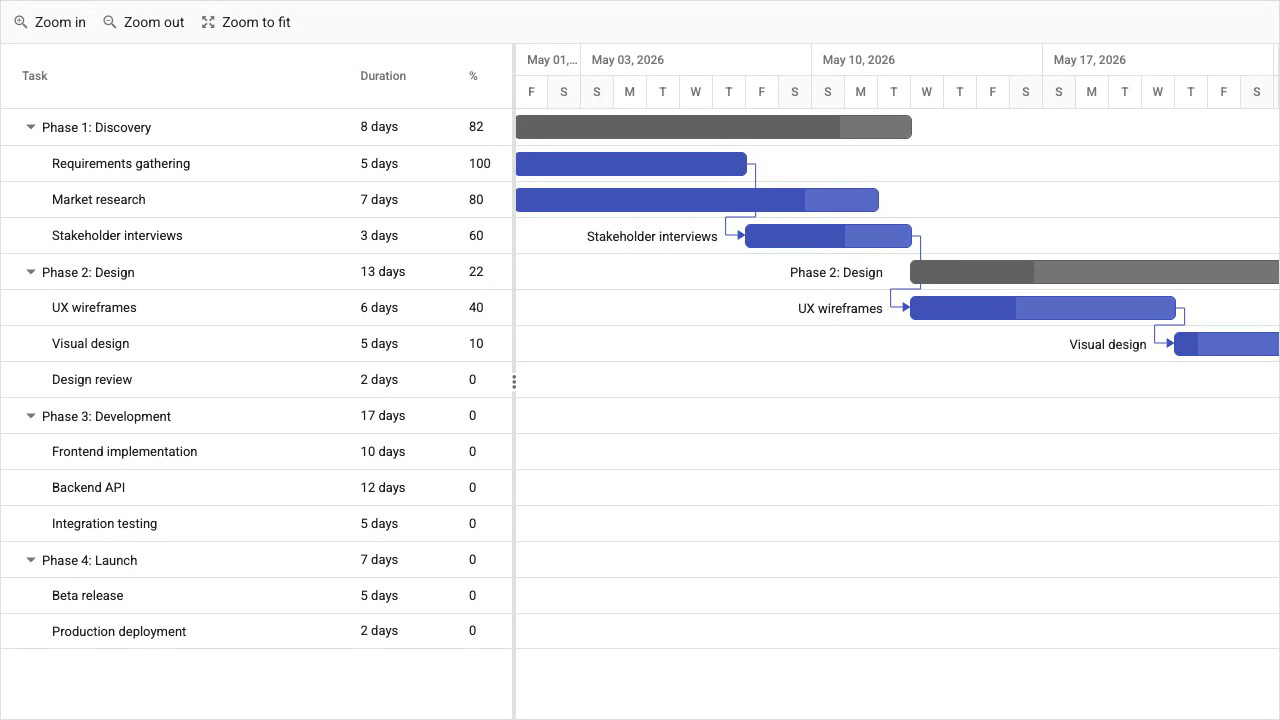
Full scheduling features are free under the Community License
The Community License is the main reason to choose Syncfusion: qualifying teams pay nothing for access to the full Gantt component, including:
- Auto-scheduling
- Critical path
- Baselines
- Task splitting
- Resource management
- Undo/redo
The package is on public npm with no authentication required.
Export to PDF, Excel, and CSV runs client-side through Syncfusion's export modules and the @syncfusion/ej2-pdf-export and @syncfusion/ej2-excel-export packages. Syncfusion also documents a Microsoft Project XML import/export workflow for JavaScript Gantt, but it is more involved than a single client-side API call. Framework wrappers cover React, Angular, Vue, and Blazor.
Multi-step setup: CSS imports, Gantt.Inject(), and license registration
CSS setup requires either a combined Syncfusion theme file or separate imports for the Gantt component and its dependencies. The Gantt.Inject() call for each feature module adds a setup step that is easy to omit.
Commercial licensing uses custom pricing with no published rates. Teams that outgrow the Community License criteria need to contact Syncfusion sales for pricing.
The Syncfusion MCP server is React-specific and communicates via stdio, not HTTP. It does not register as a Claude Code MCP server using the standard claude mcp add command. Syncfusion ships no dedicated Claude Code skill.
Syncfusion Gantt pricing: free Community License, commercial pricing on request
The community license is free for organizations with less than $1 million in annual gross revenue, five or fewer developers, and ten or fewer total employees (and less than $3 million in external funding). A license key is generated from the Syncfusion account portal at no charge.
Commercial licensing uses quote-based subscription pricing. Syncfusion does not publish standard rates. Contact sales for current terms.
taskFields mapping, feature injection, and framework wrappers
TypeScript type definitions ship with the package. Documentation at syncfusion.com includes live examples for all Gantt features with an in-browser code editor.
Framework wrappers for React (@syncfusion/ej2-react-gantt), Angular (@syncfusion/ej2-angular-gantt), and Vue (@syncfusion/ej2-vue-gantt) are on the same version cycle as the core. Blazor support is also available.
The taskFields configuration maps each data property to a Gantt field. The component works with existing data schemas without transformation, which is useful when connecting to a project management API that uses different field names.
React stdio MCP server: no Claude Code skill or HTTP registration
Syncfusion ships MCP servers for its product line. The JavaScript/TypeScript server (@syncfusion/react-assistant) provides documentation retrieval and component code generation via stdio for VS Code, Cursor, Windsurf, and JetBrains. It is React-focused and does not register as a standard Claude Code HTTP MCP server. Syncfusion reports that the MCP server tools are free with unlimited usage.
Syncfusion ships no dedicated Claude Code skill or built-in AI assistant for end users.
The multi-step setup (theme CSS, Gantt.Inject(), and registerLicense()) is the main friction point for AI agents. An agent without current Syncfusion documentation is likely to omit one of these steps, since each is a prerequisite for a polished, licensed integration.
Use Syncfusion Gantt when the Community License fits
The Community License is the right reason to choose Syncfusion Gantt. Qualifying organizations get the following at no cost:
- Auto-scheduling
- Critical path
- Baselines
- Task splitting
- Client-side export
The multi-step CSS and module injection setup takes longer to configure than a single-import library, but the feature breadth justifies it for complex scheduling requirements.
Which is better: Bryntum Gantt or Syncfusion Gantt?
For most production project management applications, Bryntum Gantt is the better choice when the team does not qualify for the Syncfusion Community License. Setup is more direct, and the following features are included by default:
- Auto-scheduling
- Critical path analysis
- Resource calendars
- MS Project export
- ChronoGraph scheduling engine
The MCP server and Claude Code skill make Bryntum more practical for teams using AI coding agents.
Bryntum Gantt remains the cleaner setup, but Syncfusion Gantt is hard to beat on price for organizations that qualify for the Community License: less than $1 million in annual revenue, five or fewer developers, and ten or fewer total employees. All scheduling features are available under the Community License at no cost:
- Auto-scheduling
- Critical path
- Baselines
- Task splitting
- Resource management
- Undo/redo
For teams that grow beyond those thresholds, commercial licensing requires a custom quote from Syncfusion.